OPERATION
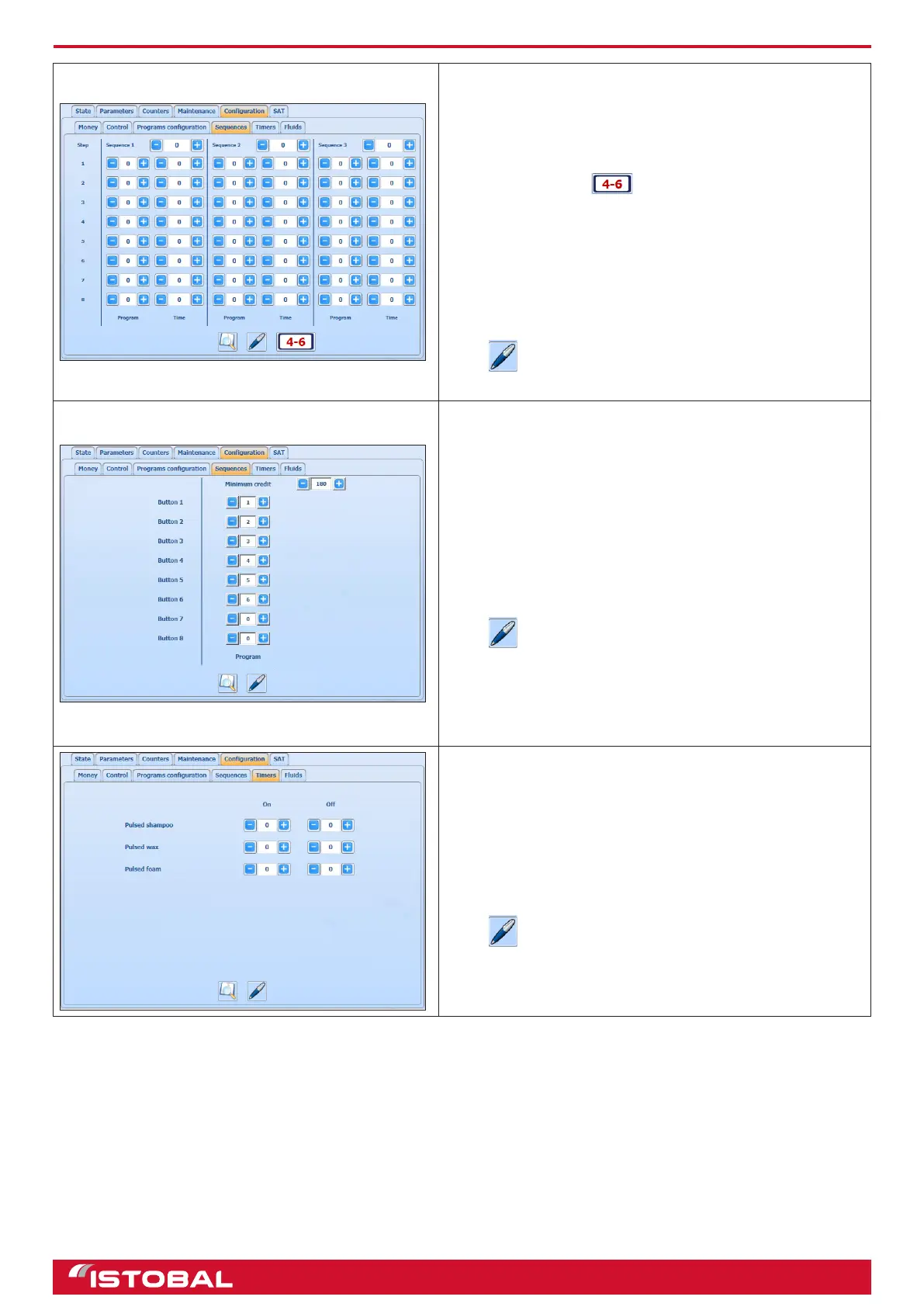
SEQUENCES (MULTI PROGRAMME)
This screen allows you to congure the wash sequences. Up
to eight different sequences can be congured and shown on
three screens. Press to move on to the next group of
sequences.
The rst eld is for conguring the price of the sequence.
Then, the phases of the sequence are congured by entering
the program involved in each phase and how long the
program is used for.
The example shows Sequence 1, with a price of 5€ and
which uses Program 1 for 240 seconds, program 2 for
another 240 seconds and program 3 for 100 seconds.
Press to save the data entered.
SEQUENCES (BUY TIME)
This screen allows programmes to be assigned to their
respective buttons.
The minimum credit eld indicates the minimum time that
needs to be bought for a program to start up.
Press to save the data entered.
TIMERS
This screen is for conguring the dosing pump activation
cycle i.e. how long the dosing pumps be enabled and
disabled in the cycle.
Press to save the data entered.
22


 To Next Page