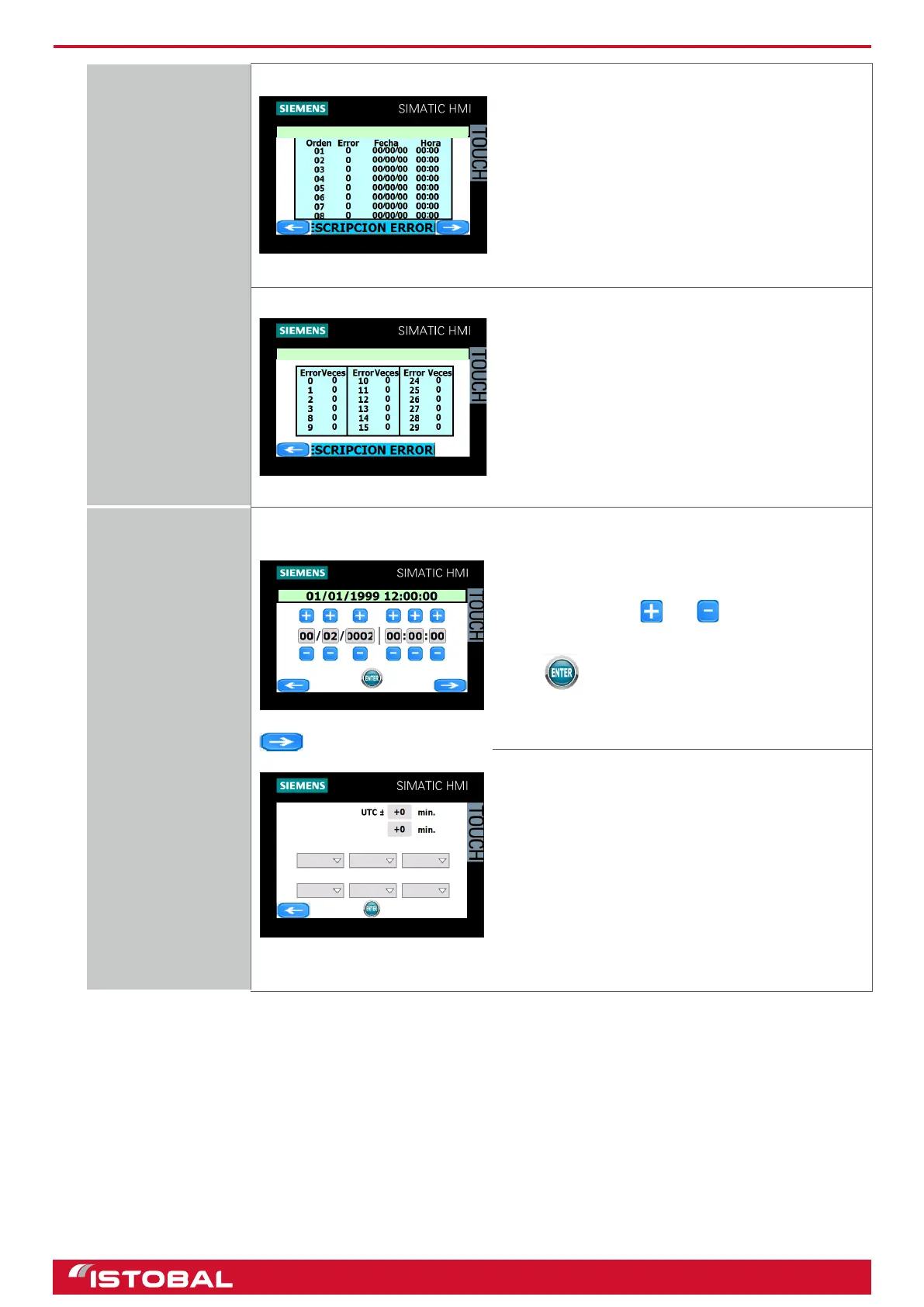
SIEMENS KTP400 touch-screen screen
View faults
LATEST FAULTS
Last faults
You can view the last fteen faults chronologically,
with the time and date they occurred.
FAULT COUNTERS
Fault counters
Faults are displayed by fault number, specifying the
number of times they occurred.
Date / Time
Local Time:
Start date summer time
Daylight saving time
Start date winter time
Mes
Semana
Día
Mes
Semana
Día
To set the touch-screen date and time. For this
setting, use buttons and . To enter the current
date and time. The format is dd/mm/yyyy hh:mm:ss.
Once the new date and time have been entered,
press .
The time zone screen allows you to program the
summer/winter timetable change and vice versa. To
do so, enter the local and world timetable offset (for
example, for UTC +1 = +60 min.). Next, enter the
summer/winter timetable offset (+60 min.) and the
days when summer/winter timetable changes are
scheduled.
37


 To Next Page