17
B. WPS
WPS refers to Wi-Fi Protected Setup. You can use the WPS setup function to add a wireless client to a network, without setting
some specific parameters, such as SSID, security mode, and password. To use this function, a wireless client must support WPS. If
the wireless client does not support WPS, you must manually configure the wireless settings of wireless client, and ensure that its
SSID and other wireless security settings are the same as that of the PLC wireless adapter.
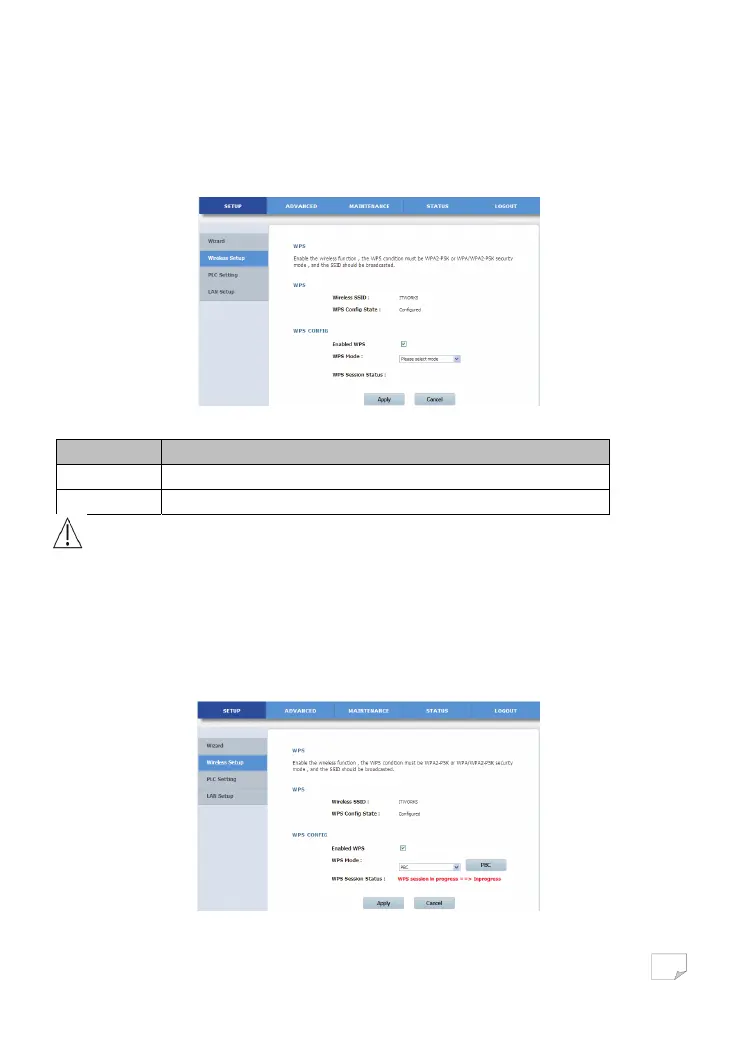
Choose Wireless Setup > WPS on the left pane or click WPS in the WIRELESS SETUP page to display the following page.
The following table describes parameters on this page:
Field Description
Enabled WPS Enable or disable WPS.
WPA Mode Display current WPA mode.
Caution:
If you want to use WPS, you must select the WPA-PSK/WPA2-PSK mode and the SSID must be broadcasted.
WPS modes contain PBC mode, PIN mode and AP-PIN mode.
• PBC Mode
Select PBC in the WPS mode dropdown list, and click the PBC button on the WPS page or press the WPS button on the PLC
wireless adapter to start WPS connection.
Downloaded from www.vandenborre.be


 To Next Page