Single Phase Voltage Regulator RAV-2
with control CTR-2
Instruction Manual MI-010
Page: 15/27
Rev. 06/2017
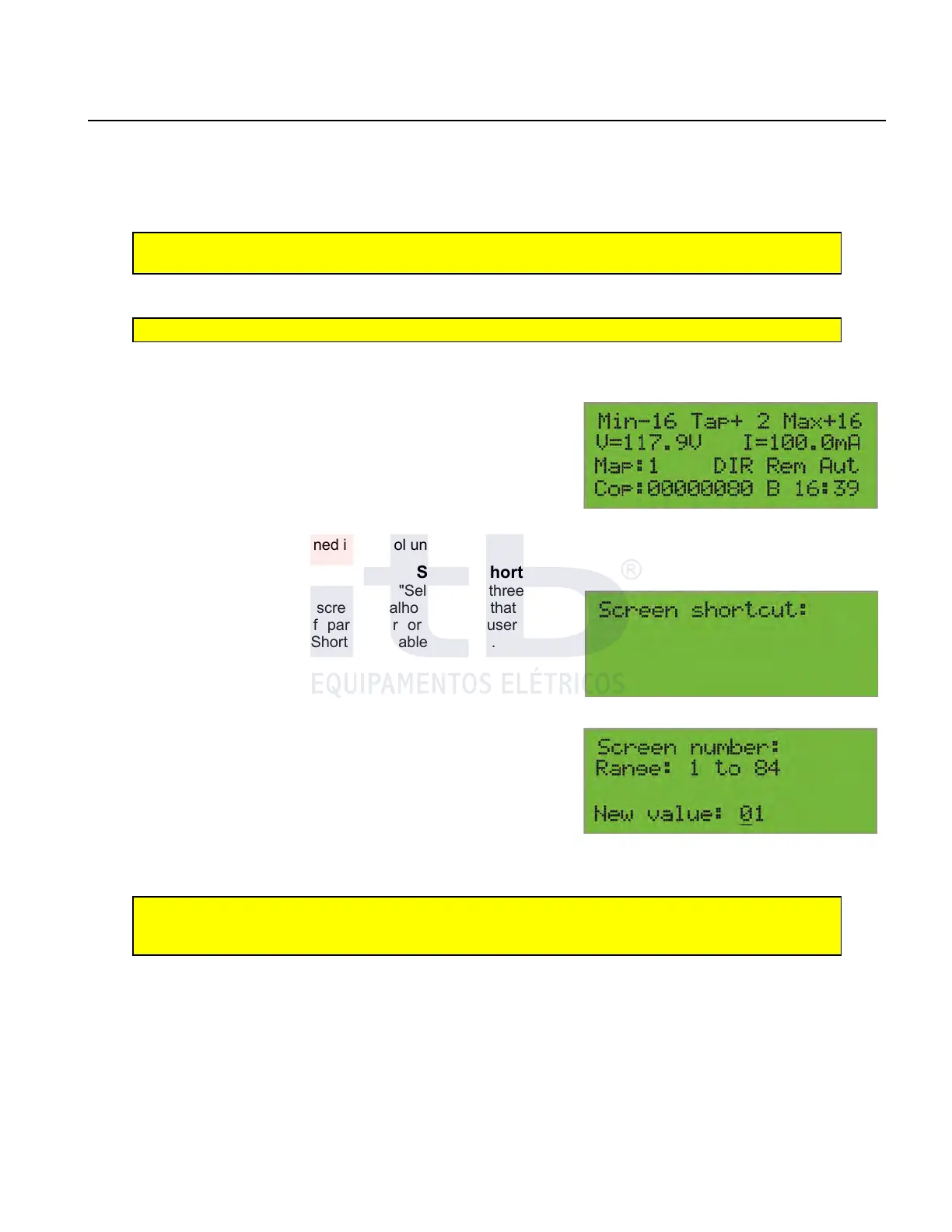
Standard screen
Control shows in its standard screen, figure 15, the following values:
1. The value next to the abbreviation "Min" is the lower driver position ever since the last effective reset;
2. The value next to the abbreviation "Tap" which is the current position of the tap changer;
3. Three. The value next to the abbreviation "Max" is the highest driver position ever since the effective reset;
Note: “Mín” and “Máx” value can be updated pressing “Reset” key. Values will then show
actual tap changer position
4. Value of abbreviation “V=” is the instantaneous voltage in load;
5. Value of abbreviation “I=” is the instantaneous current in load;
Note: “Conf” key commutes values of “V =” and “I =” between high tension and low tension
6. Value of “map” is the active map or active set of variables;
7. “Dir” indicates that CTR-2 control detected direct power flue. IF “INV” is displayed inverse power flow has been
detected;
8. “Rem” indicates that Com1 and Com2 communication ports are
working fully. If “loc” is displayed, no direct commands (automatic,
manual, buck, boost) are received by communication;
9. ”Aut” informs that CTR-2 control is operating in automatic mode.
When in manual mode “Man” is displayed;
10.Value next to “cop” is the number of operations done by the
control;
11. “B” indicates a blocking condition is active;
12.“hh:mm” is actual time as defined in control unit.
Screen Shortcut
From the standard display, if you press the "Select" key three times
the control displays a shortcut screen “atalho de tela” that allows
entering directly the number of parameter or screen user wants
displayed as shown in columns "Shortcut" in tables 6 and 7.
The shortcut screen will be displayed as shown in figure 16. When
“conf” key is pressed this will change as displayed on Figure 17 which
allows new value” field to be changed through the following
procedure:
1. Note that under one of the digits on “New value:” field a
highlighting cursor is displayed. This means that digit can be
modified.
2. Press keys “+” or “-” to change that digit between 0 and 9;
3. Press the “Selec” key or “conf” to allow cursor navigate between
different digits of “New value” field
4. Repeat operation until desired parameter (two digits mandatory) is
shown on display;
5. With cursor under the least significant digit, press “conf” key to validate selected value;
6. The selected screen will be immediately displayed and keeps as in readings and adjustment screen from then;
Note: If adjusted value is outside the range, 1 to 84, message “Invalid number” will be
displayed in the bottom line and “new value” will remain as “”actual value” as in settings
screen.
7. If “conf” key is pressed while cursor is under the least significant value no actions are adopted by CTR-2 control;
8. To return to standard screen from shortcut screen press “conf” key once.
Direct Command Key
CTR-2 control has 6 direct command keys with specific functions as described here after:
- Key 12, “Reset” key updates values that allow this possibility which is shown as “Resettable” (Able to reset) written
in the bottom line of the screen;
- Key 13, “Lower” key operates the tap changer in the sense of decreasing the tap changer position when manual
mode is active. Manual mode is identified by “man” in the last field of the third line of the standard screen;
- Key 14, “Auto Zero” key sets regulator to zero position (neutral) from any screen or operation mode;
- Key 15, “Local / Remote” key limits tap changer command to local action only to avoid operation risks;
ITB - Equipamentos Elétricos Ltda.
Figure 17: Shortcut selection screen.
Figure 15: Default screen.
Figure 16: Shortcut screen.



 To Next Page