Visit
dashcamtalk.com for the latest firmware and owners forum.
How
to play the Video f PASS ©BLACK
All Date
Name
20111207. .191703 2011-12-07 19:17:03
N
20111207 191803 2011-12-07 19:18:03
N
20111207 191903 2011-12-07
19:19:03
1 20111207 192003 201 1-12-07 19:20:03
N
20111207 .192103 2011-12-07 19:21:03
20111207 192203 201 1-12-07 19 22.03
All Date
Name
X 20111207 .191703 2011-12-07 19:17:03
N
20111207 .191803 2011-12-07 19:18.03
N
20111207 .191903 2011-12-07 19:19:03
El
20111207 .192003 2011-12-07
19:20:03
I
20111207 .192103 2011-12-07 19:21:03
20i
It 207
.192203 2011-12-07 19:22.03
®\
All;
.
Date] j ©| Name! f|
N
201li'207J91903
2011-12-07 19:19:03
20111207 192003 2011-12-07 19:20 03
20111207 192103 2011-12-07 19:21:03
20111207 192203 2011-12-07 19:22:03
4.
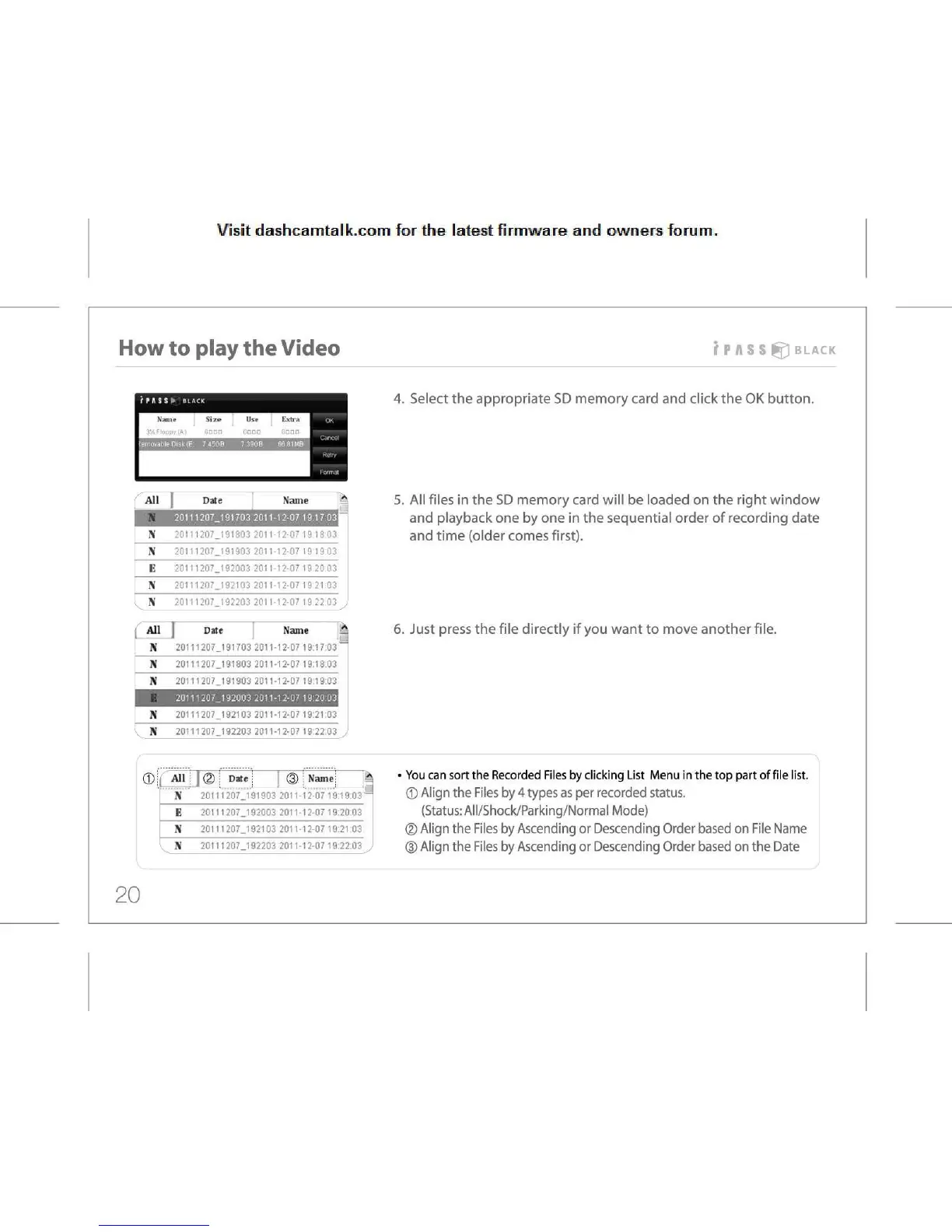
Select the appropriate SD memory card and click the OK button.
5.
All files in the SD memory card will be loaded on the right window
and
playback one by one in the sequential order of recording date
and
time (older comes first).
6.
Just press the file directly if you want to move another file.
You
can sort the Recorded Files by clicking List Menu in the top part of file list.
©
Align the Files by 4 types as per recorded status.
(Status:
All/Shock/Parking/Normal Mode)
©
Align the Files by Ascending or Descending Order based on File Name
(D
Align the Files by Ascending or Descending Order based on the Date
20



 To Next Page