Visit
dashcamtalk.com for the latest firmware and owners forum.
How
to format the SD memory card - method
1
r P A S S g BLACK
Generally,
a SD memory card has limited lifetime and may be unable to store new data after certain period of time.
In
order to extend its lifetime, we recommend you to format the SD memory card periodically.The recommendable
format
cycle is 2 times per week and the method of format is as follows.
Ntm
6
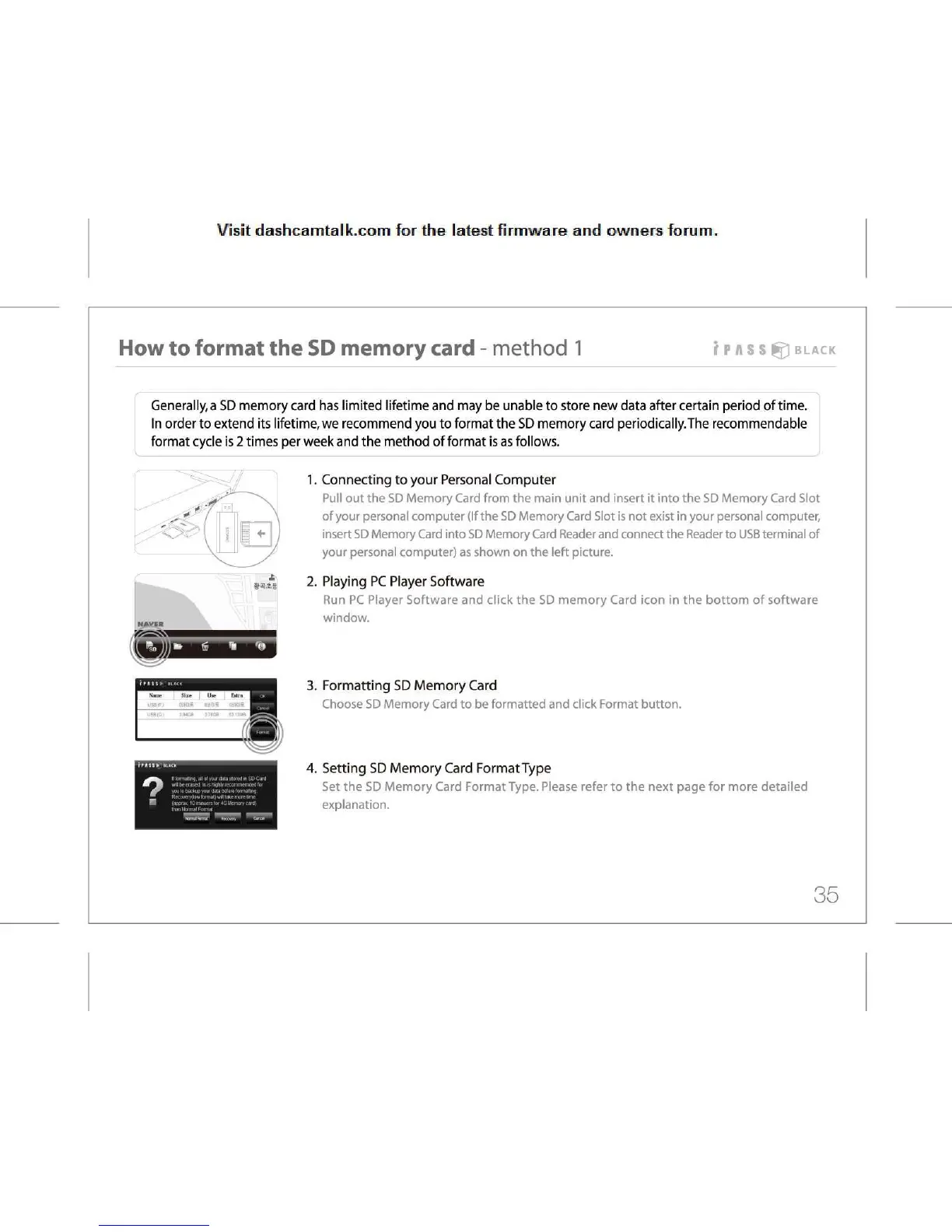
1.
Connecting to your Personal Computer
Pull
out the SD Memory Card from the main unit and insert it into the SD Memory Card Slot
of
your personal computer (If the SD Memory Card Slot is not exist in your personal computer,
insert
SD Memory Card into SD Memory Card Reader and connect the Reader to
USB
terminal of
your
personal computer) as shown on the left picture.
2.
Playing PC Player Software
Run
PC Player Software and click the SD memory Card icon in the bottom of software
window.
3.
Formatting SD Memory Card
Choose
SD Memory Card to be formatted and click Format button.
4.
Setting SD Memory Card Format Type
Set
the SD Memory Card Format Type. Please refer to the next page for more detailed
explanation.
35



 To Next Page