Visit
dashcamtalk.com for the latest firmware and owners forum.
How
to manage the recorded files - PC Player
f
P A S S g| BLACK
This
product
saves
the image based on always-recording type. However,as per the circumstances at the time of image recording,
it
classifies by normal recording while driving/event recording while driving/event recording while parking and
saves
to memory
allocation
as per user setting
values. In
case of exceeding the allocated memory capacity, it deletes the images either from the
oldest
order or deletes all by the lump and then saves the newer images. Please refer to the below for more details.
1.
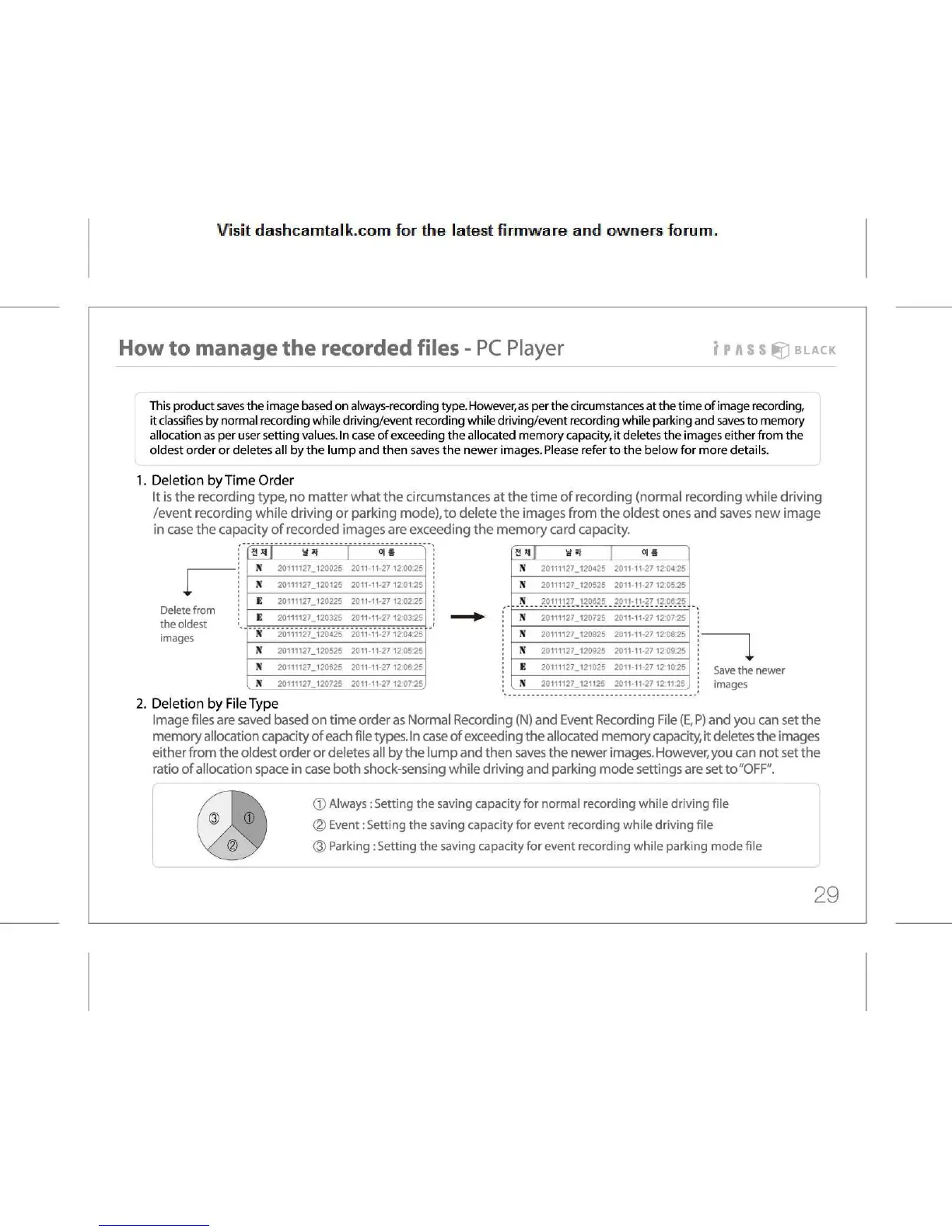
Deletion by Time Order
It
is the recording type, no matter what the circumstances at the time of recording (normal recording while driving
/event
recording while driving or parking mode), to delete the images from the oldest ones and saves new image
in
case the capacity of recorded images are exceeding the memory card capacity.
r
Delete
from
the
oldest
images
v*t
0|
• )
Ji
20111127. 120025 2011 11-27
12:00:25
X
20111127. 120125 2011 11-27
12:0125
E
20111127
120225 2011 11-27
12:02:25
E
20111127.
120325 2011 11-27
12 03:25
X
20111127.
120425 2011 11-2712:04:25
\
20111127.
120525 2011 11-27
12:05:25
X 20111127.
120625 2011 11-27
12:06:25
X 20111127 120725
2011
11-27
12 07 2?,
oil
N
20111127.
120425
2011-11-27
12 04 25
N
20111127.
120525
2011-11-27
12:05:25
X
20111127
120625
2011-11-27
12:06:25
X
20111127.
120725
2011-11-27
12:07:25
N
20111127.
120825
2011-11-27
12 08:25
N
20111127.
120925
2011-11-27
12 09:25
E 20111127.
121025 2011-11-2712:10:25
N
20111127
121125
2011-11-27
12:11:25
Save
the newer
images
2.
Deletion by File Type
Image
files are saved based on time order as Normal Recording (N) and Event Recording File
(E, P)
and you can set the
memory
allocation capacity of each file types. In case of exceeding the allocated memory capacity, it deletes the images
either
from the oldest order or deletes all by the lump and then saves the newer images. However, you can not set the
ratio
of allocation space in case both shock-sensing while driving and parking mode settings are set to "OFF".
©
Always: Setting the saving capacity for normal recording while driving file
(2)
Event: Setting the saving capacity for event recording while driving file
®
Parking
:
Setting the saving capacity for event recording while parking mode file
29



 To Next Page