27
5.1.8 Optical status and progress display (OSD)
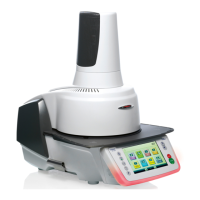
The Optical Status Display (12a) shows the most important statuses of the furnace. The following activities are shown:
Colour Activity
Yellow
The furnace is performing a self-test or is not ready for use, as the recommended
temperature range for a program start has not yet been reached.
Yellow (flashing) Information, notification or error message
Green The furnace is ready for use; the currently selected program can be started.
Orange Program is closing the furnace head or is in predrying mode.
Red Program is heating up or is in holding time mode.
Blue Program is in long-term cooling or is opening the furnace head.
Progress display:
During an active process, the progress of the program is also shown by the OSD. This is done by stage-to-stage lighting up
of the lateral OSD (12b).
5.1.9 User code
For safety reasons, a user code is required for certain settings. The user code ex factory is as follows:
1234
The user code can be individually changed. See Chapter 5.4 Settings for details.
5.2 Firing programs and programming options
5.2.1 Program structure
The furnace offers several types of programs:
a. programs for Ivoclar Vivadent materials
b. 500 free, individually adjustable programs
c. 500 free, individually adjustable programs on a USB stick.
The program types are subdivided into program groups. Each program group consists of 20 programs. All programs are
equivalent and therefore full-fledged programs. All the parameters can be individually set in each program.
a) Programs for Ivoclar Vivadent materials (see enclosed Program Table)
When the furnace is delivered ex factory, the Ivoclar Vivadent programs already contain the recommended material param-
eter settings and are write-protected. Consequently, it is not possible to accidentally overwrite these programs.
If required, the parameters can be changed and overwritten at any time, if the programs are to be used for other purposes.
Therefore, these programs are also available as individual programs.
In case of software updates, individually changed parameters in Ivoclar Vivadent programs might be reset to the
factory settings or changed!
b) 500 free, individually adjustable programs
The programs are designed in such a way that they can be either used as conventional, one-stage programs or as two-
stage programs, if required. The programs and program groups can be individually named.
In case of software updates, individually changed parameters in free programs are NOT reset to the factory
settings or changed!
5. Operation and Configuration



 To Next Page