14
5. Menu Operation and Standard Settings
5.1 Introduction to the operation
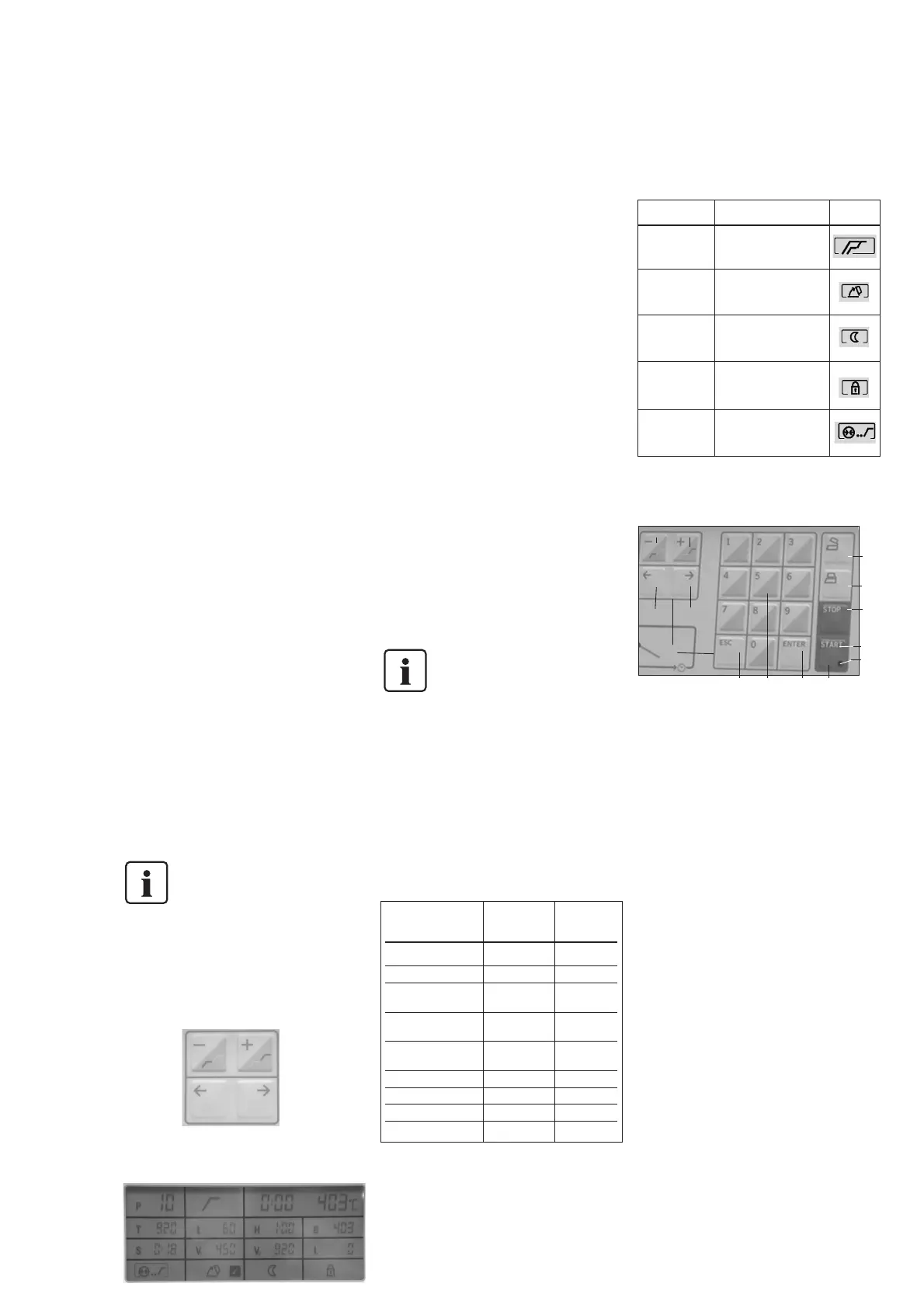
The P200 is equipped with a display showing
the parameters.
The parameters are selected with the ‘right’/
’left’ cursor keys. The current cursor position
is indicated with a frame, in which the
parameter or the corresponding symbol is
blinking. By entering the desired digits, the
parameters may be changed. Another option
is to reduce/increase the values with the
‘+’/’–‘ keys, provided the write protection is
not activated. The setting of the values is
confirmed with ENTER (see Firing Tables in
Chapter 10 for possible values).
If the START key is pressed immediately
after entering a value, the value will also be
confirmed. Should the desired value not be
possible for the selected program or firing
parameter, the framed symbol or numerical
value starts blinking, and an error message
(Err) will be indicated. ESC may be used to
delete undesired values before they have
been confirmed with ENTER (the 'old' value
reappears).
After starting the program, the LED of the
respective parameter will be shown in the
firing curve (8). If a program with vacuum is
in progress, the first LED (9) starts blinking.
After reaching the first vacuum level, the
blinking stops and the LED is permanently
illuminated. The second LED starts blinking.
This process continues over a second and a
third pressure level until all three LEDs are
illuminated indicating that the maximum
vacuum has been reached.
The P200 furnace is equipped with an
electronic vacuum control system (EVCS),
which stops the program in progress if the
vacuum has not been appropriately built up
during the first minute.
ENTER KEY
Please note that the values
entered have to be confirmed
with ENTER.
5.2 Parameter selection
in the display
Parameters in the menu can be selected with
the left and right arrow keys (53, 54).
The remaining time indicator and the current
temperature value (highlighted in green) may
not be reached during navigation.
Remaining time indicator
When a program is selected, the estimated
time is indicated. Once a program is started,
this time starts to elapse. If a program is
stopped, the remaining time indicator also
stops.
Current temperature
Indicates the current temperature in the
firing chamber. Depending on the set mode,
the temperature is indicated in °C or °F.
Program number P
Current program
Holding temperature T
Indicates the holding temperature
Temperature increase rate t
Indicates the temperature increase rate
Holding time H
Indicates the holding time
Stand-by temperature B
Indicates the stand-by temperature
Closing time S
Indicates the closing time
Vacuum On V
1
Indicates the temperature level at which the
vacuum is switched on
V1 is not accessible if the
pre-vacuum function has been
selected.
Vacuum Off V
2
Indicates the temperature level at which the
vacuum is switched off. If this temperature
equals the holding temperature T, the
vacuum is maintained during the entire
holding time.
Long-term cooling L
Indicates the temperature level at which the
furnace head starts to open after the end of
the holding time and free cooling.
Acceptable value ranges
5.3 Operating the menu /
key functions
+/– keys (50, 51)
– The set parameter may be altered with the
‘+’/’-‘ keys.
– During the ‘Silver Test’, the temperature
within the firing chamber may be altered
with the ‘+’/’–‘ keys.
– Shifting the indication
– Parameters for the first or second stage
– As long as the cursor is positioned on the
program number, the ‘+’/’–‘ keys allow
convenient leafing through the programs.
The marked program is accepted by
pressing ENTER or START.
Numeric keys (55)
– Numeric keys for entering the values:
See Firing Tables in Chapter 10 for
possible values.
– Wrong values entered result in an error
message being displayed.
– Impossible values are not accepted once
ENTER is pressed or the program started.
The 'old' value reappears.
Open furnace head (symbol) (58)
– Pressing this key results in the furnace
head being opened. Once the furnace
head is completely open and the actual
temperature has dropped below 320 °C
(608 °F), the buzzer sounds.
– The furnace head cannot be opened
when a program is in progress, during the
self-diagnosis or the vacuum test program
P193, and as long as a vacuum is present.
54
53
Parameter °C °F
value range value range
Program number P 001–199 001–199
Holding temperature T 100–1200 212–2192
Temperature increase
rate t
30–140 54–252
Holding time H or
start of a program
00:01–60:00 00:01–60:00
Stand-by
temperature B
100–700 212–1292
Closing time S 00:18–10:00 00:18–10:00
Vacuum On V
1
0–1200 34–2192
Vacuum Off V
2
0–1200 34–2192
Long-term cooling L 0–1200 34–2192
Symbol name Description Symbol
Symbols used in the display
51
50
54
52
53
56
57
61
62
60
59
58
55
52
One-stage or
two-stage
program
Quick opening
of the furnace
head
Overnight
program
Write protection
Pre-vacuum
Indicates whether it is a
one-stage or two-stage
program
At the end of the
program, the furnace
head is opened quickly
Indicates if the program
should be conducted as
an overnight program
Indicates whether or not
the program parameters
can be changed
Indicates if the program
should produce a vacuum
prior to heating up.



 To Next Page