15
Close furnace head (symbol) (59)
– Pressing this key results in the furnace
head being closed.
– During the self-diagnosis and during
program P193, the furnace head cannot
be closed manually.
STOP key (60)
Pressing this key once has the
following effects:
– Interruption of the program
(LED in the START key blinks)
– Movement of the furnace head stops
– Heating process stops (temperature is
maintained at a constant level)
– Buzzer stops
– Error messages are deleted
Interrupting a program in
progress at high temperatures over
a prolonged period of time may
damage the furnace.
Pressing this key twice has the
following effects:
– Heater stops
– Vacuum stops
– Program is stopped
( LED in the START key is dark)
START key (62)
– The program P is started by pressing this
key. The LED in the key is illuminated.
– As an option, Start may also be pressed to
confirm a value entered and immediately
start the program.
ENTER key (57)
– Each value entered has to be confirmed
with ENTER.
ESC key (56)
– Undesired values may be deleted with this
key before ENTER is pressed. The old value
reappears.
– Error message is deleted.
Cursor or arrow keys (53, 54)
• Pressing these keys moves the cursor
(80) on the display.
left
right
5.4 Adjusting the intensity of
the background illumination
In program P190, the brightness of the
display may be adjusted.
0 = no background illumination
4 = maximum illumination
The values may be edited with the ’+’/’–‘
keys. The value is confirmed by pressing
ENTER.
Protect the display from
direct sunlight.
program has been started and the tempera-
ture is 30 °C and more below the stand-by
temperature.
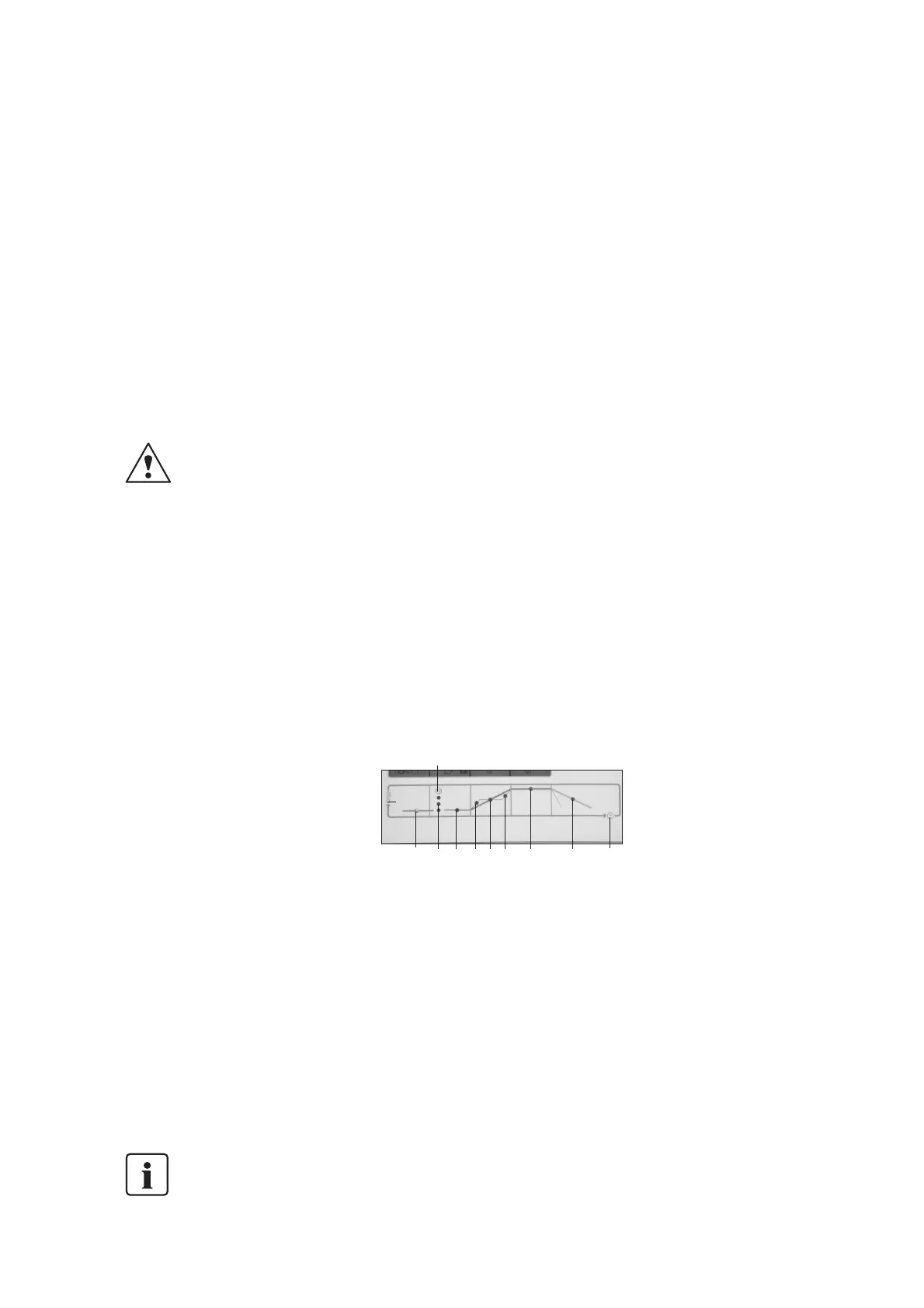
Orange LED (64)
– The LED is illuminated if the program in
progress is in its temperature increase
stage. The duration of this stage depends
on the temperature increase parameter t
(73). The holding temperature T is not yet
reached. The furnace head is closed (one-
stage program).
– The LED is illuminated if the program is in
the first temperature holding stage (H1)
(two-stage programs).
Orange LED (64a)
This LED is illuminated if the program in
progress is in its first temperature increase
stage (t1) (two-stage programs).
Orange LED (64c)
This LED is illuminated if the program in
progress is in its second temperature
increase stage (t2) (two-stage programs).
Orange LED (65)
This LED is illuminated if the program in
progress is in its holding temperature stage.
The duration of this stage depends on the
holding time parameter H (76). The furnace
head is closed.
Orange LED (66)
This LED is illuminated if the program in
progress is in its long-term cooling stage.
The duration of this stage depends on the
long-term cooling parameter L (79) and on
the current cooling behaviour of the furnace.
If the value for long-term cooling has been
set to 0, this stage is omitted.
Green LED (63)
This LED is illuminated if the program in
progress is in its pre-vacuum stage. The
duration of this stage can be changed in
Program P195.
Description of the green LED (61)
in the START key (62)
– LED lights up after the start
– LED blinks during program interruption
(1 x STOP)
– LED is dark after the program has bee
stopped; the furnace heats to stand-by
temperature.
5.5 Selecting the °C or °F mode
The temperature mode can be selected by
means of Program 197. This is generally
done on the occasion of the initial start-up.
Pressing ENTER sets °C or °F.
5.6 Selecting the buzzer signal
By selecting Program 191, the current
buzzer tune is activated. There are
9 different buzzer tunes. Ø means that the
buzzer is not activated. Pressing ‘+/–‘ results
in the corresponding tune being played.
ENTER activates the marked buzzer tune.
Now select another program number and
confirm with ENTER to leave P191.
5.7 Description of the
firing curve display
The firing curve display (8) informs users
about the status of the vacuum and that of
the current program (firing stage).
Vacuum status:
Three green LEDs (9):
1
st
LED blinking ->
vacuum inadequate
1
st
LED illuminated ->
25 % vacuum
1
st
+ 2
nd
LED illuminated ->
50 % vacuum
1
st
+ 2
nd
+ 3
rd
LED illuminated ->
100 % vacuum
The 1
st
LED is the bottom
one. The LEDs remain
extinguished if a program is
run without vacuum.
Program status (firing phase)
Orange LED (67)
The LED is illuminated if the temperature in
the firing chamber = B minus 30 °C or B
minus 54 °F, independent of the position of
the furnace head. The LED is blinking if no
9
A
B
C
63 64 65
66
64a
67
64c



 To Next Page