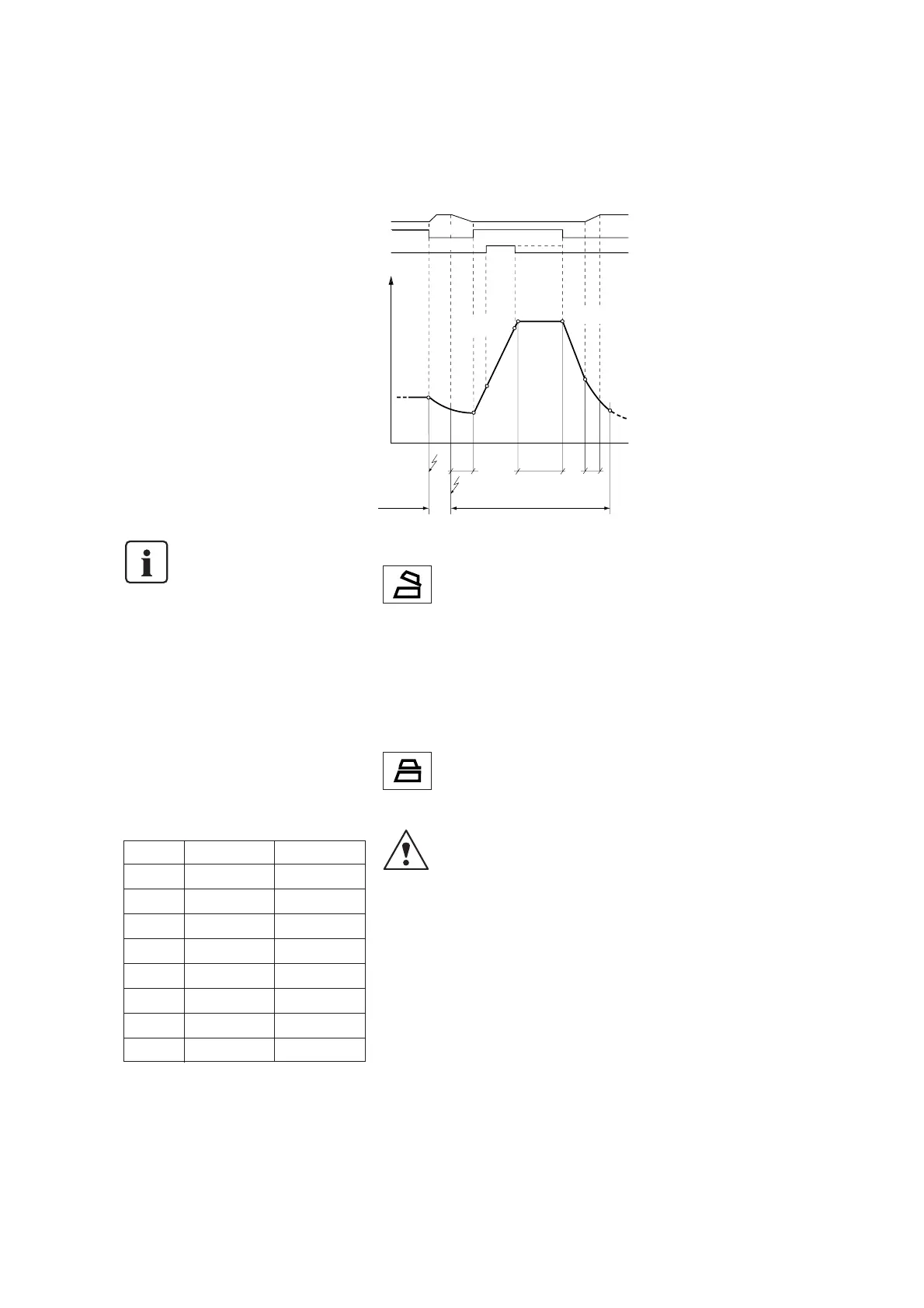
Furnace head
on
1 min. *)
* Depending on the program, 18 s possible.
closed
on
on
open
open
off
off
off
off
Heater
Vacuum pump
Temperature
V
2
(if V
2
= T)
(if V
2
< T)
V
2
L
T
HS
t➚
V
1
B
Time
Opening
key
Buzzer
320 °C
(608 °F)
START key
Furnace in
stand-by mode Total program duration
16
6. Practical Use / Program Description
The operating procedure for the
Programat P200 will be explained with the
help of two examples: one standard and one
individual program.
All programs are equal, i.e. P1 to P189 are
fully functional firing programs for the user.
P190 to P199 are auxiliary programs.
6.1 Switching on/off
Switching on:
Put On/Off switch (23) at the rear of the
furnace on position ‘I’. After approx.
1 second, the unit conducts an automatic
self-diagnosis of the individual components
(SELF appears in the display). Once the self
test has been completed, the furnace is
ready for use.
Switching off:
Put the On/Off switch on position ‘0’ to
switch off the furnace.
If the furnace is switched off,
the furnace head should always
be closed in order to prevent the
stone lining inserts from absorbing
moisture.
6.2 Firing with standard programs
Trial run
Step 1
Select the desired standard program (P3-P10)
with the P-parameter and confirm with
ENTER. The standard programs may also be
changed, once the write protection is
deactivated.
e.g. P3
This program contains the following values:
Typical program sequence
Step 2
Press key (58) (furnace opens)
Step 3
Press START after the buzzer has sounded.
The display indicates the remaining time
according to the program sequence.
The program runs automatically.
Opening the furnace head: 1 min.
Step 4
The buzzer indicates the end of
the program.
Close furnace with this key (59)
Note: The outside of the
furnace becomes hot when
the head is open
Should something not work properly, please
refer to Chapter 8.
6.2.1 Firing with individual oxidation
programs (P1, P2)
Observe and set the values stipulated in
the instructions of the corresponding alloy
manufacturer. The values can be changed,
once the write protection has been
deactivated.
6.3 Firing with special functions
The special functions may be used for all
the programs.
Cursor
The current cursor position is shown
as usual by means of a frame and the
blinking parameter letter/symbol. The
cursor is navigated using the [] or []
keys. Set values have to be confirmed with
Enter. If a symbol is activated, an arrow is
displayed on the right of the symbol. If the
corresponding function is deactivated, only
the symbol is visible. Once the start key is
pressed, the cursor jumps back to the
program number position (71) and stops
blinking.
Programming of two-stage programs
Two-stage programs feature two different
holding temperatures, holding times,
temperature increase rates, vacuum on,
and vacuum off points.
If the cursor is located on the’one-stage/
two-stage’ symbol, pressing Enter results in
alternating between the one-stage and
two-stage indications.
For one-stage programs (standard for most
users), the symbol consists of one part,
which represents the firing curve diagram
of a one-stage program.
For two-stage programs, the symbol
consists of two parts with the first part
(Part 1) immediately blinking. This indicates
that the parameters of the first stage are
shown, which may then be edited.
If the cursor is set on the ‘one-stage/
two-stage’ symbol, pressing [–] or [+]
results in alternating between the
parameters for the first stage and those
for the second stage.
[–] … changes to the parameters for
the first stage
[+] … changes to the parameters for
the second stage
If the parameters for the first stage are
shown, the parameter field ‘Long-term
cooling’ and the symbols ‘Quick furnace
head opening’ and ‘Overnight program’
are blank.
If the parameters for the second stage are
shown, the parameter fields ‘Closing time’
and ‘Stand-by temperature’ and the
symbol ‘Pre-vacuum’ are blank.
The blanking of the non-relevant
parameters for the shown stage is
another hint to recognize that the currently
selected program is a two-stage program.
Program °C mode °F mode
T * 900 (°C) 1652 (°F)
t➚ 80 (°C/min.) 144 (°F/min.)
S * 6:00 (min.) 6:00 (min.)
B 403 (°C) 757 (°F)
H * 1:00 (min.) 1:00 (min.)
V
1
450 (°C) 842 (°F)
V
2
899 (°C) 1650 (°F)
L (*) 0 (no) 0 (no)



 To Next Page