17
Indication/setting of the parameters
for the first stage
Indication/setting of the parameters
for the second stage
The program may be started at any time,
even if the input screen for the second stage
is still being displayed. After the start, the
parameters of the first stage are shown, as
long as the program in progress is in its first
stage (part one of the symbol blinks). As
soon as the second stage of the program is
reached, the parameters for the second
stage are shown (part two of the symbol
blinks).
One the two-stage program has been
completed, the display immediately shows
the parameters of the first stage.
If an interrupted two-stage program is
continued, the parameters of the current
stage are immediately shown.
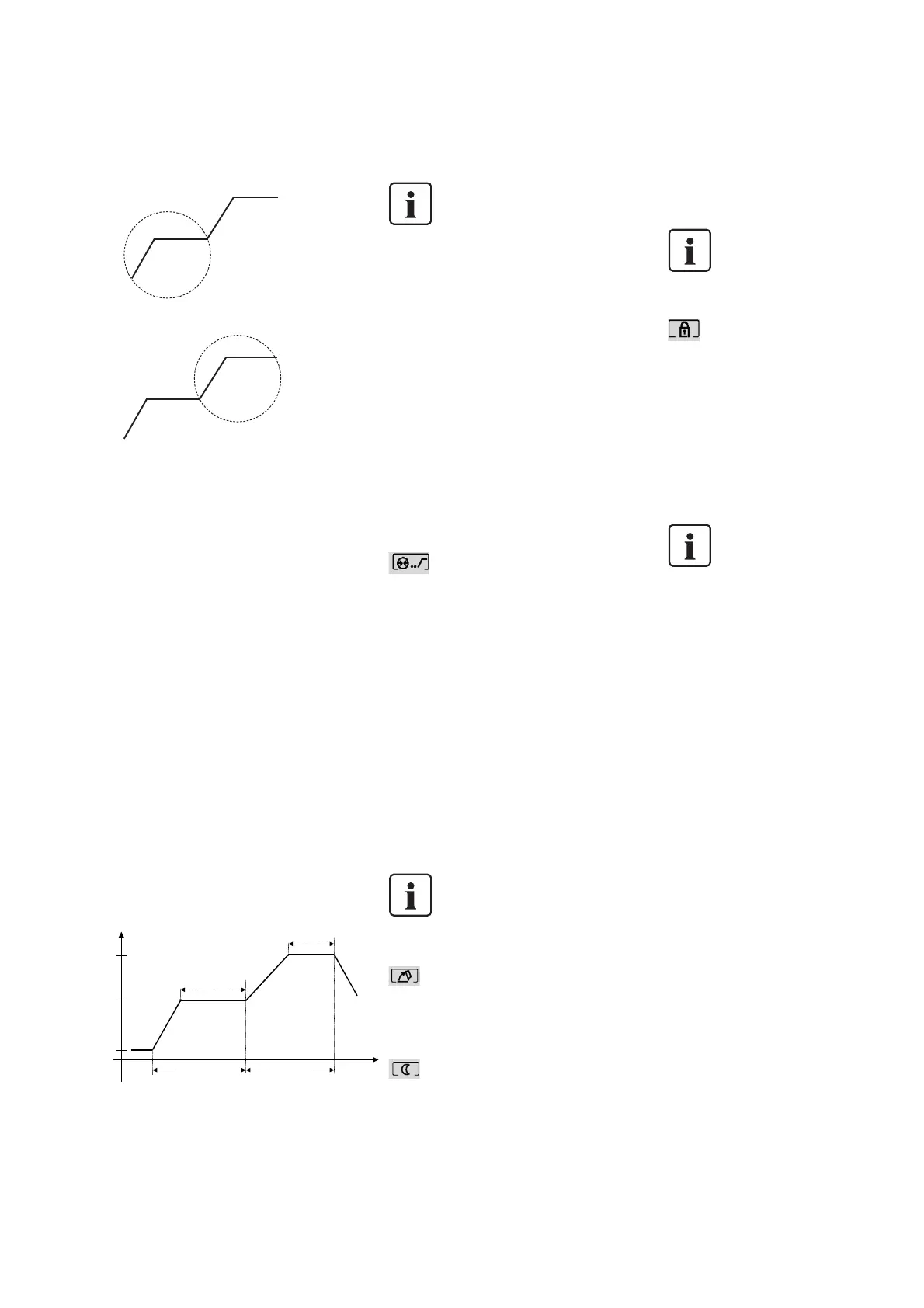
The two vacuum levels are allocated to the
temperature levels. Please note that the on
and off points of the two vacuum levels V1
and V2 or second-stage V1 and V2 must not
exceed T or second-stage T. If this is not
observed, a corresponding error message will
be displayed after the start of the program.
Allocation of temperature stages –
vacuum stages
In order to maintain the vacuum
between the first-stage vacuum
on V
1
and the second-stage
vacuum off V
2
, the values for the
first-stage vacuum off V
2
and the
second-stage vacuum on V
1
must
be exactly the same.
Special variant
Two-stage program, in which the first half
of the individually set holding time is fired
with vacuum and the second half without
vacuum. All the values can be freely set.
Holding temperature 1 = Holding
temperature 2.
Example
1
st
stage:
With vacuum, e.g. Holding time 1 min.
2
nd
stage:
Without vacuum, e.g. Holding time 1 min.
Pre-vacuum
This value is set for each program
individually. If a firing program is conducted
with pre-vacuum, the set pre-vacuum time
will pass at the end of the closing time (as
soon as the furnace head is closed), i.e. the
vacuum pump is in operation during this
pre-vacuum time. Once the pre-vacuum time
has elapsed, the heating phase will begin.
If a program with activated pre-vacuum is
started, the value in the parameter field V
1
is ignored. The vacuum is maintained until
V
2
is reached. V
2
must be higher than the
stand-by temperature B. If V
2
is lower than
B or 0 and the pre-vacuum is activated,
error message Er19 is indicated.
The pre-vacuum time can be set in the
auxiliary program P195 in the range of
01:00 to 05:00 minutes.
If the pre-vacuum is selected,
field V1 is highlighted.
Quick opening the furnace head
The furnace head opens quickly (18 seconds)
at the end of a program.
Overnight program
Once the ‘Overnight’ program has been
completed, the furnace head opens without
the buzzer sounding. As soon as the
temperature has dropped below 80 °C
(176 °F), the furnace head closes
automatically and the furnace cools to room
temperature. The green LED in the START
key blinks. In the event of a power failure
during the night, the furnace will no longer
heat up, but remains at room
temperature.
The overnight program may
also be changed once the
program has already started.
Write protection
This function is used to activate or
deactivate the write protection of the
currently loaded program. The program
parameters can only be changed if the
write protection is not activated.
To activate / deactivate the write
protection, the ENTER key has to be
pressed for at least 2–3 seconds. This
prevents accidental deactivation of the
write protection.
The write protection field
can only be selected if the
furnace has not been
completely locked by means
of a code (see description of
the auxiliary program P196).
Auxiliary programs (P190 to P199)
For the auxiliary programs (P194, P195,
P196, P198), the input fields (e.g. T, S,
B, L) are shown in a different manner,
depending on the editing mode of the
selected program. This means that only
those input fields are shown, which
may actually be changed in the selected
program.
Program P190
With this program, the intensity of
the background illumination of the
display may be adjusted in 5 stages
(0 = no background illumination). The
corresponding value is indicated in the
remaining time field (70). The values
can only be edited using the [–] and [+]
keys. The set value has to be confirmed
with ENTER. All the other parameters
are not visible. P190 can be left by
entering another program number
followed by Enter. (Cursor is not
activated.)
Program P191
Setting the acoustic signal. The fre-
quency can be altered with the ‘+’/’–‘
keys. The set value has to be confirmed
with ENTER. The value is indicated in
the remaining time field (70) of the
display (range of values 0–9; 0 = no
buzzer). (Cursor is not activated.)
Temperature (°C / °F)
T(B) Holding temperature
First stage
Second stage
T Holding
temperature
B Stand-by temperature
V2 Vacuum OFF
t Temperature increase
Time
V1 Vacuum ON
H
Holding time
H (B)
Holding time
V2 Vacuum
OFF
t (B) Temperature
increase
V1 (B) Vacuum ON
Your Example
S Min =
B °C(°F) =
L °C(°F) =
FIRST stage
t °C(°F)/Min =
T °C(°F) =
H Min =
V1 °C(°F) =
V2 °C(°F) =
SECOND stage:
t
°C(°F)/Min =
T °C(°F) =
H Min =
V1 °C(°F) =
V2 °C(°F) =



 To Next Page