Operating Instruction
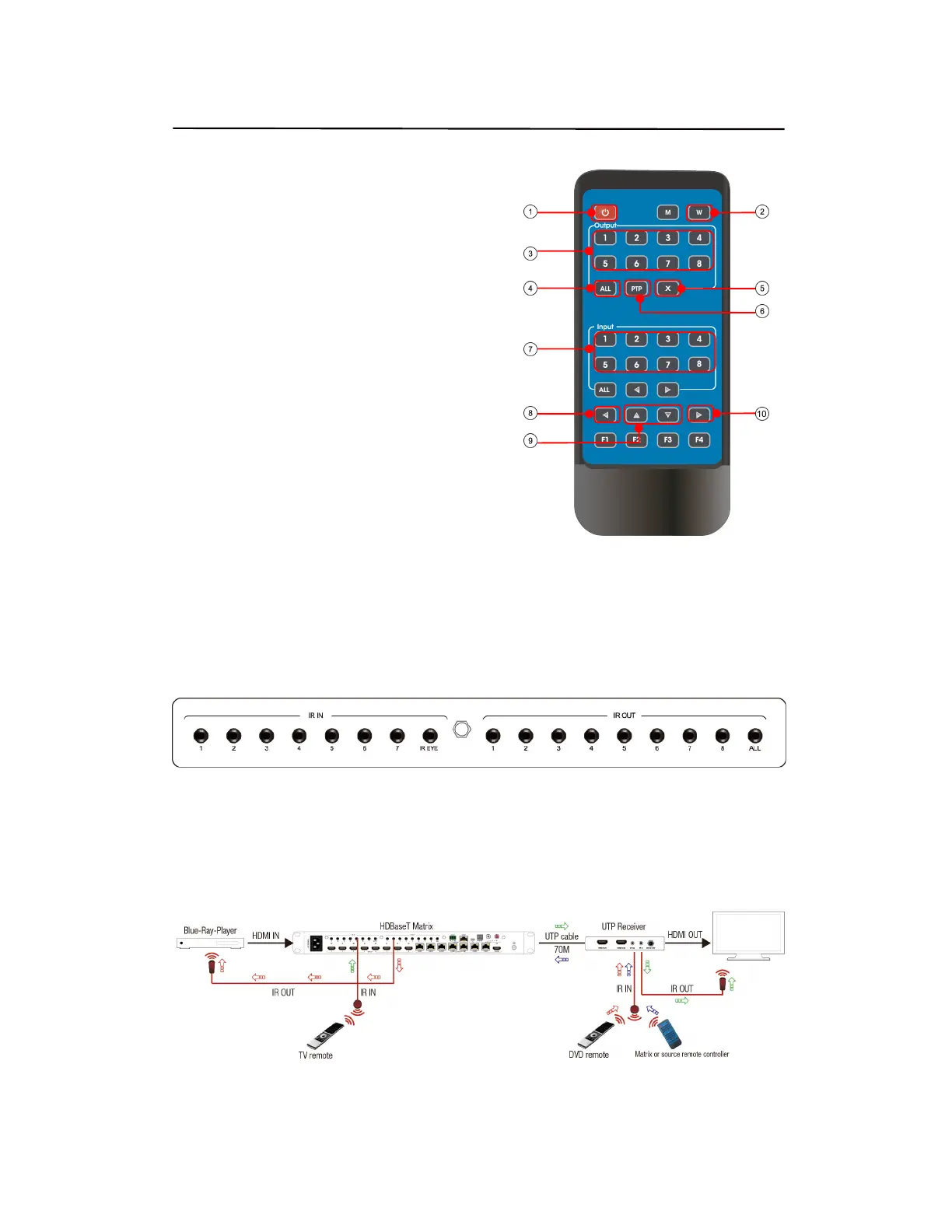
6. Remote Control Description
ᬅ Standby Mode
ᬆ Lock or Unlock the Panel Button
ᬇ Choose output from 1-8
ᬈ Choose all the outputs.
ᬉ X: Turn on/off output port which you select
ᬊ PTP button: Mirror all inputs and outputs
(Ex. Input 1 to output 1, input 2 to output 2, etc)
ᬋ Choose input from 1-8
ᬌ Menu (back to previous option) button
ᬍ UP and DOWN button
ᬎ Enter button
7. IR system
The matrix can pass the IR signal through the IR system to the HDMI source or pass the IR signal
from the HDMI source to the HDMI sink
Dual way IR using:
Step1: “IR IN” is for HDBaseT output, “IR OUT” is for input channel
Step2: “IR IN EYE” Controlled by all input IR; “IR OUT ALL” Controlled by all output IR.
Step3: HDBaseT receiver support connect with IR receiver to control the Matrix by remote
Step4: Matrix IR channel “IR IN EYE” support connect with IR-RX cable to control the Matrix by
remote


 To Next Page