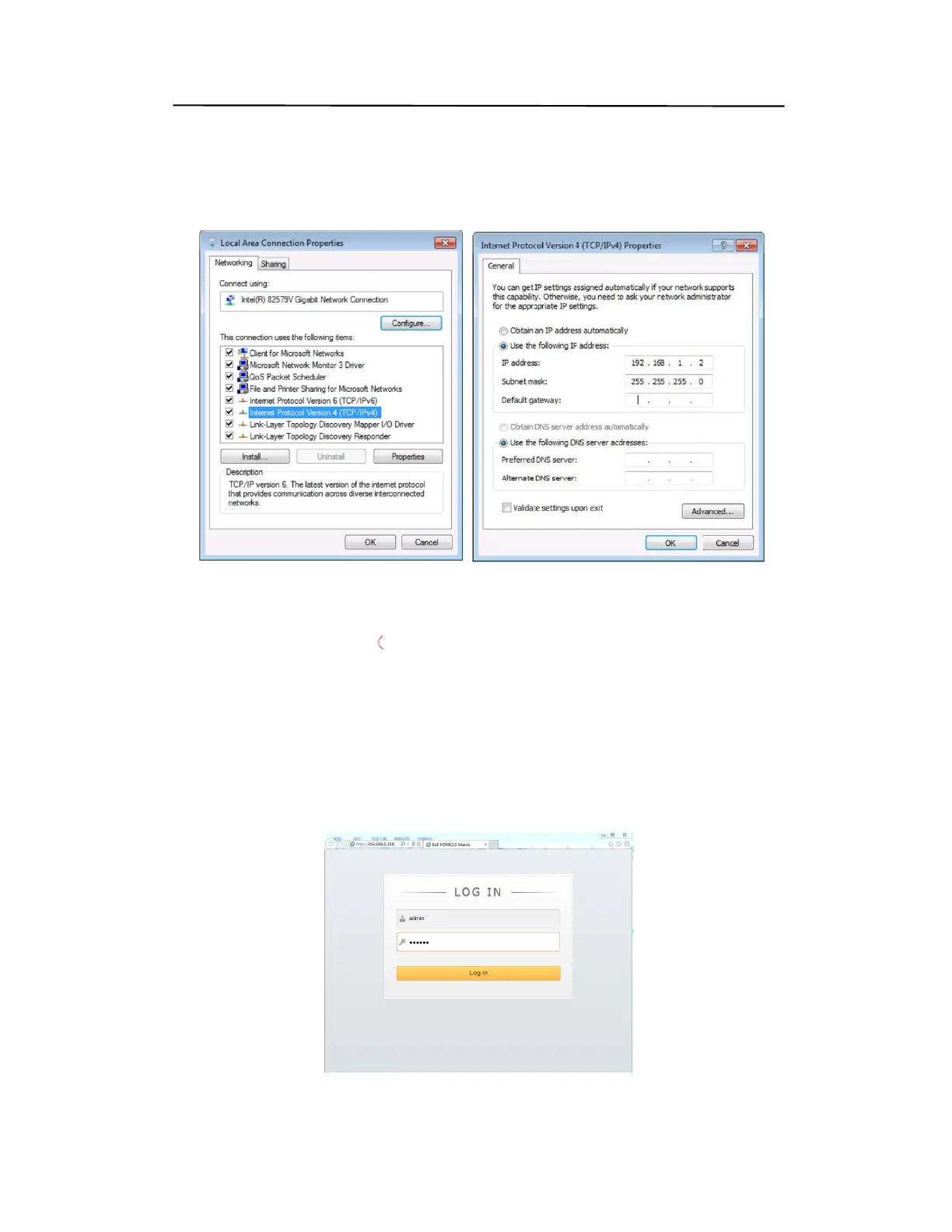
6). Select Use the following IP Address for static IP addressing and fill in the details.
For TCP/IP
v4 you can use any IP address in the range 192.168.1.1 to 192.168.1.255 (excluding
192.168.1.168).
7). Click OK.
8). Click Close.
Web Control (P19)
Default IP Address: 192.168.1.168;
MASK: 255.255.255.0;
Gateway:192.168.1.1;
MAC:0008-DCCA-CF3F (
Each device have different MAC address)
9.2. Enter Web and Control.
1) Enter the default IP address of the matrix: 192.168.1.168.
2) You will see following picture and control:
(User Name: admin; Password:admin)
Note: web control is recommended to use Google, fire fox, IE8 and above browsers,
using other browsers may not be compatible
Web Control (P20)
Operating Instruction


 To Next Page