USB Application
USB2.0 JWR2100 a router port for connecting the USB device, this function before the operation please plug in a
USB device, you can connect a flash drive or printer in accordance with demand.
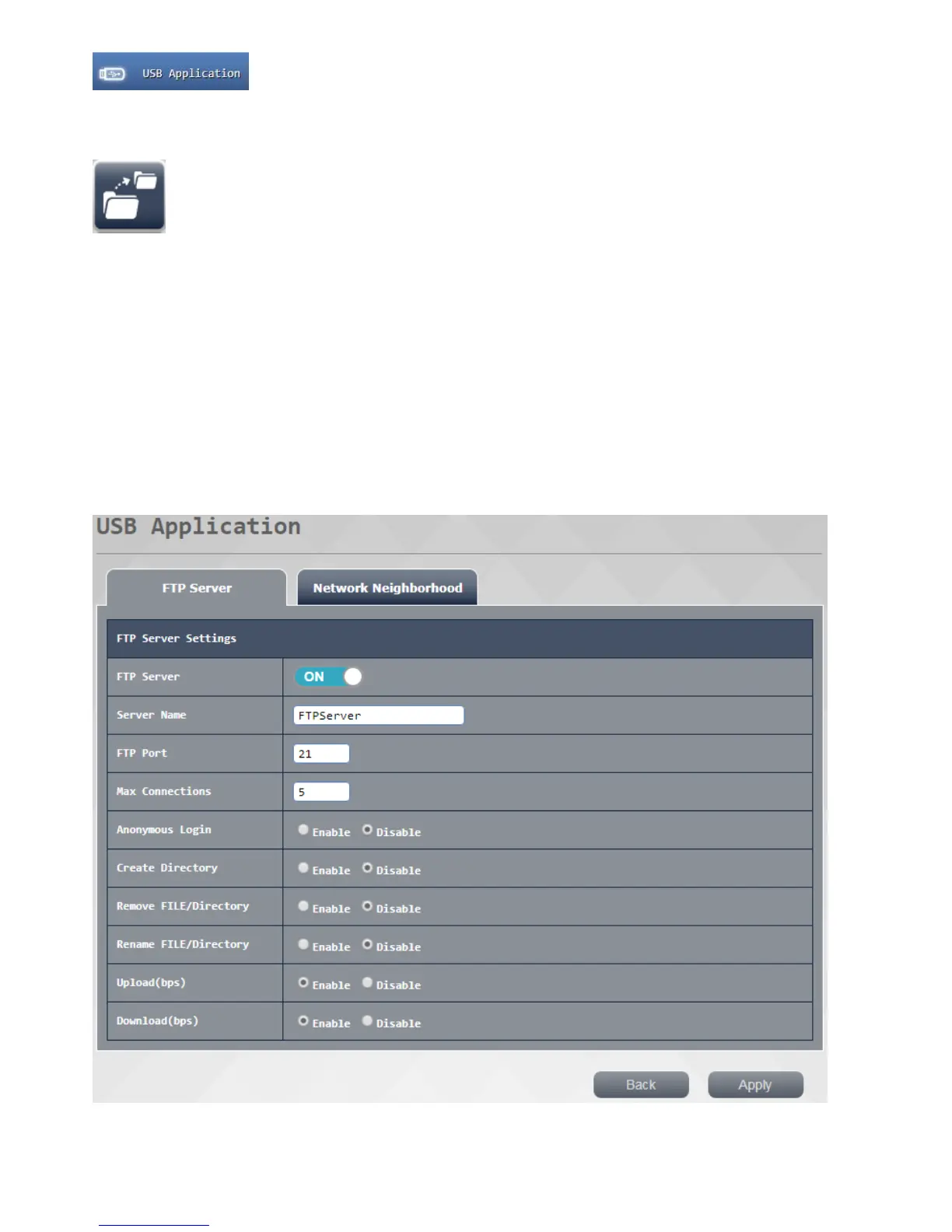
USB storage function: allows users to access shared files on the USB router out by
clicking "File Transfer Server (the FTP)"top-down feature describes
1. File Transfer Protocol (FTP):. This can be set to function to enable or disable
2. Server name: set the name of the server you want to use
3. FTP port: It is recommended to use the default value
4 . Maximum number of connections: set the number of your FTP same time be open connection
5. Anonymous login: setting is open anonymous FTP login function
6. Create the directory : set whether the user is open to connect the new folder permissions in the FTP server above
7. Delete, Rename file / directory: set whether even open in the above FTP server line users delete, rename file /
directory permissions
8. Upload / Download (bps):. set upload and download speeds for each connection
Press Apply button after setting is completed, that is, after waiting for the reopening of the system is completed
complete set



 To Next Page