Troubleshooting Bluetooth/Speakers
Caution: *Unplug the sauna before handling any wiring or electrical components*
If the sauna’s Bluetooth audio connection is not working, proceed to steps 1-3 below.
If the speakers are not functioning properly, proceed to step 4.
Step 1:Make sure that there isn't another device connected to the sauna. The Bluetooth
module in our saunas will only allow for 1 connected device at a time.
Step 2: Unplug your sauna for about 30 seconds to reset the electronics within the unit.
Go to the Bluetooth settings on your device(s) and unpair the sauna (if currently paired)
Plug your sauna back in and go through the pairing process again
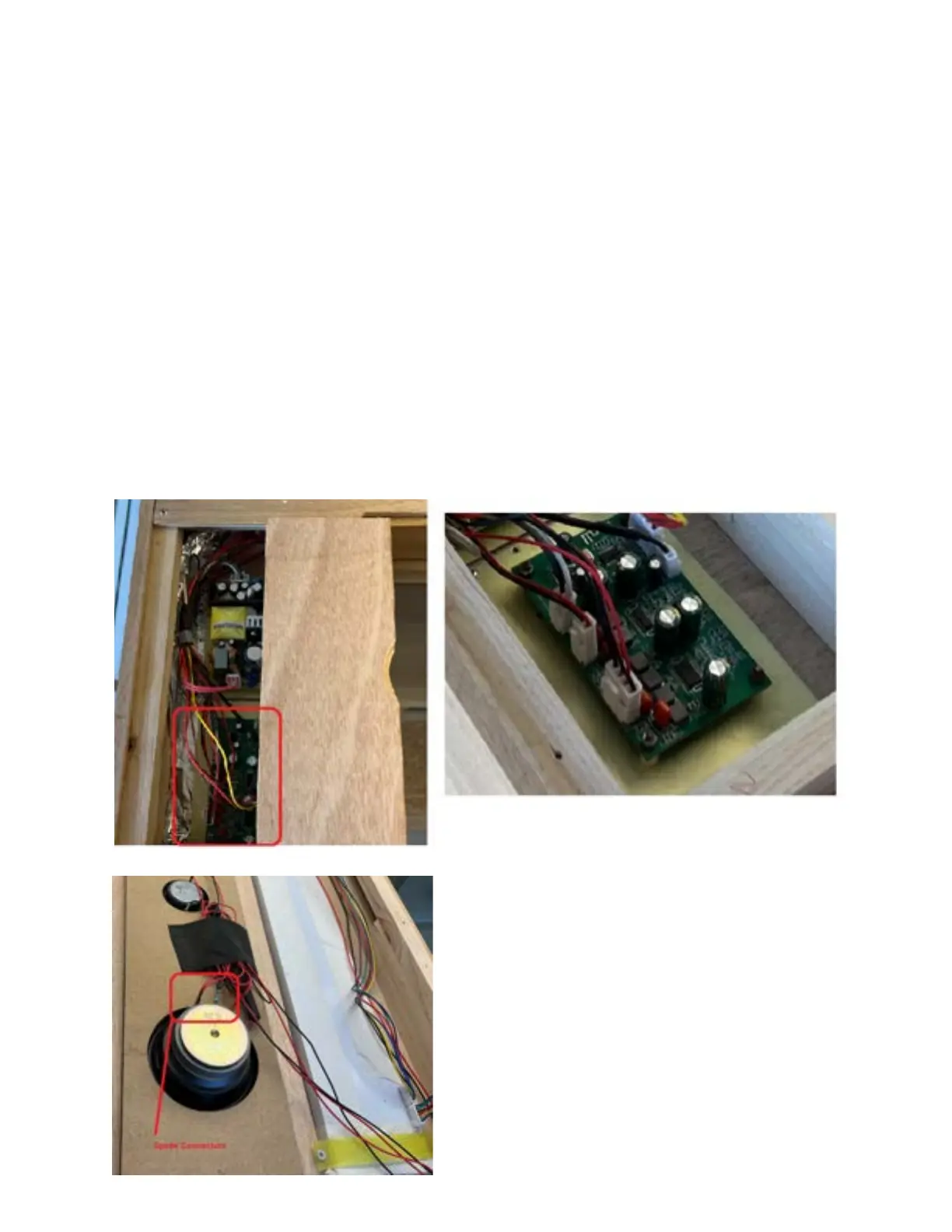
Step 3: If the sauna’s Bluetooth connection does not appear on your device, check for any loose
wiring connections to the audio board, located inside the trapdoor on the left side of the roof (if
facing the sauna from the outside)
Step 4: Check the speaker wire connections - this
will be the 4-pin wiring connector with red and black
wires, connected to the audioboard (shown in the
picture above). The wiring will then lead to the
speakers - Each speaker will have two spade
connectors. Make sure that all wiring/connectors
are firmly secured.


 To Previous Page