EN
47
JAGA NV | BRIZA JFCC | MANUEL | .. | V..
C.. ROOM THERMOSTAT
C..JRT-
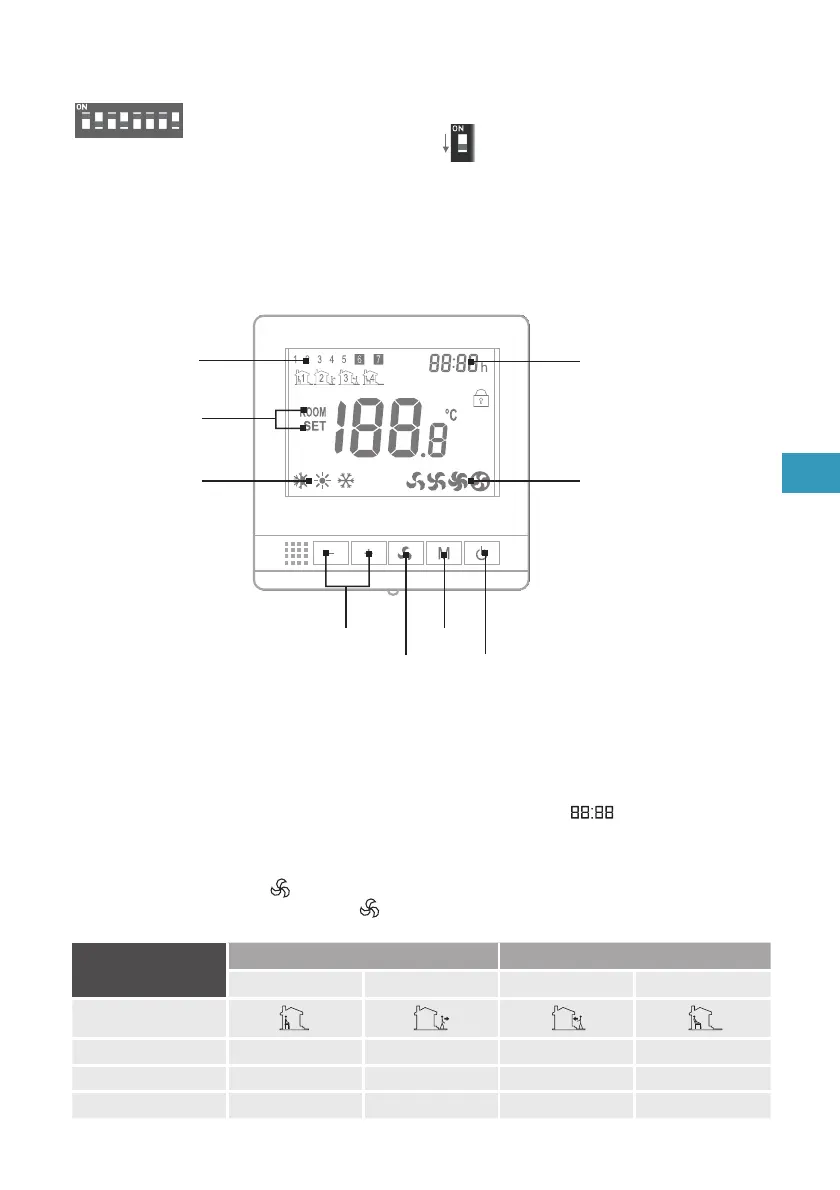
Clock
Display mode
Fanspeed
Temperature - /
Parameter settings
Programmable
time zones
Mode
Mode
On / Off
Fanspeed
WEEK
TIME ZONE TIME ZONE
Switch on Switch o Switch on Switch o
Icons
1 2 3 4
. Monday - Friday
From until From until
Saturday
From until From until
Sunday
From until From until
Programmable time zones
– Press the “M” button for seconds to enter the “clock setting” and the “day setting. (
)
– enter + + programmable mode
– push “+” and “-“ to set “on / off time”
– scroll through the menu with the “M” button.
– Activate the set time: press the “ ” button for seconds.
– To deactivate the programmed time: press the “ ” button for seconds.
Window contact
The window contact is not activated by default and has to be activated /deactivated manually .
Switch on : turn on the DIP switch
12345678
ON
1
ON



 To Next Page