ADwin Installation, manual version 2.1, December 2005 29
ADpcmcia adapter
ADwin
Operation with two
ADpcmcia adapters
If you work with two ADpcmcia adapters you have to pay attention to the fact,
that Windows automatically allocates the address 190h to one of the cards.
Which card it is, you have to check as is described in the previous paragraph.
While working with ADbasic, you have to indicate this address under
"Options\ Compiler" as "Device No." and also in all other applications
with ADwin systems.
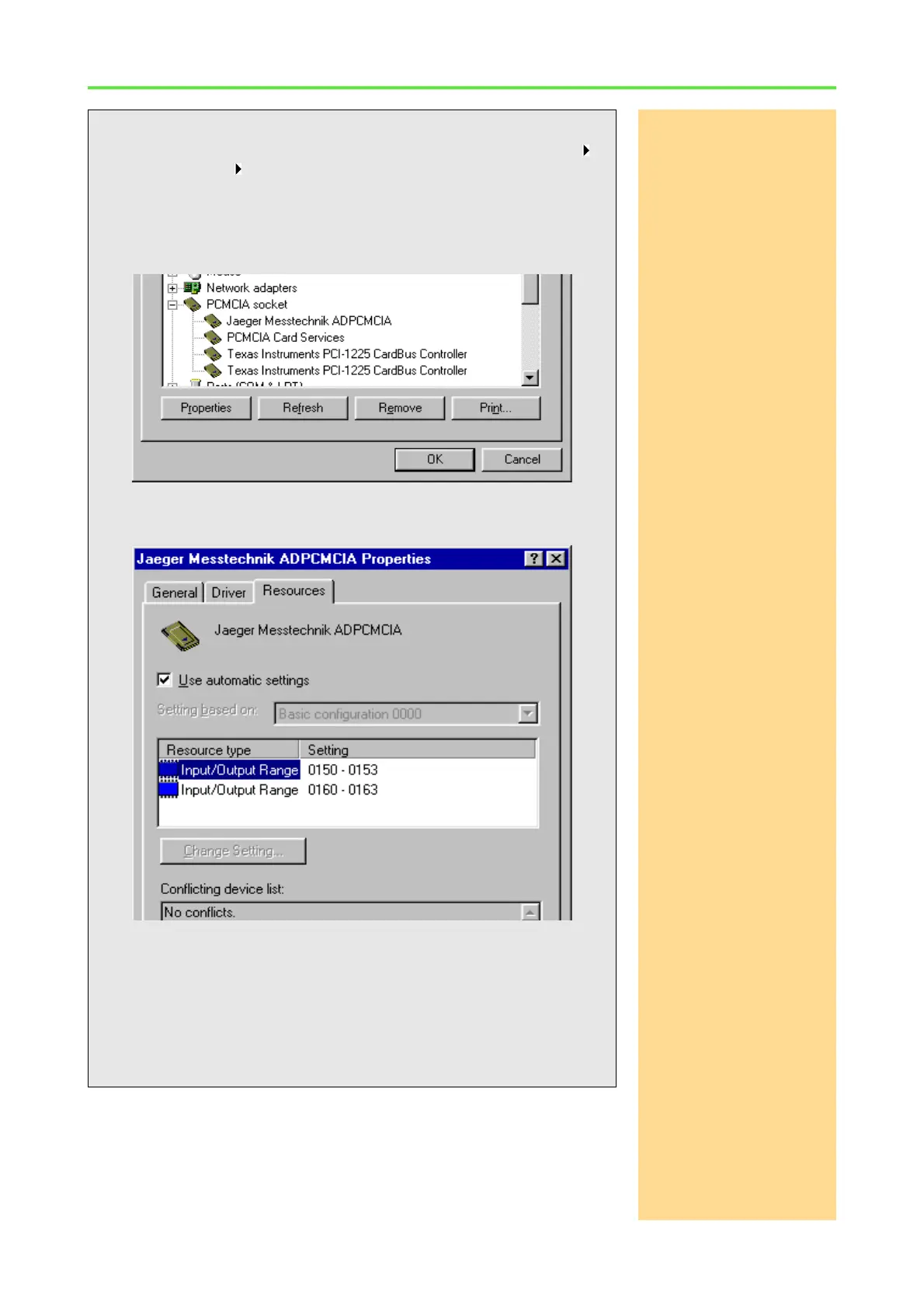
How to find the base address:
Call the device manager in the Windows start menu: Settings
Control panel System.
The device manager displays the ADPCMCIA board of Jäger
Messtechnik at "PCMCIA socket" (under Windows 2000 and XP in
the newly created directory: Computer\ADwin). Select it by dou-
ble-clicking.
Under the tab: "Resources" the base address of the ADpcmcia card
is displayed as first number.
If in the window above you found the address 0190 (equals 190h) in-
stead of address 0150, it would be the valid base address you have to
set as "Device No." in ADbasic and in the objects of your development
environment, e.g. TestPoint, Matlab, Visual Basic or C/C++.
Now return to the ADbasic window: "Compiler Options" and correct
the "Device No.", if necessary.



 To Next Page