ADwin System with Ethernet Interface
ADwin
58 ADwin Installation, manual version 2.1, December 2005
9.3 Configuration with ADconfig
Configure first the settings in the PC then the Ethenet interface by using the
program ADconfig.
9.3.1 Configuration of the PC
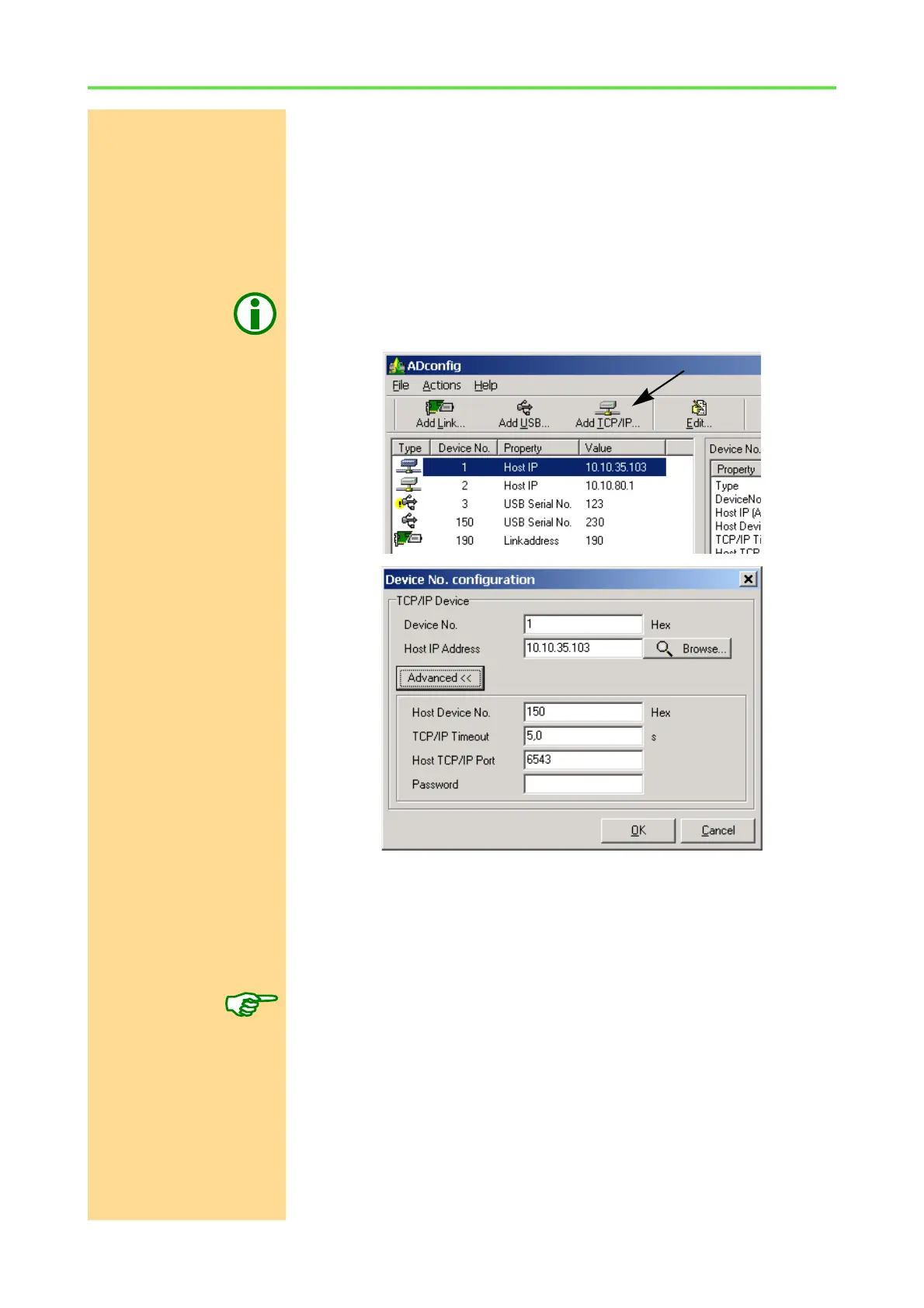
Configure the connection to the ADwin Ethernet interface with the program
ADconfig as follows:
PC configuration Configure the connection to the ADwin Ethernet interface with the program
ADconfig as follows: (See also chapter 10.3.2). For more information about the
program see the online help of ADconfig (button F1).
Add TCP/IP
Host IP see page 51
Advanced…
see page 55f
OK
The Advanced settings will normally stay unchanged.
The "Host Device No." has no effect during the configuration of the ADwin
Ethernet interface and should be left on the standard (default) value 150h.
The difference Do not mix up the allocation of the "Device No." to the ADwin Ethernet interface
with the configuration of the ADwin Ethernet interface itself!
The configurations made in this menu are saved on the PC and these settings
are transferred to the ADwin driver (ADwin32.dll) saying which "Device No."
and which configurations are necessary to access the ADwin Ethernet inter-
face.



 To Next Page