Stored Readings
Stored readings are shown in the bottom left corner of the software display
with the most recently taken reading at the top. The number of readings
stored is shown by the number to the left of the top reading shown. When
more than four readings are stored it is possible to scroll through the
readings using the scroll buttons to the right of the ‘stored readings’ area.
Deleting Readings
If a reading has been taken which the user no longer requires it is possible to
delete it from the list. Scroll through the readings so that the reading to be
deleted is on display and click on the reading to highlight it. If you now
‘right click’ the reading will be erased.
It is not possible to recover deleted readings.
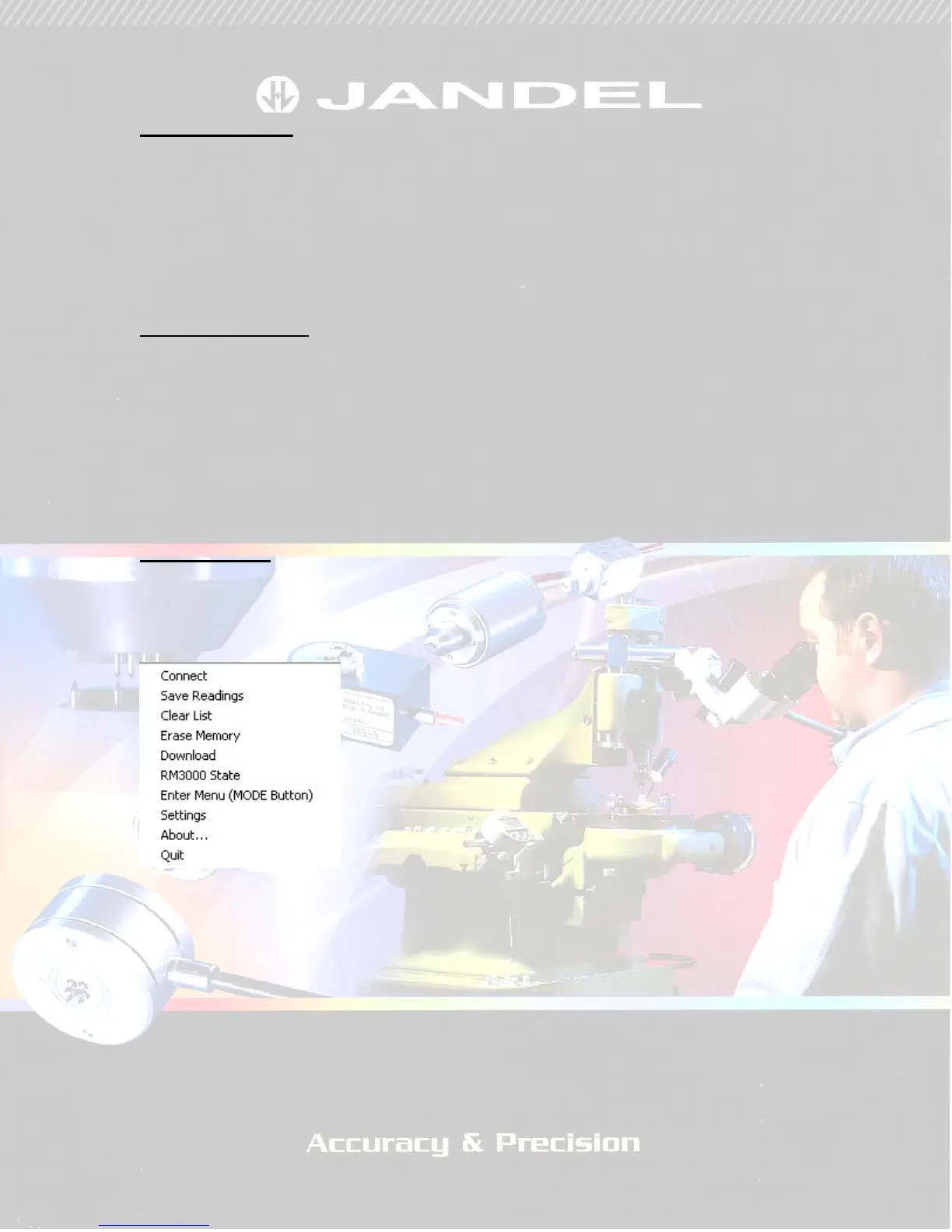
Pop-up menu.
Right clicking on the software screen will give a pop-up menu as shown in
Figure 2.
FIGURE 2
There are a number of options and these can be used as follows:
Connect – if the computer and RM3000 have ceased communicating after a
period of inactivity then clicking this will reconnect them
Save Readings – if you want to save the readings that are showing in the
‘Stored Readings’ area of the software, clicking this will give you the save
options (see ‘Exporting Measurements’ below).


 To Next Page