- 8 -
G31 Series User's Manual
1.4 Connecting Rear Panel I/O Devices
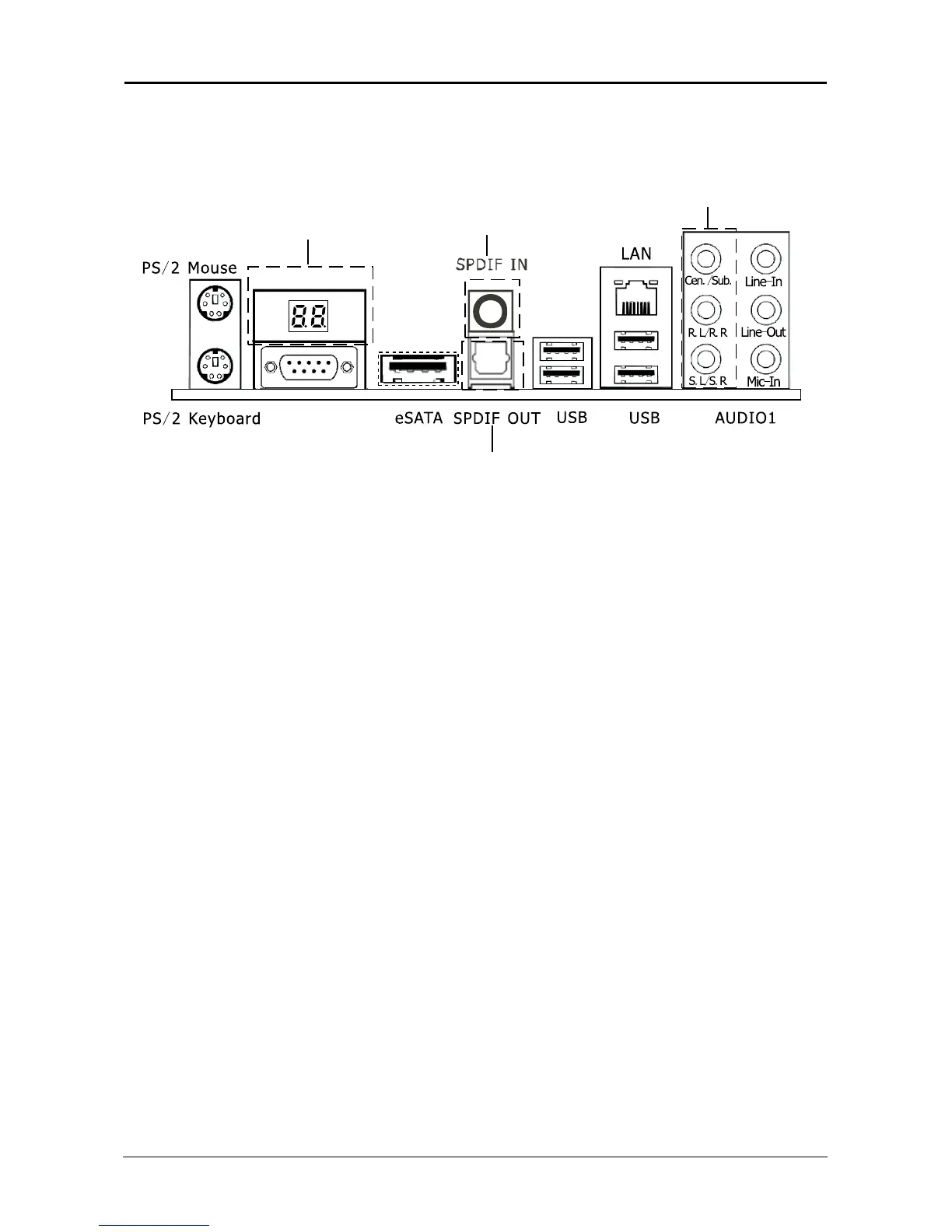
The rear I/O part of these mainboard provides the following I/O ports:
(This picture is only for reference)
• PS/2 Mouse: Connect to PS/2 mouse.
• PS/2 Keyboard: Connect to PS/2 keyboard.
• Debug LED: Display error code. (please reference attached 1)
• VGA: Connect to monitor input.
• eSATA: Connect to peripherial SATA devices.The peripherial SATA devices must connect
inside SATA connectors.
• SPDIF OUT: Connect to digital audio device.
• LAN: Connect to Local Area Network.
• USB: Connect to USB devices such as scanner, digital speakers, monitor, mouse, keyboard,
hub, digital camera, joystick etc.
• AUDIO1:
Cen./Sub. (Center / Subwoofer): Connect to the center and subwoofer channel in the 7.1
channel audio system.
R.L./R.R. (Rear Left / Rear Right): Connect to the rear left and rear right channel in the 7.1
channel audio system.
S.L./S.R. (Surround Left / Surround Right): Connect to the surround left and surround right
channel in the 7.1 channel audio system.
Line-In: Connect to the line out from external audio sources.
Line-Out: Connect to the front left and front right channel in the 7.1-channel or regular
2-channel audio system.
Mic-In: Connect to the plug from external microphone.


 To Next Page
 Loading...