EasyManua.ls Logo

JBL Cinema - Buttons and Controls

JBL Cinema
16 pages
Print Icon
To Next Page IconTo Next Page
To Previous Page IconTo Previous Page
Loading...
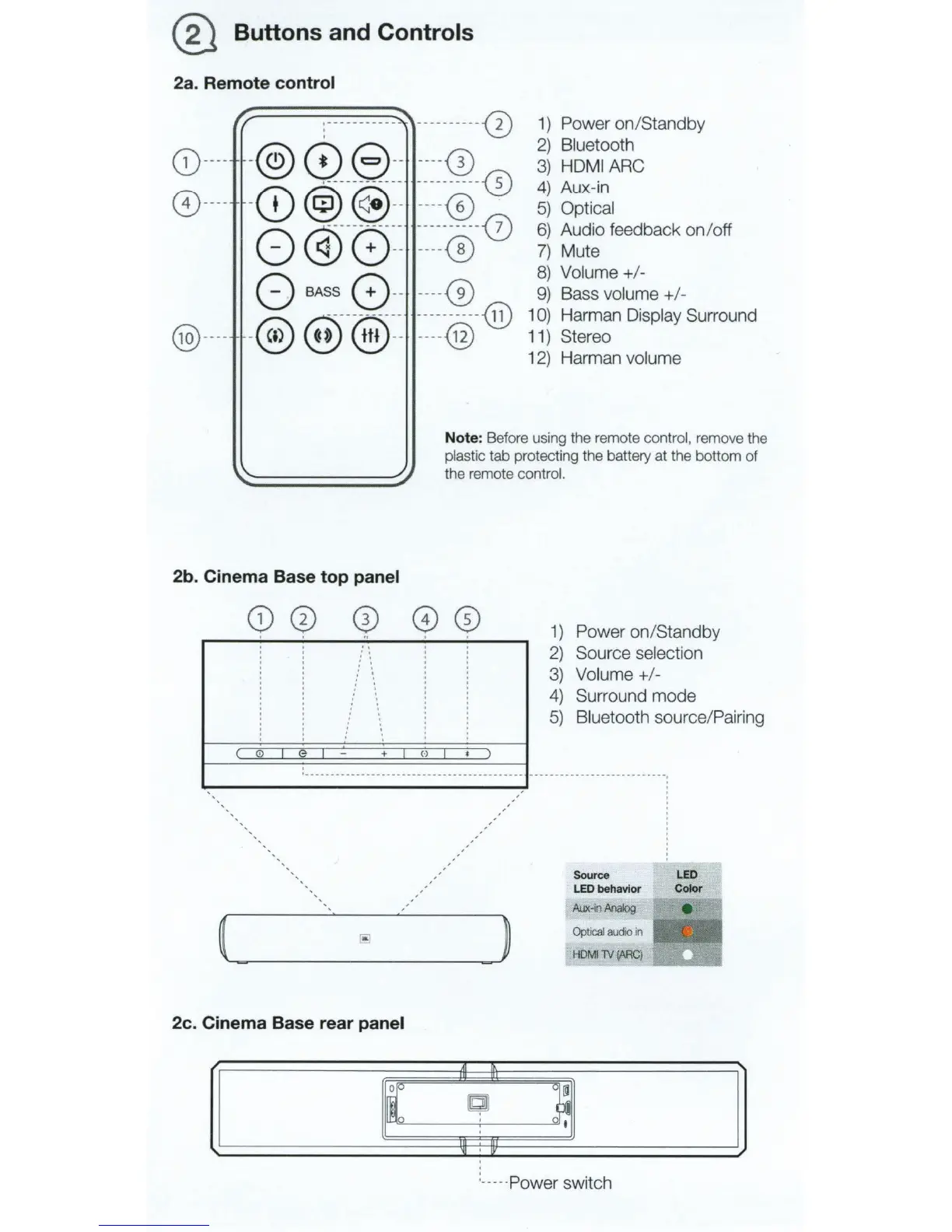
@ Buttons and Controls
2a. Remote control
CD
----
0
----
@
----
/.
:------
- -
--
-
~
-----------0
-
@)
0 8 --
----0)
·---
--
-----
--
----------~
-
CD
@)
@
--
----
<B
~
---------
----------~
0
~
0
--
----@
0 BASS 0
--
-
---
@
~
-
-
-
--
- - - - -
---------
~
-®
~
@
--
----
@
1)
Power
on
/Standby
2)
Bluetooth
3)
HDMI
ARC
4)
Aux-in
5)
Optical
6)
Audio feedback on/off
7)
Mute
8)
Volume+/-
9)
Bass volume+
/-
1
0)
Harman Display Surround
11)
Stereo
12)
Harman volume
Note: Before using the remote
co
ntrol, remove the
plastic tab protecting the battery at the bottom of
the remo
te
contro
l.
2b. Cinema Base top panel
2c. Cinema Base rear panel
A1
I[
II.
~
1)
Power
on
/Standby
2)
Source selection
3)
Volume +
1-
4)
Surround mode
5)
Bluetooth source/Pairing
(g
c~
t
Sour
ce
LED
LED behavior Color
Aux
-i
n
Analog
e
Optical
audio
in
HDMI
TV
(ARC)
_..;::;;..
___,i
:_----
Power switch

Related product manuals