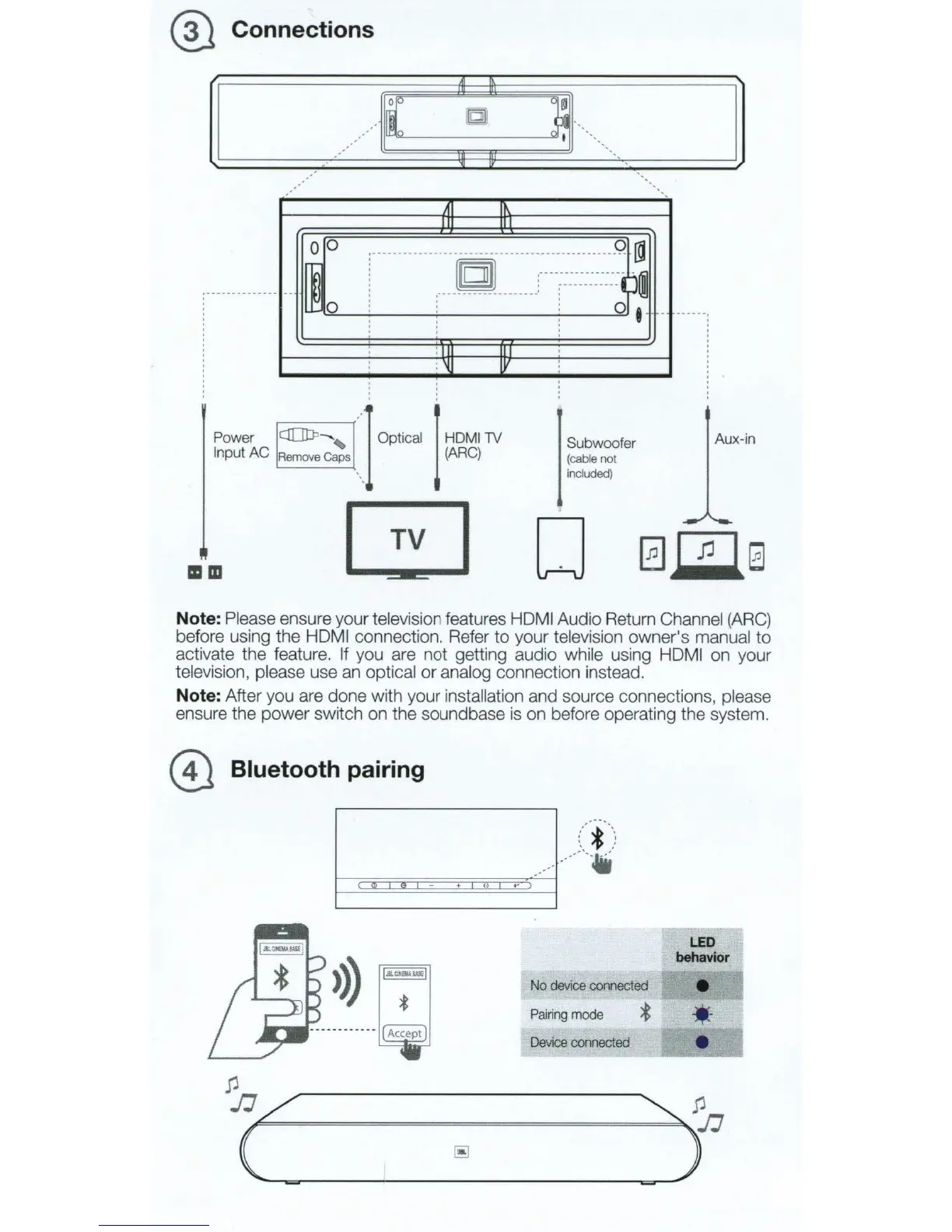
@ Connections
A1
,..
op
~
rn
b
~
Jl
··
..
I
•,
.·
oo:
:••
•••
••
••
••••••••
C]Di
uuuu
:::::::::
:::
9
~~
I
~
I
•----
-
..
-----
0 ' '
i
:----
--
---
--
-----
----
j 0 •
' ' '
'
'
' :
Power
C!OtP
-, I Optical
Input
AC
Rem
ov
e C
ap
s \
:
Ill
II
: 'ij
lV
I
HOMilY
(ARC)
Subwoofer
(
cab
le
not
in
cl
uded
)
TV
IIID
D
Aux-in
Note: Please ensure your television features HOM I Audio Return Channel
(ARC)
before using the HOM I connection. Refer to your television owner's manual
to
activate the feature. If you are not getting audio while using HDMI on your
te
levision, please use an optical
or
analog connection instead.
Note: After you are done with your installation and source connections, please
ensure the power switch on the soundbase is on before operating the system.
@ Bluetooth pairing
>))
No
device
connected
Pairing
mode
*
LED
behavior
•
·-
Device
connected
e



 To Next Page