CZJ
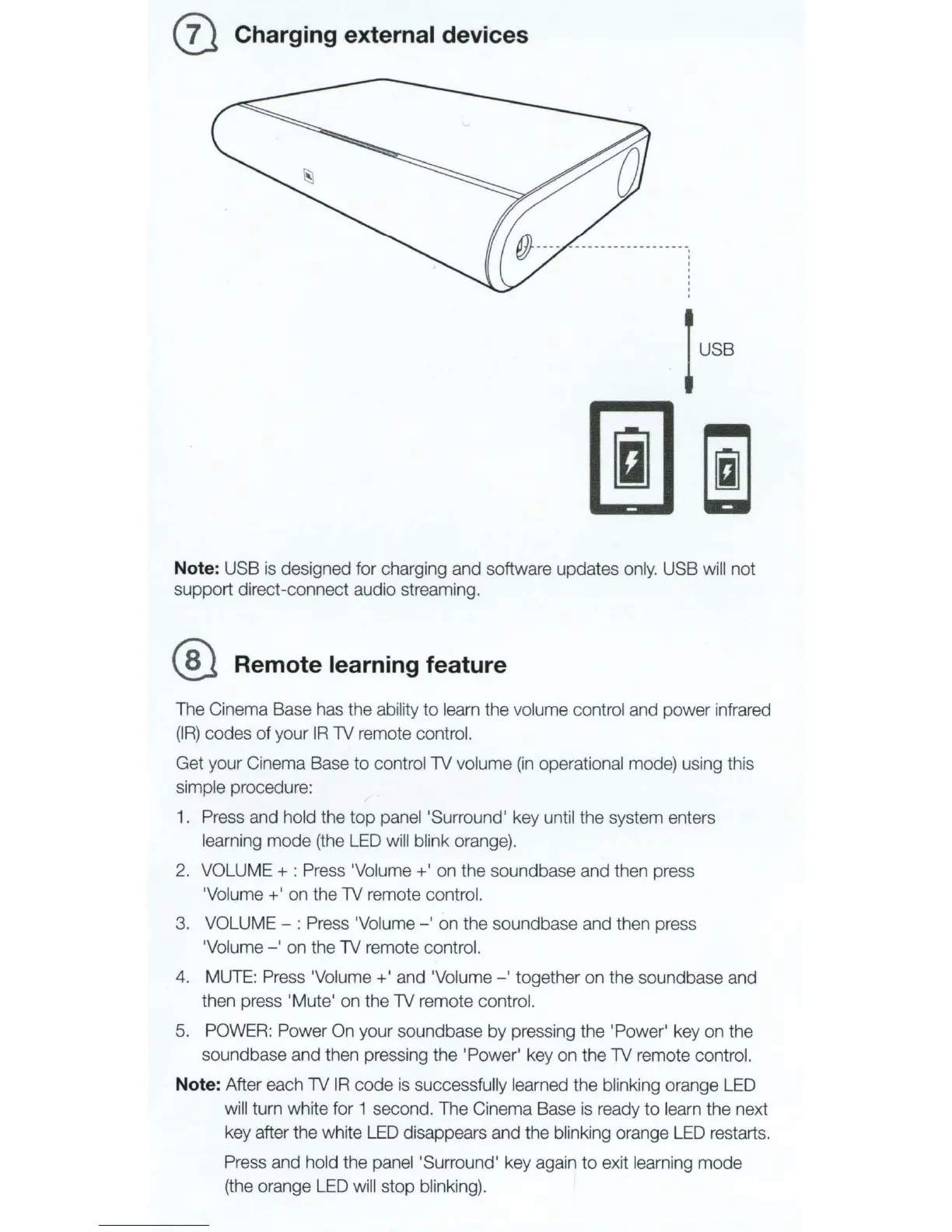
Charging external devices
Note: USB
is
designed for charging and software updates
only.
USB will not
support direct-connect audio streaming.
® Remote learning feature
The Cinema Base has the ability
to
learn the volume control and power infrared
(IR)
codes of your
IR
1V
remote control.
Get your Cinema Base to controi1V volume
(in
operational mode) using this
simple procedure:
1.
Press and hold the
top
panei'Surround' key until the system enters
learning mode (the
LED
will blink orange).
2.
VOLUME+:
Press 'Volume+' on the soundbase and then press
'Volume
+'
on the
1V
remote control.
3. VOLUME - : Press 'Volume
-'
on
the soundbase and then press
'Volume-'
on the
1V
remote control.
4. MUTE: Press 'Volume+' and 'Volume - ' together
on
the soundbase and
then press 'Mute' on the
1V
remote control.
5. POWER: Power On your soundbase
by
pressing the 'Power' key on the
sound base and then pressing the 'Power' key on the
1V
remote control.
Note: After each
1V
IR
code
is
successfully learned the blinking orange LED
will turn white for 1 second. The Cinema Base is ready
to
learn the next
key after the white
LED
disappears and the blinking orange
LED
restarts.
Press and hold the panei'Surround' key again
to
exit learning mode
(the orange LED will stop blinking).



 To Next Page