7
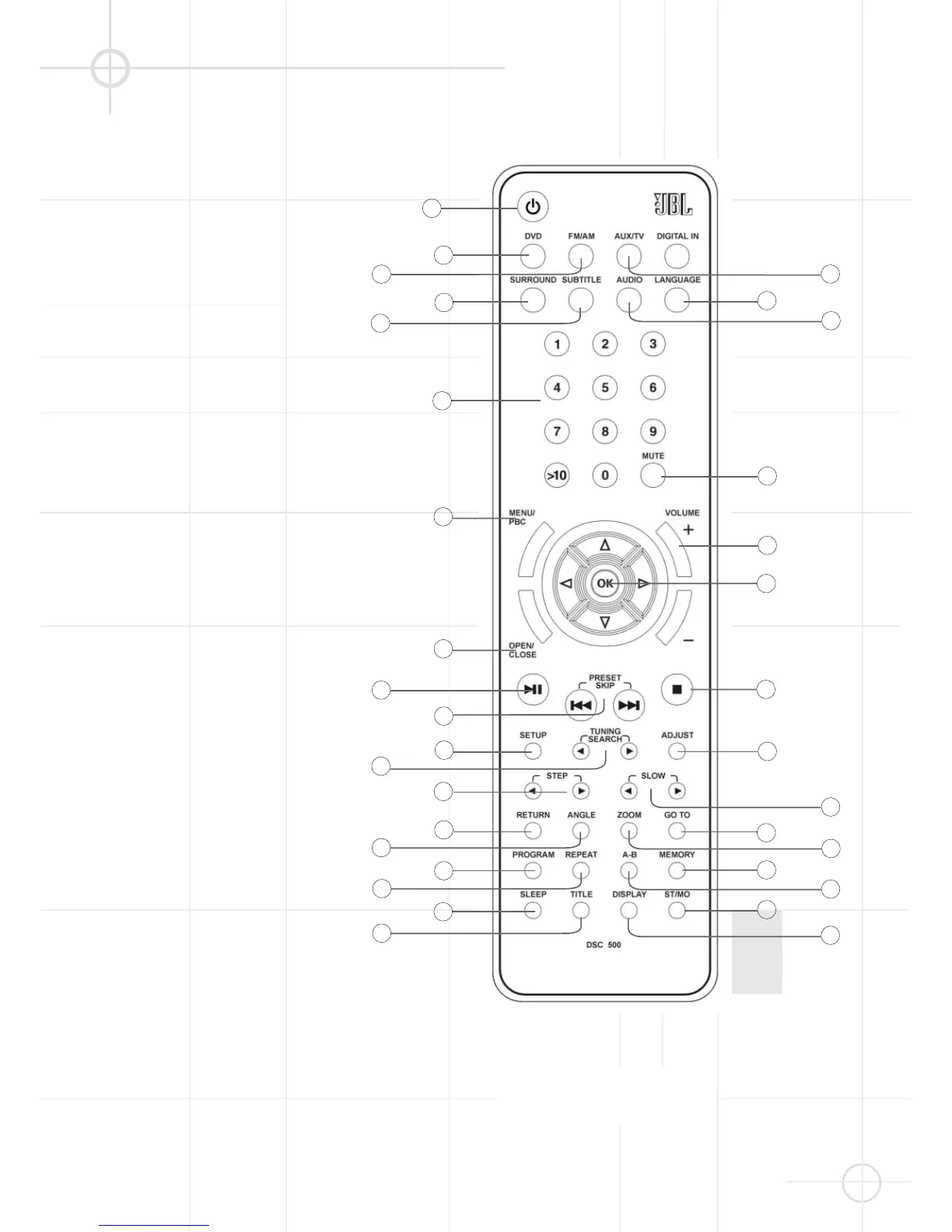
STANDBY (page 15).
Turns the system power on or off.
(Note: Power switch on the
backpanel of main unit must be “on“).
GO TO (page 21). Selects a
starting point to play.
Numbers (page 15, 18, 21).
Select the items or settings or tracks
directly with discs or presets with
tuner.
PROGRAM (page 20). Stores CD
tracks for program play.
STEP. Activates frame by frame
playback when playing DVD
(page 17).
MEMORY. Stores radio station in
preset memory when tuner is
selected (page 15).
H
/
I
(TUNING/SEARCH).
Press to play a disc in fast forward /
reverse mode (page 17). In tuner
mode, press to select next/previous
frequency (page 15).
/
(PRESET/SKIP). In DVD
mode, press to select next/previous
title chapter or track (page 17). In
tuner mode, press to select previous/
next preset station (page 15).
ST/MO (STEREO/MONO).
Switches between mono and stereo
during FM stereo reception (page 32).
A
STOP. Stops disc playback
(page 16). Also used to delete stored
program (page 22).
OPEN / CLOSE (page 16).
Opens or closes the disc tray.
RETURN (page 18). Displays root
menu when playing a DVD.
REPEAT (page 19). Press to select
Repeat 1 or Repeat All tracks (CDs) or
titles/chapters (DVDs) playback.
A-B (page 19). Specifies a section
and plays it repeatedly.
MUTE (page 16). Mutes the sound.
In this case, the loudspeaker icons
will disappear from the LCD display.
REMOTE CONTROL




 To Next Page