6 - 3
CHAPTER 6 Trouble Shooting
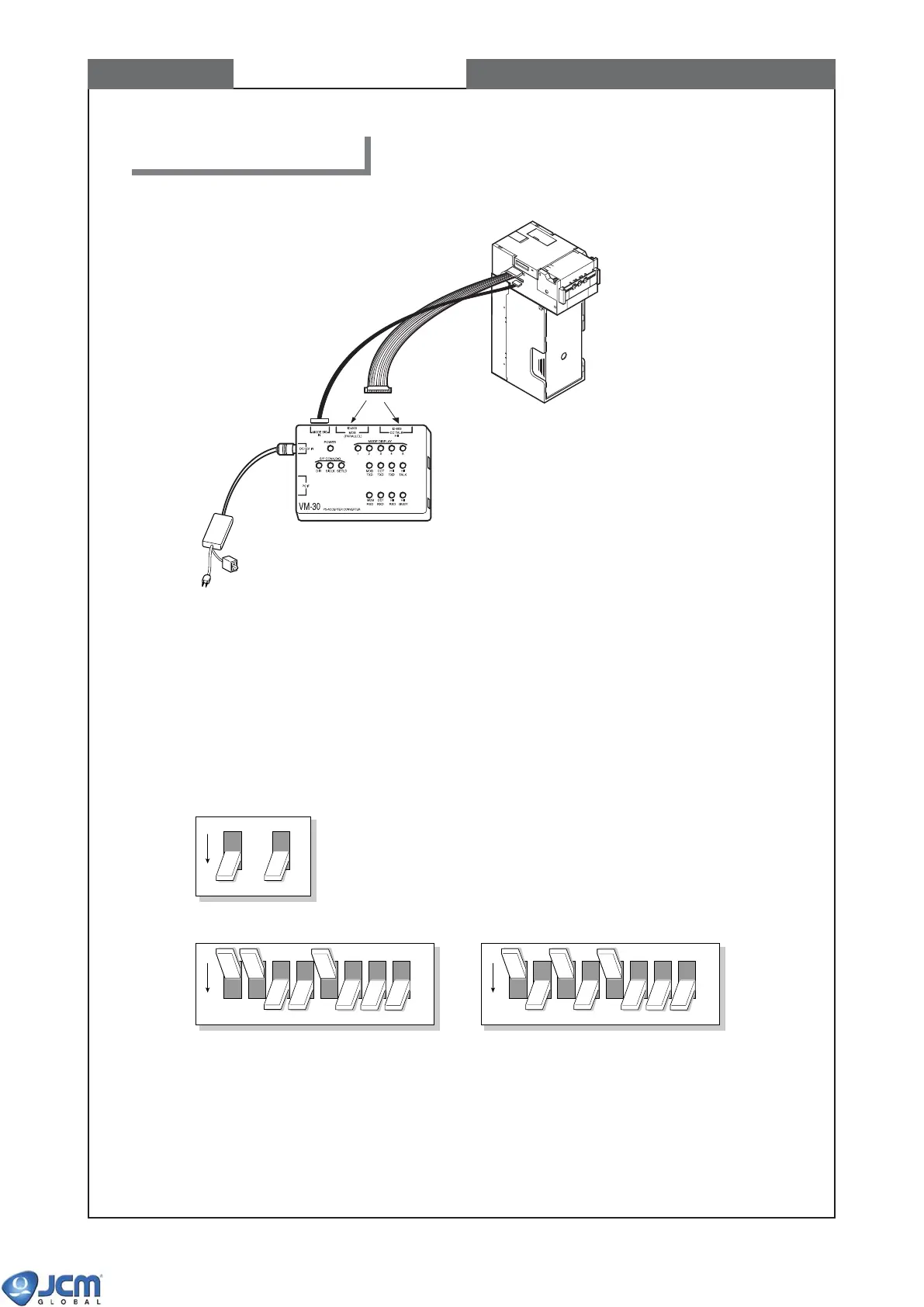
2-1 Connecting VM-30 with EBA
2. Bill Acceptance Test
EBA-32/33
EBA-32/33
EBA
ON/OFF Switch
To AC power
Caution:
For bill acceptance test, do not use bills in the following conditions.
(a) Torn, wrinkled, wet or worn bills.
(b) Bills with folded corners or edges.
(c) Bills with wrong cutting dimensions and printing displacement.
(d) Bills with oil spots or iron particles
2-2 DIP switch setting of bill acceptance test
(1) Be sure the power of VM-30 is off. Set DIP switches of VM-30 and EBA as shown below:
(2) Turn the VM-30 power on.
Power LED on VM-30, and green LED of EBA light. This is stand-by status of test mode.
OFF
DIP switch of VM-30
DIP switch 1 of EBA
EBA acceptor only EBA with SD3 stacker unit
(i.e. without SD3 stacker unit)
OFF
12345678
OFF
12345678



 To Next Page