7 - 19
3. Downloading software to Flash Memory
This section describes how to download software program to flash memory of CPU board.
WHEN TO DOWNLOAD
- Software upgrade
- After CPU board is replaced.
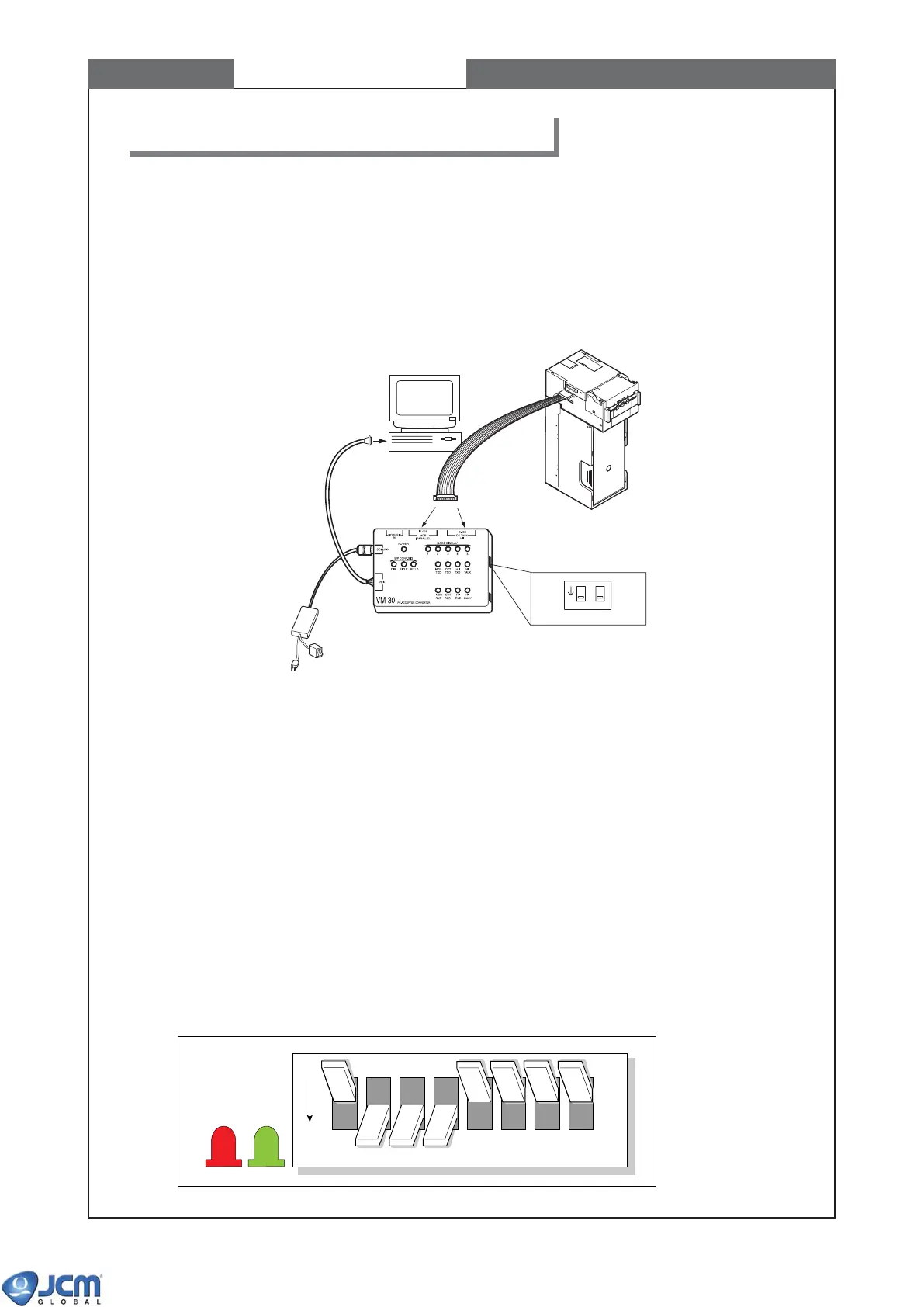
3-1 Connecting PC and VM-30 with EBA (Fig-40).
Fig-40
Connection of EBA with VM-30
(if the CPU board is EBA-30/31/34, connect to ID-003/MDB socket, and
if the CPU board is EBA-32/33, connect to ID-003/ccTalk/HII socket.)
3-2 Setting EBA to download mode
(1) Confirm the power of VM-30 and/or host machine is OFF when connecting the cable to EBA.
Failure to do so may cause electric shock and/or permanent damage to the equipment.
(2) Set DIP Switch 1 #1 and #5-8 ON, and #2-4 OFF.
Set both DIP switches of VM-30 ON.
The baud rate is set to 38400bps. For other baud rate settings, see page 7-19.
(3) Supply power to the unit.
Fig-41
CHAPTER 7 Downloading software to Flash Memory
OFF
greenred
12345678
PC
EBA-32/33/34
DIP Switch of VM-30
EBA-30/31
EBA
ON
1-ON
2-ON
12
ON/OFF Switch
To AC power
To serial port



 To Next Page