7 - 20
3-3 Starting the download program
There are 3 ways to start the EBA download program.
A] When using the DWN.exe on MS-DOS
1) Turn on the PC.
2) Insert the FD (floppy disk) saved the download program (DWN.exe) to PC's FDD (floppy disk
drive ).
3) Start MS-DOS (see your PC and MS-DOS manuals to find out how to start MS-DOS).
4) After MS-DOS menu appears, input "A" (when your FD is in "A" drive) and press "Enter".
5) Input "DIR" and press [Enter]. The list of file names in FD appears.
6) Find the file name of software and enter the parameters as shown in the diagram below.
B] When using the DWN.exe on Windows98/Me/2000/XP)
1) Turn on the PC and start Windows98/Me/2000/XP
2) Insert the FD (floppy disk) containing the download program to PC's FDD (floppy disk drive).
3) Start MS-DOS prompt or Command prompt from START menu of Windows.
4) When MS-DOS/Command prompt menu appears, input "A:" (when your FD is in "A" drive)
and press [Enter].
5) Input "DIR" and press [Enter]. The list of file names in the FD appears.
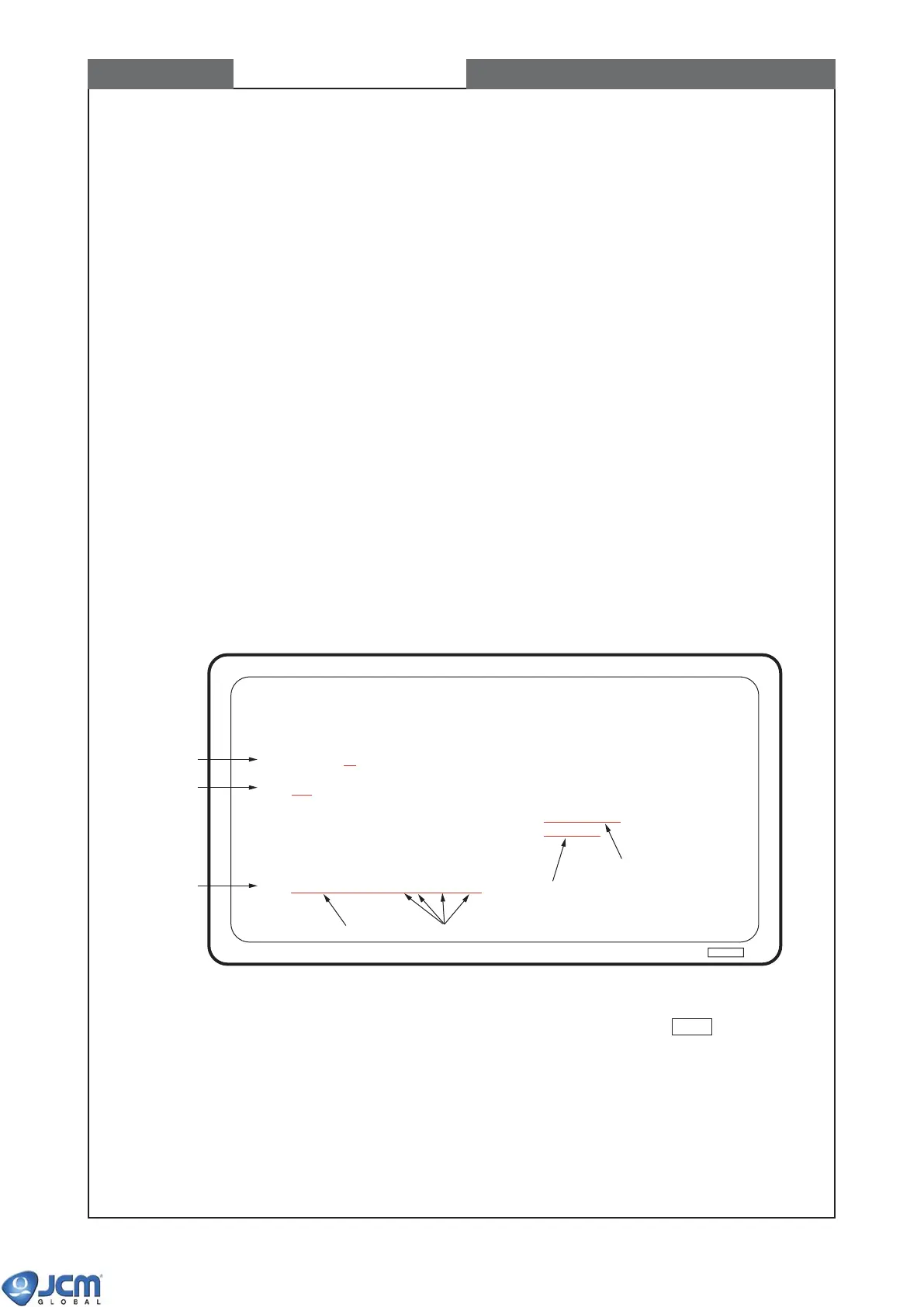
6) Find the file name of software and enter the parameters as shown in the diagram below (Fig -
42). Press [Enter].
Fig-42
Explanation of Parameters: DWN [File name][baud rate][address][size][port] Enter .
[File name] Download file name (must be specified)
[baud rate] 0: 9600bps 1: 19200bps 2: 38400bps Default:0
[address] Fixed at 252 (FC hex.). Default:252
[size] Fixed at 246. Default:246
[port] Serial port number Default:1
CHAPTER 7 Downloading software to Flash Memory
Microsoft (R) Windows 98
(C) Copyright Microsoft Corp 1981-1999
C:/Windows>A:
A:/>DIR
24207710 USA 524,288 01-12-15 21:21 E30EUR5,003
DWN EXE 57,863 98-08-28 11:45 DWN.EXE
A:/>DWN_E30EUR5,003_2_252_246_1
Download Program
File name of software
(4)
(5)
(6)
Space Space



 To Next Page