7 - 4
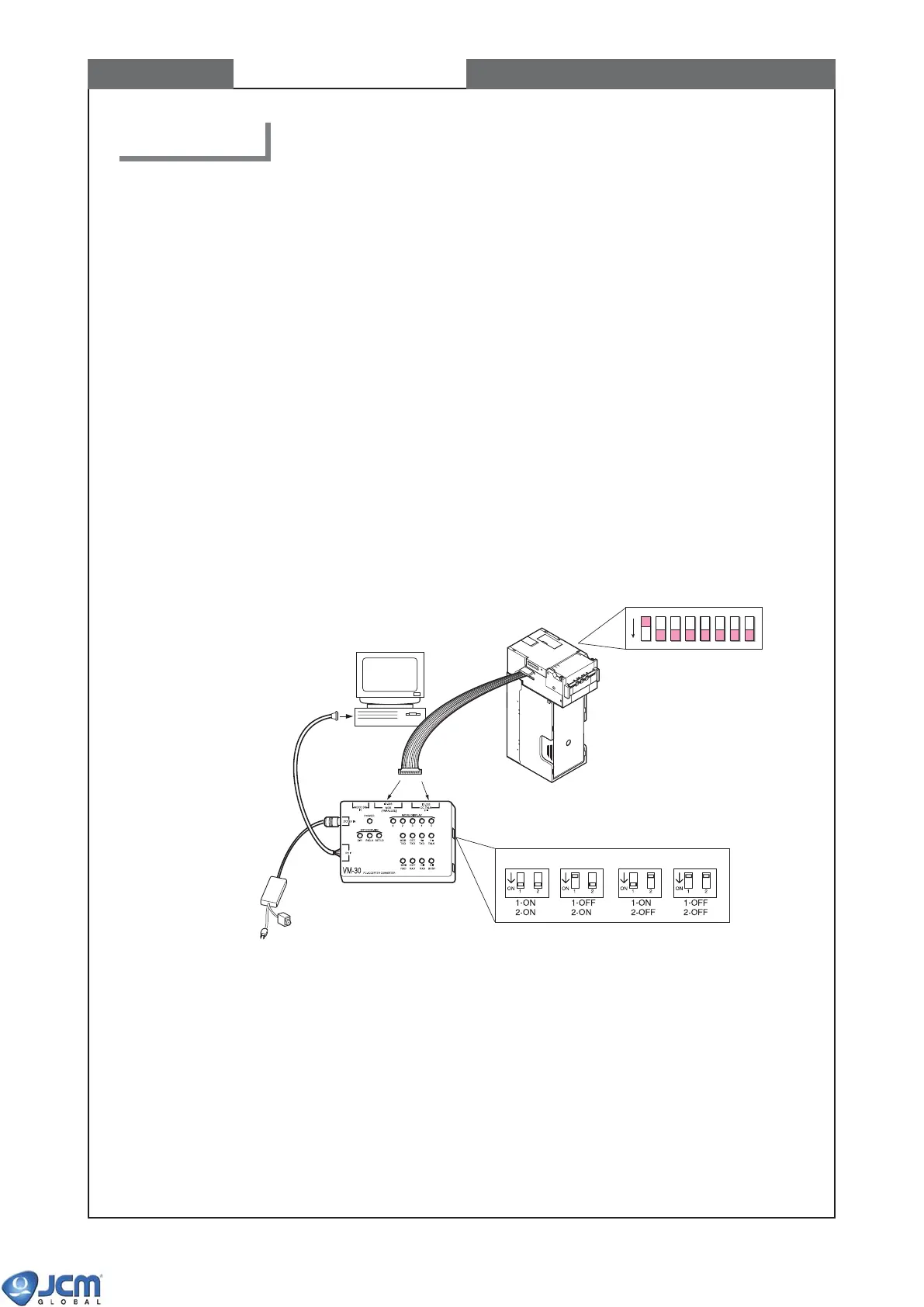
PC
EBA-32/33EBA-30/31
EBA
ON/OFF Switch
To AC power
To serial port
DIP Switch 1 Setting
OFF
12345678
DIP Switch of VM-30
ID-003 I/F MDB I/F CCTALK I/F HII I/F
CHAPTER 7 Calibration
2. Calibration
Calibration sets a starting reference point for all the optical and magnetic sensors within the unit.
WHEN TO CALIBRATE
- After the acceptor component has been disassembled
- After the sensor and/or CPU board has been replaced
- Whenever bill acceptance is degraded
- Once a year
TOOLS NEEDED
- PC (with RS-232C serial port, OS: MS-DOS/Windows98/2000/ME/XP)
- Power Supply unit VM-30 (Part#093895)
- Calibration Program
E30A-xxx.exe (MS-DOS/Windows98/2000/ME/XP)
AdjMenu.exe (Windows98/2000/XP))
- White Reference Paper KS-056 (Part#092110)
- Black Reference Paper KS-057 (Part#092123)
- Mag Tool (Part#059318)
2-1 Setting
(1) Connect PC and VM-30 with EBA.
Fig-1 Connection
(2) Turn the PC power ON.
(3) Start the calibration program by selecting either method A, B or C below.
A] When using E30A-xxx.exe on MS-DOS.
1) Start MS-DOS. See your PC and MS-DOS manuals to find out how to start MS-DOS.
2) Insert a floppy disk containing E30A-xxx.exe to your PC's floppy drive.
3) Change the current drive to the drive in which you have inserted the floppy disk (if it is A drive,
enter A.)
4) To start calibration, input "E30A-xxx(file name)" and press [Enter].
Please remove the Face Plate before calibrate the Bill Validator.



 To Next Page