6 - 6
CHAPTER 6 Trouble Shooting
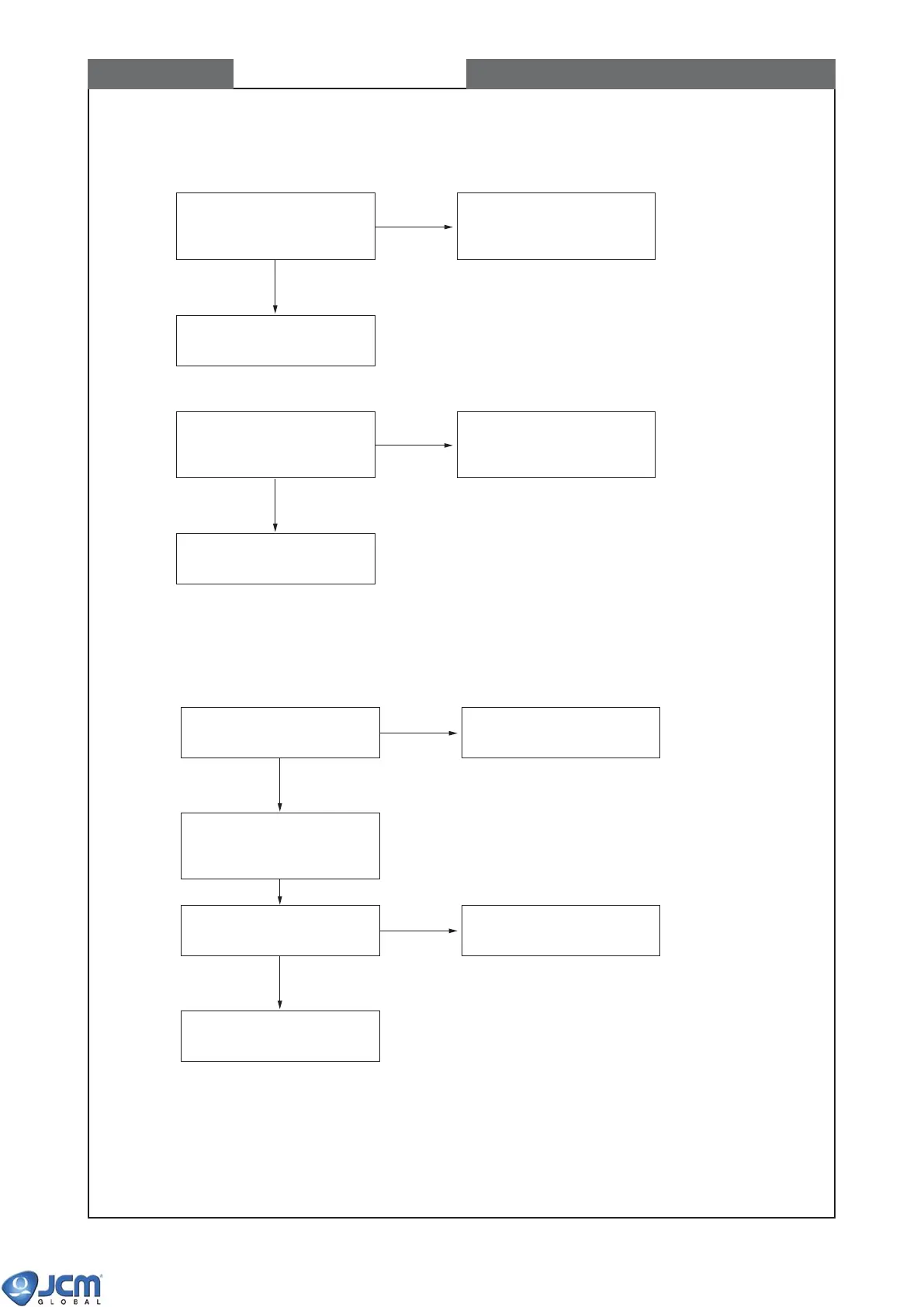
4-2 Test Mode cannot be started
(a) EBA-30/32 (flash ROM)
Check whether the software
in the flash ROM is properly
installed.[*1]
Install (download) the
correct software to the flash
ROM.
Replace CPU board.
==> Calibration.[*2]
[*1] Set Acceptor to EBA download mode,
and choose "V" (version request) to confirm
the contents of the flash ROM.
(See CHAPTER 7-3)
[*2] Refer CHAPTER 7-2 for
"
Calibration procedure
".
(N)
(Y)
Check EPROM by using
ROM-writer whether the
software is correct.
Replace EPROM.
Replace CPU board.
==> Calibration.[*2]
(N)
(Y)
(b) EBA-31/33 (EPROM)
Check the connection of the
harness.
Properly connect the
harness.
Check by Performance Test
7-5-4 "Acceptor I/F Output"
(N)
(Y)
Check Mode Display LEDs
on VM-30.
Replace CPU board or
sensor board.
Replace the board of
illuminated bezel.
(N)
(Y)
4-3 LEDs on the illuminated bezel does not light.
<Note> The LEDs on the illuminated bezel do not blink during the bill acceptance test.



 To Next Page