8
®
KDC 9520
✓
Testing
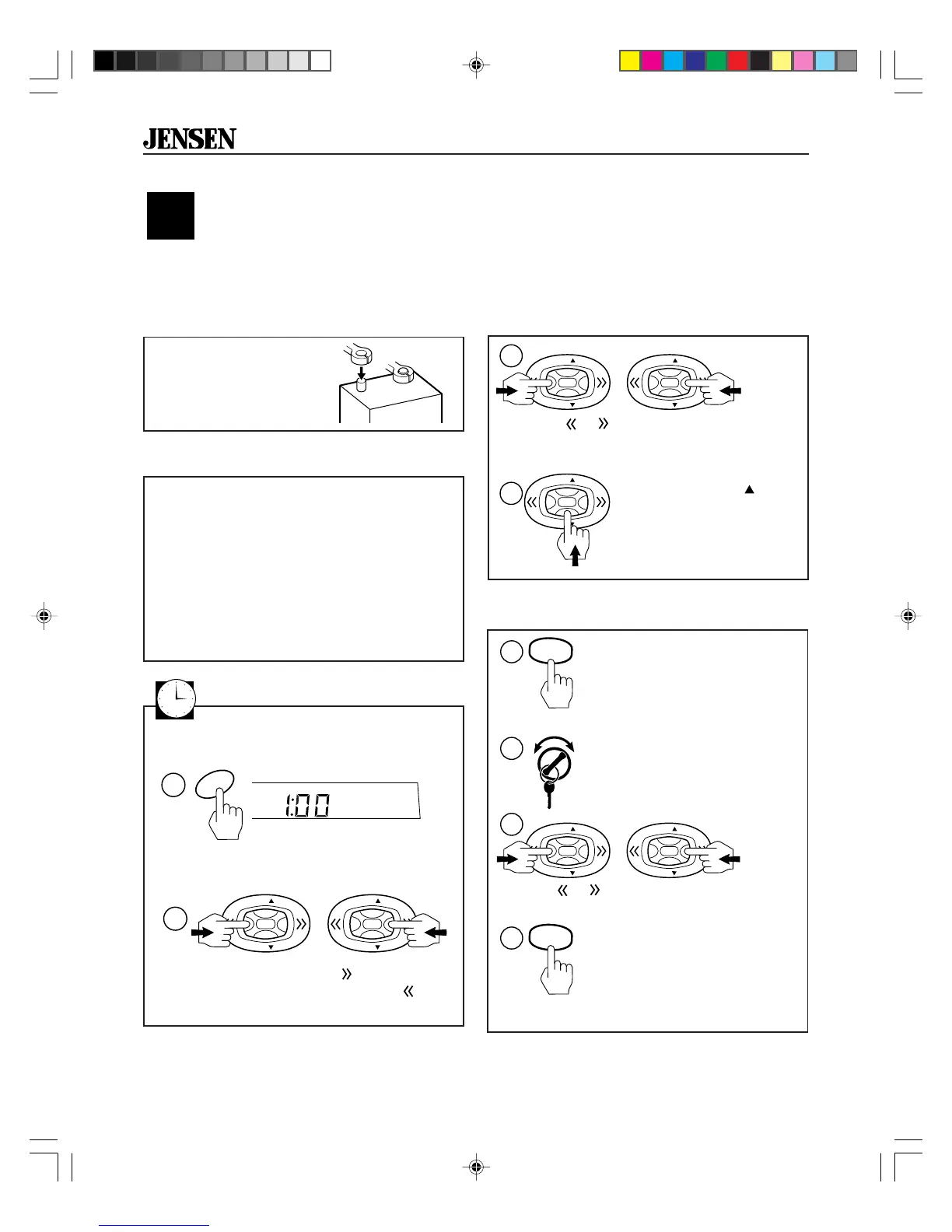
Before you finish the installation, you should do the following tests to make sure the wiring is correct
and everything is operating properly.
Test Memory Wiring
Test Power Wiring
1. Turn ignition switch on. The display should
light. If not, check the electrical connection
at the yellow and red wires.
2. Press PWR button to turn the receiver on.
You will see the radio display. If not, check
electrical connections to the red and
yellow wires.
3. If equipped, the power antenna should
also operate. If not, check electrical
connections to the dark blue wire.
Reconnect Battery
When wiring is complete,
reconnect the battery
negative terminal.
+
–
1. With the radio playing,
hold button 1 for five
seconds. The radio will
beep. You just stored the
current station in memory.
2. Turn the key off, then turn
the key on again.
4. Press button 1 again. It
should return to the station
that was playing before (step
1). If not, make sure the
yellow wire is connected
properly.
3. Press
or . The radio will select a
different station.
INTRO
1
INTRO
1
5 Sec
1
2
or
VOL
VOL
VOL
VOL
3
4
Test Antenna Connection
1. Press or . The radio should tune to a
nearby station. If not, check antenna
connection.
or
VOL
VOL
VOL
VOL
1
2
VOL
VOL
2. Press the
VOL
button
to increase volume
until you can hear the
radio playing.
View/Set the Clock
Press CLK button to temporarily display clock.
CLK
1
1. Press and hold CLK button for more than
two seconds. Receiver will beep.
2
HM
VOL
VOL
VOL
VOL
2. Within 3 seconds, press on the control
button to change the minutes and
to
change the hours.
>2 sec
To set the clock:
KDC9520 _EIN.p65 3/14/00, 1:28 PM8









 To Next Page