Pairing a Bluetooth Device
Before you begin, consult the owner's manual for the Bluetooth device you want to pair with the JMS32.
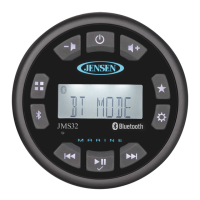
1. Make sure the device you intend to pair with is on and ready to receive a signal from the JMS32.
2. Press the button (4) to enter Bluetooth mode.
3. Press and hold the button (8) and press repeatedly until the unit display PAIR, then press button (6). The unit
will display PAIR and count down from 120 to o. While the unit counts down, use your mobile device Bluetooth function to
search for a Bluetooth function to search for a Bluetooth device.
4. When your mobile device has completed its search, the mobile device will display the Bluetooth device name (JMS32).
5. Select JMS32. Once connected the Bluetooth Audio icon will appear on the display.
6. Enter the pairing password (0000), if requested.
After connecting successfully, you will be able to listen to audio stored on your Bluetooth enabled device through the radio.
Answering a Call
When answering a call using the connected phone, Bluetooth audio playback will pause. After hanging up from the call, Bluetooth
audio will continue on some phones. It may be necessary to press the button (6) to resume Bluetooth audio playback.
Bluetooth Audio (A2DP)
Selecting Tracks
During playback, press or button (5, 7) to play the previous or next track.
Pausing Playback
During playback, press button (6) to pause the Bluetooth audio playback. “PAUSE” will appear on the LCD. Press button
(6) again to resume playback. If you change to another mode, playback will automatically pause. Press the button (3) to
return to Bluetooth mode and resume audio playback from your Bluetooth enabled device.
NOTE: If a Bluetooth device is disconnected due to the power being turned off or if the device goes out of range, the
unit will automatically search for the matching Bluetooth mobile device when the power is restored.
9
JMS32


 To Next Page