VM9314
Bluetooth
User
Interface
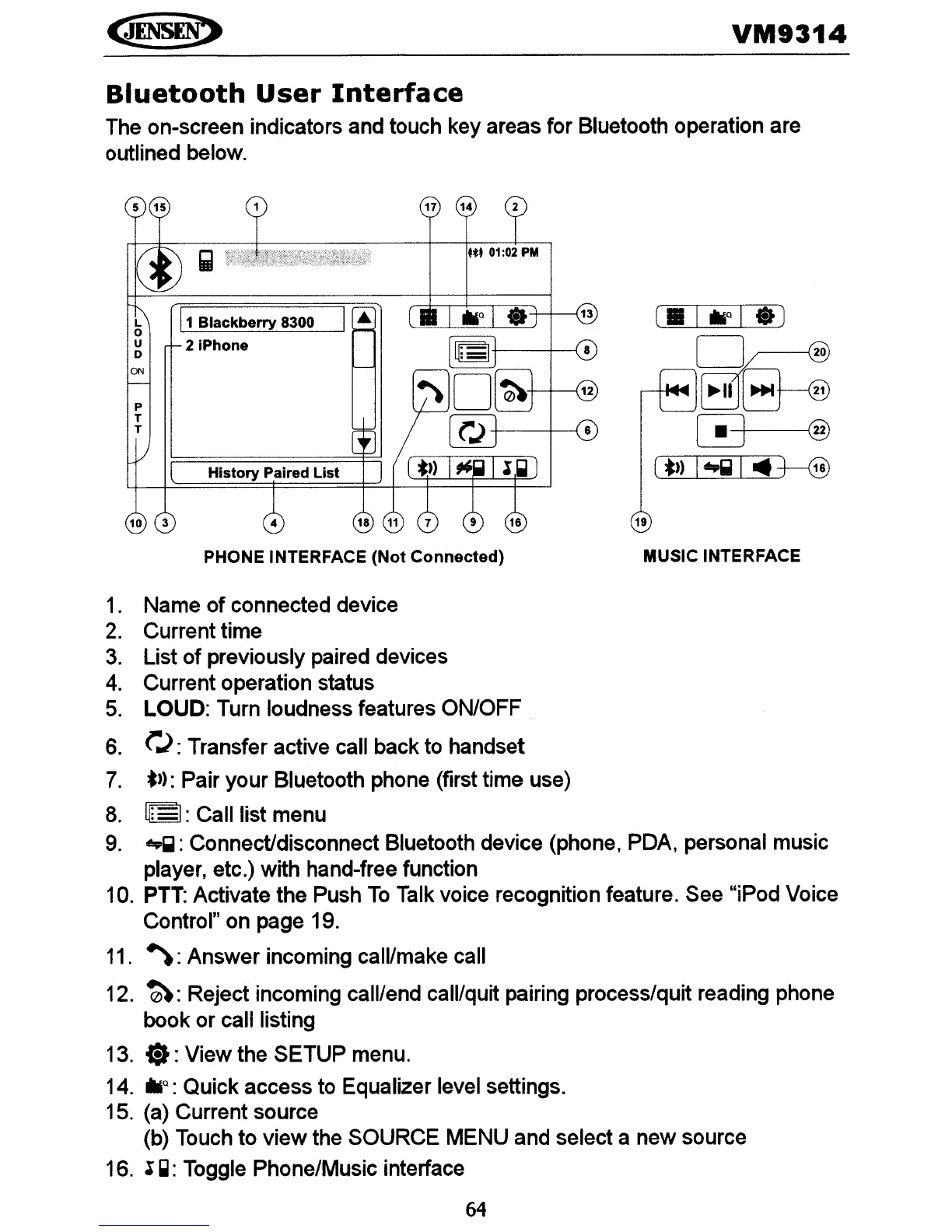
The on-screen indicators and touch key areas for Bluetooth operation are
outlined below.
19
-f---f-----{
6
ft.
01:02 PM
17 14
4
History
Paired
List
P
T
T
L
11
Blackberry
8300 I'"
o
u
2iPhone
o
ON
PHONE INTERFACE (Not Connected) MUSIC INTERFACE
1. Name of connected device
2.
Current time
3.
List
of
previously paired devices
4.
Current operation status
5.
LOUD: Turn loudness features ON/OFF
6.
('.):
Transfer active call back to handset
7.
*»:
Pair your Bluetooth phone (first time use)
8.
~:
I: Call list menu
9.
..~:
Connect/disconnect Bluetooth device (phone, PDA, personal music
player, etc.) with hand-free function
10.
PTT:
Activate the Push
To
Talk voice recognition feature. See "iPod Voice
Control" on page 19.
11.
~:
Answer incoming call/make call
12.
~:
Reject incoming call/end call/quit pairing process/quit reading phone
book or call listing
13.
..:
View the SETUP menu.
14.
!llliQ:
Quick access to Equalizer level settings.
15. (a) Current source
(b) Touch to view the SOURCE MENU and select a new source
16.
~
~:
Toggle Phone/Music interface
64















 To Next Page