VM9314
XM@
RADIO
OPERATION
Listeners can subscribe to
x&fB>
Radio on the
Web
by
visiting
www.xmradio.com.
or
by
calling
(800)
967-2346. Customers shouldhave
theirRadio
ID
ready (see "Displaying the Identification
(10)
Code'1.
Customers can receive
a limitednumber
of
free-to-air channels without
activation.
Accessing
XM@
Radio Mode
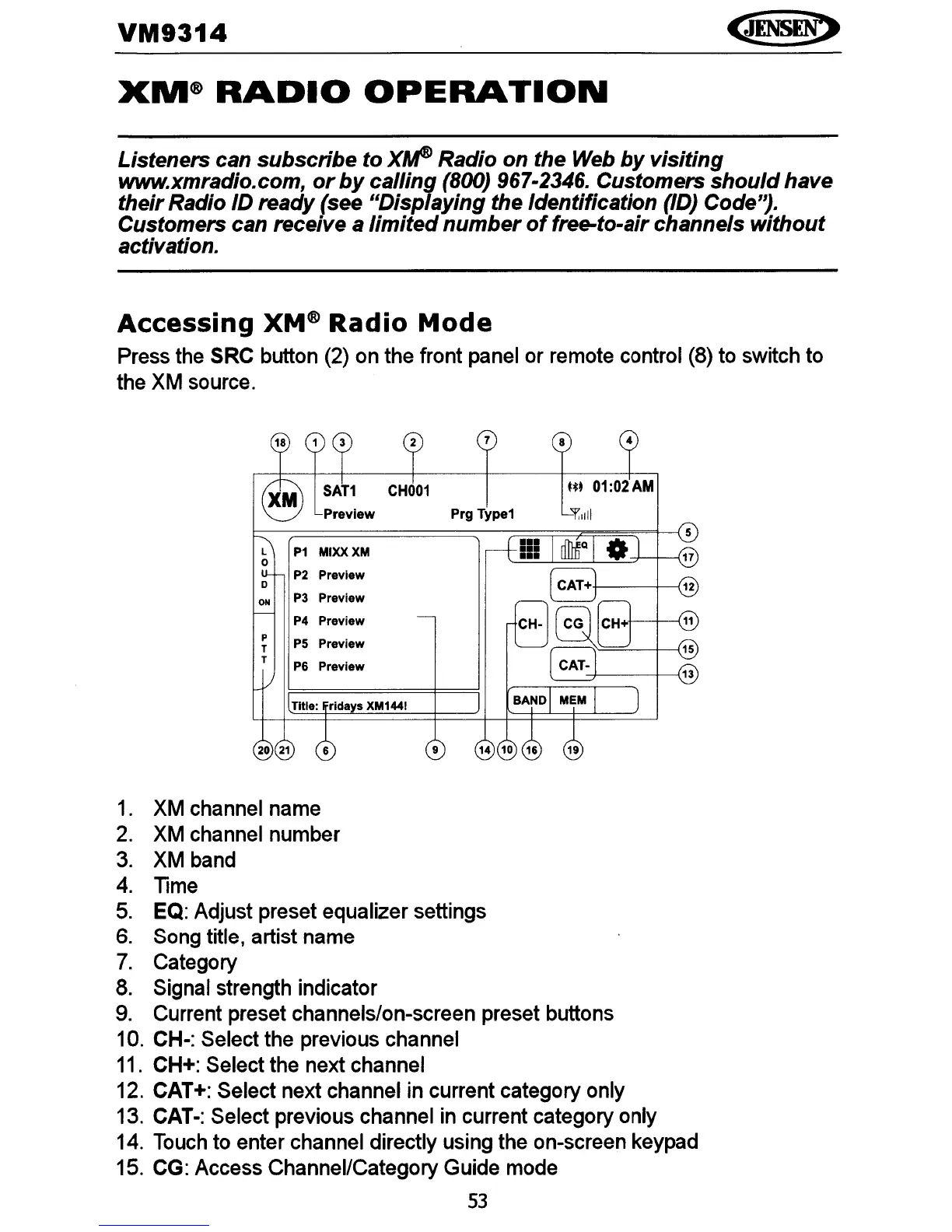
Press the SRC button (2) on the front panel or remote control (8) to switch to
the
XM
source.
ON
P3
Preview
4
-+---+-----{13
Ut
01:02
AM
8
7
Prg Type1
:r.,liI
9
P4
Preview
P5
Preview
P6
Preview
P2
Preview
P1
MIXXXM
Title: rldays
XM1441
P
T
T
20
21
D
1.
XM channel name
2.
XM channel number
3. XM band
4.
Time
5.
EQ: Adjust preset equalizer settings
6.
Song title, artist name
7.
Category
8.
Signal strength indicator
9.
Current preset channels/on-screen preset buttons
10. CH-: Select the previous channel
11.
CH+: Select the next channel
12. CAT+: Select next channel in current category only
13. CAT-: Select previous channel
in
current category only
14.
Touch
to enter channel directly using the on-screen keypad
15. CG: Access Channel/Category Guide mode
53















 To Next Page