VX3020
AV-In1/AV-In2 CONTROLS
AV-In1
fF.~T~F.
~J~1~0;~_
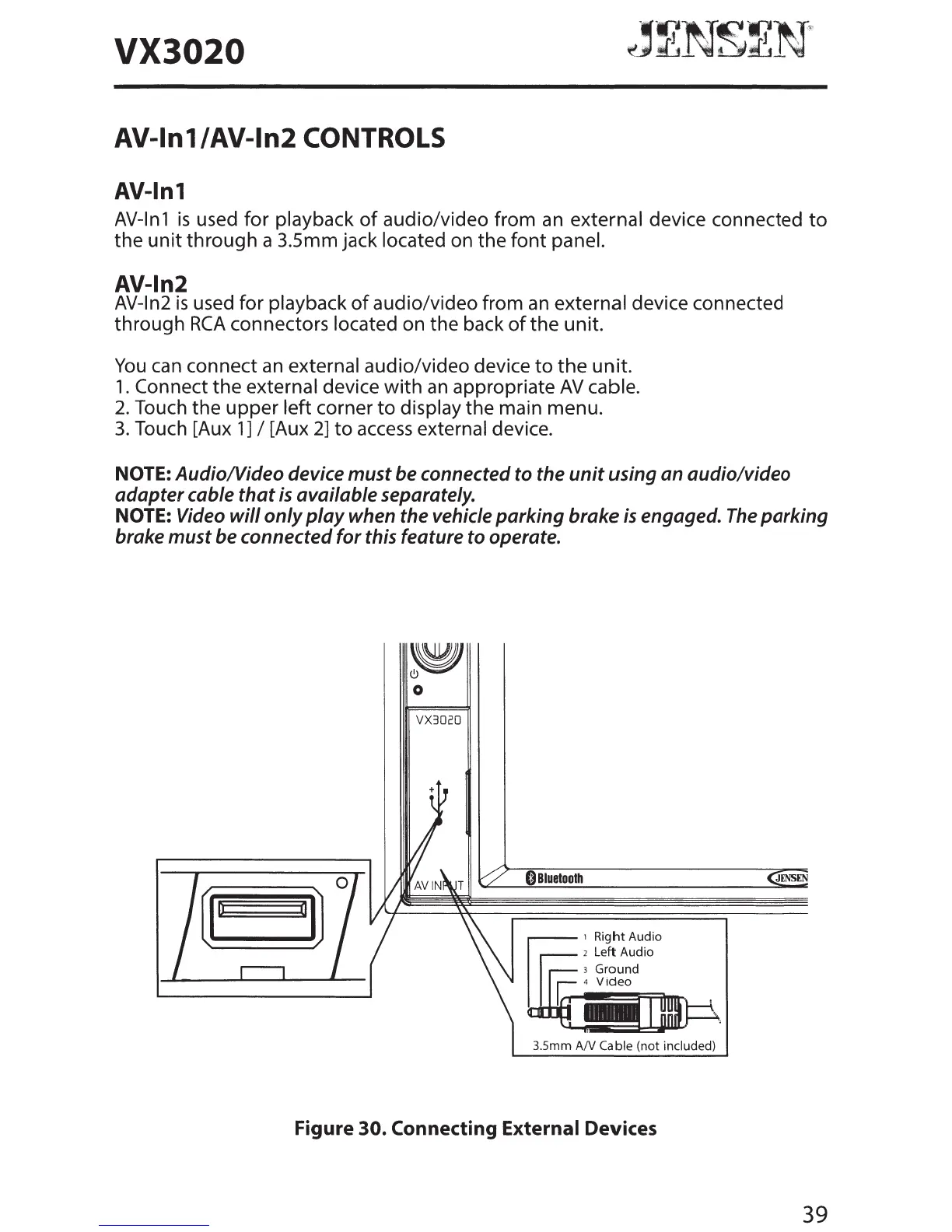
AV-In1
is
used for playback
of
audio/video from
an
external device connected
to
the
unit
through a 3.5mm jack located on the font panel.
AV-In2
AV-In2
is
used for playback
of
audio/video from
an
external device connected
through
RCA
connectors located on the back
of
the unit.
You
can
connect
an
external audio/video device
to
the
unit.
1.
Connect the external device
with
an
appropriate
AV
cable.
2.
Touch the upper left corner
to
display the main menu.
3.
Touch [Aux
1]
I [Aux
2]
to
access
external device.
NOTE:
AudioNideo
device
must
be connected to the
unit
using an audio/video
adapter cable
that
is
available separately.
NOTE: Video
will
only
play
when the vehicle
parking
brake
is
engaged.
The
parking
brake must be connected
for
this feature to operate.
~
0
VX3020
C)Biuetooth
JENSEN
0
ij
o a
I]
..-----,
Right Audio
2 Left Audio
3.5mm
AN
Cable (not included)
Figure
30.
Connecting
External Devices
39



 To Next Page