Section 3—Controls and Indicators
3-1931211031
Home Screen
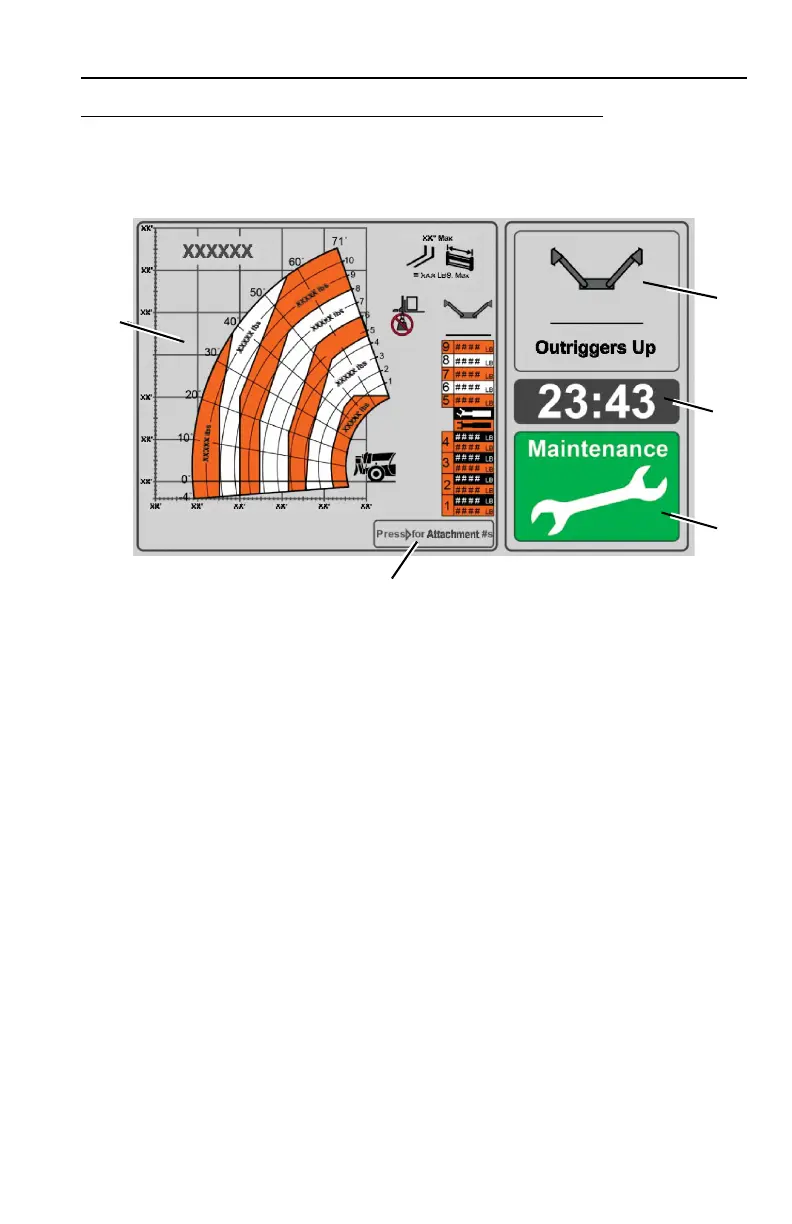
The home screen displays upon successful startup or when selected using the home
button.
1. Capacity chart and attachment selection area.
Note: If capacity chart or attachment programming is not compatible with your machine
configuration, a large gray question mark (?) displays. Contact your dealer or service
representative for assistance.
2. Outrigger position. Select appropriate capacity chart dependent on outrigger
position.
3. Real-time clock.
4. Maintenance status (if enabled).
• Green: No maintenance required.
• Yellow: Maintenance required.
5. Attachment part numbers.
• Press right navigation button to display list of attachment part numbers.
• Part numbers display for 30 seconds, then previous screen displays.



 To Next Page