28
4-5
2
3
4
6 7
8 9
9e
9d
9c
9b
9a
1
5
Full Diagnostic
Balance with
Ruonout
Balance
Balance no
Spokes
Manual
10
11
Layout
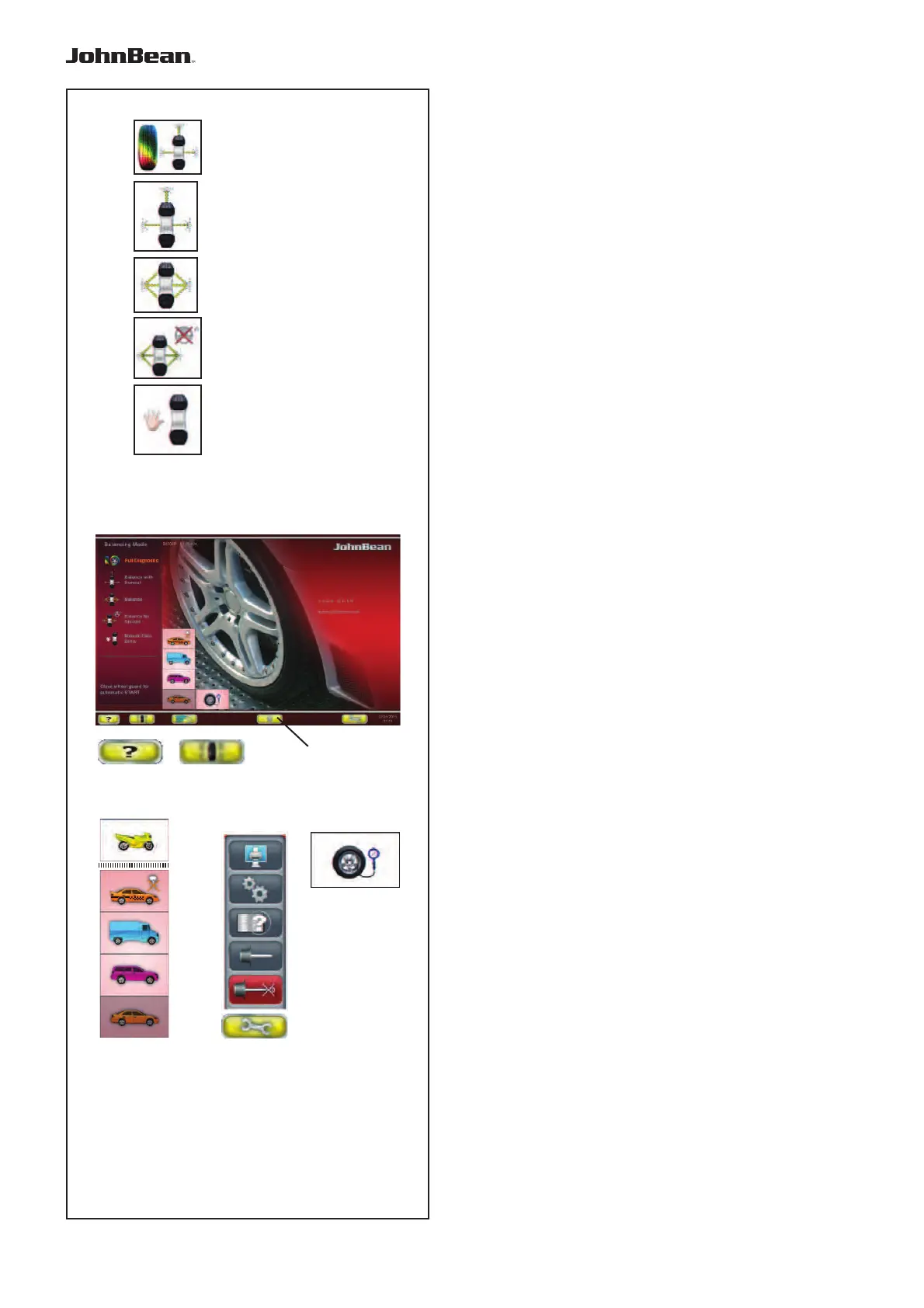
4.1.2 Screen pages & Commands
The Display fi eld shows the main Operating Screen
Pages:
Each Screen Page contains basic commands, located
at the bottom in the Commands Field. Further com-
mands may be positioned in other parts of the screen,
with specifi c Screen Pages and operating phases.
Fig. 4-5 INTRO SCREEN
Basic screen / Main menu.
This is the initial Screen Page, activated immediately
after starting the machine. It can be reached from
any other Screen Page in the program using the
HOME key
.
Commands:
1 - FULL DIAGNOSTIC
key - L’equilibratrice effettua
anche la diagnosi del pneumatico. Una ricostruzione
tridimensionale della ruota sul video e l’uso di colori
identifi cativi, consentono di apprezzare aspetti quali
l’uniformità e l’usura del battistrada, la presenza di
eventuali difettosità della ruota.
2 - BALANCE WITH RUN OUT key - For selecting
the automatic (complete) balancing program, machine
performs tyre run-out and possibly rim run-out.
3 - BALANCE - Selects the automatic (complete)
balancing program.
4 - BALANCE NO SPOKES - Selects the automatic
balancing program, excluding the spoke identifi cation
process.
5 - MANUAL Data Entry - Selects the manual
balancing program.
6 - HELP key - Selects HELP texts for the current
function (F 4.3).
7 -
BALANCING key - Opens the BALANCING Screen
Page.
8 - VEHICLE key - Allows selections; MOTORCYCLE (only
Manual), SPORTS CAR, TRUCK, SUV, CAR (F6.1.1).
9 - SETTINGS MENU key - Opens the Settings Menu.
9a- PRINT key - Generates a print-out (If enabled)
9b- SETTINGS key - Opens the SETTINGS Screen
Page.
9c- CUSTOMER DATA ENTRY key - Opens the
Customer Data Entry Screen Page (F 9.7).
9d- USER CALIBRATION key
- Starts User Calibration.
9e- COMPENSATION RUN key
- Retrieves the
Compensation Run.
10 - PRESSURE key - Change the pre-set Infl ation
Pressure value.
11 - Rim Data Imput - Opens the Manual Data Entry
Screen
..
_
..........



 To Next Page