Hardware Installation—Installing the IFC-1010/2020
99
To install:
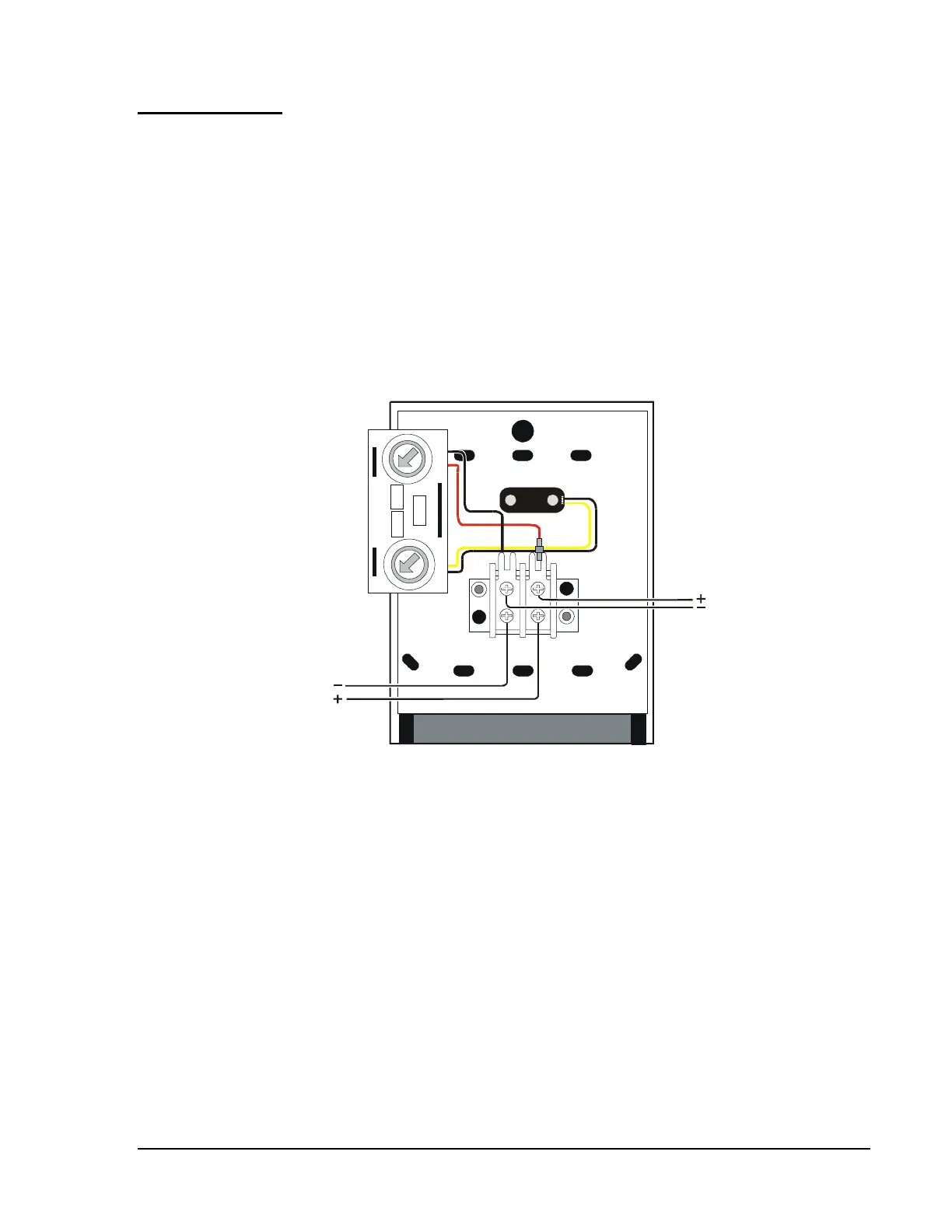
1. Connect the SLC loop to the BGX-101L. If additional devices are to
be connected to the SLC loop after the BGX-101L, use the second
pair of screw terminals to continue the loop (see Figure 71 for wiring
details).
2. The BGX-101L is factory preset with address 00. Set the address for
the pull station by using a screwdriver to turn the rotary address
switches on the back of the unit to the appropriate settings. Each pull
station must have a unique module address. Refer to Figure 71.
Note: During programming of the IFC-1010/2020, this module requires
software Type ID MPUL.
SLC Loop In
SLC Loop Out
_
+
pullwire
BGX-101
(back view)
1
2
3
4
5
6
7
8
9
0
1
2
4
5
6
7
8
9
0
3
Address
Loop
Figure 71: Wiring Addressable Pull Stations
For supervised and power-limited. For SLC loop ratings, refer to
Circuit/Device Ratings and Connections Technical Bulletin (LIT-448160).
Installation




 To Next Page