D-308403 29011054R001 PG9200AX 9
Enrollment
Compatible panels
The device is compatible with the following panels:
• PowerSeries NEO (v1.37 and higher)
• PowerSeries Pro (v1.31 and higher)
• IQ2+ (v2.6.2 and higher)
• IQ Hub (v3.0.1 and higher)
• IQ4 (v4.0.1 and higher)
Enrolling the device
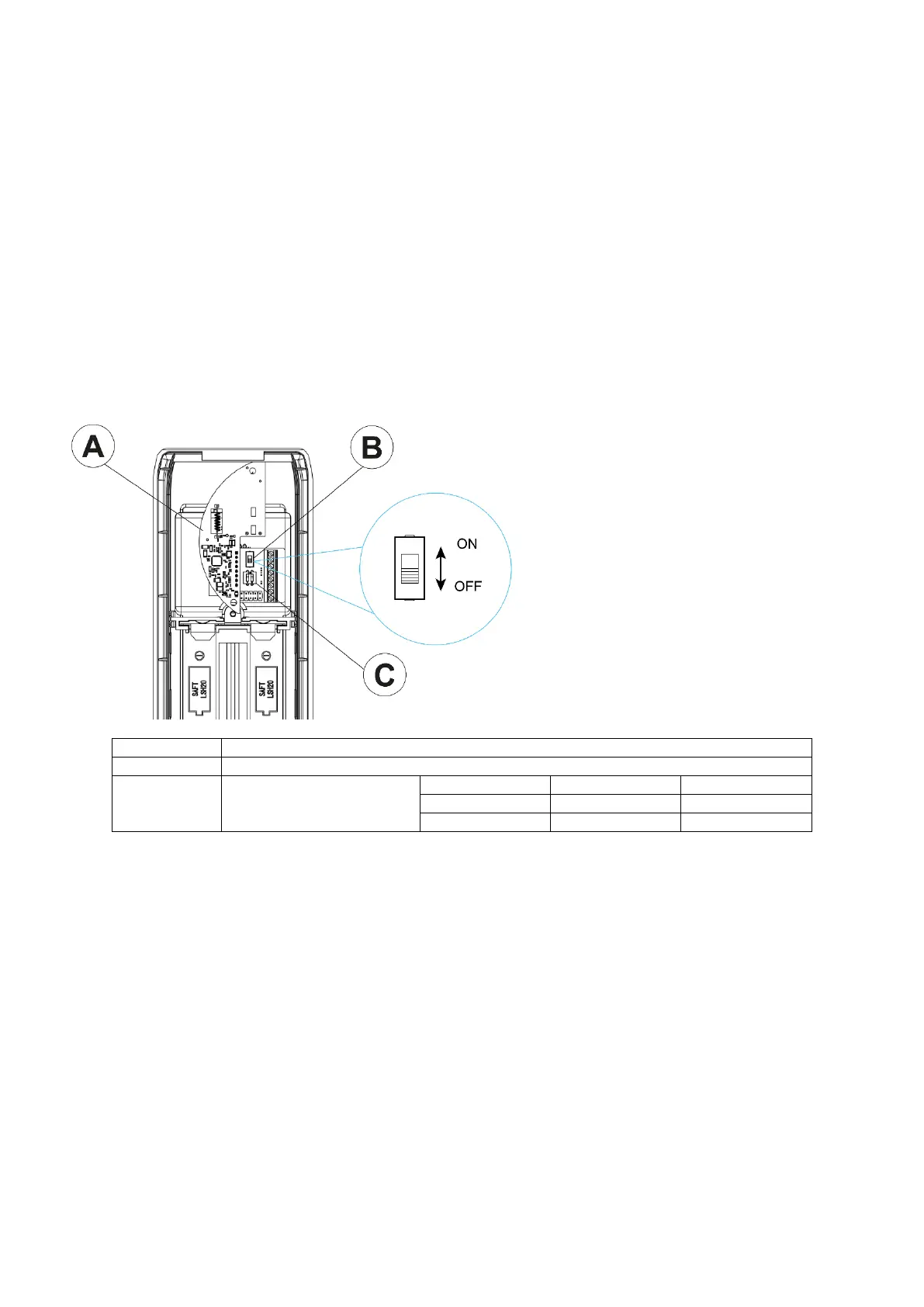
The enrollment process begins when you turn on the PowerG module. The PowerG module is a card in the detector.
Note: Enroll both the transmitter and receiver onto the control panel. The modules can be enrolled in any order.
Configuration dipswitches
1. Ensure the control panel is in enrollment mode.
2. Install batteries in the detector.
3. Turn the PowerG module power switch located on the interface board to the ON position. Refer to the control
panel installation manual for a complete set of enrollment instructions.
• If the automatic enrollment procedure fails, refer to the control panel instructions and enroll the device
manually.
4. Important! Turn the switch to the OFF position and remove the batteries. The batteries will be reinserted after
you mount the device.
Note: Complete Enrolling the device for both the transmitter and receiver before mounting the device.


 To Next Page