MA3:11
V Range 502 l 652 l 802 Maintenance Manual
Johnston Sweepers Limited
Chapter - Electrical System
Resetting the Service Acknowledgment indicator
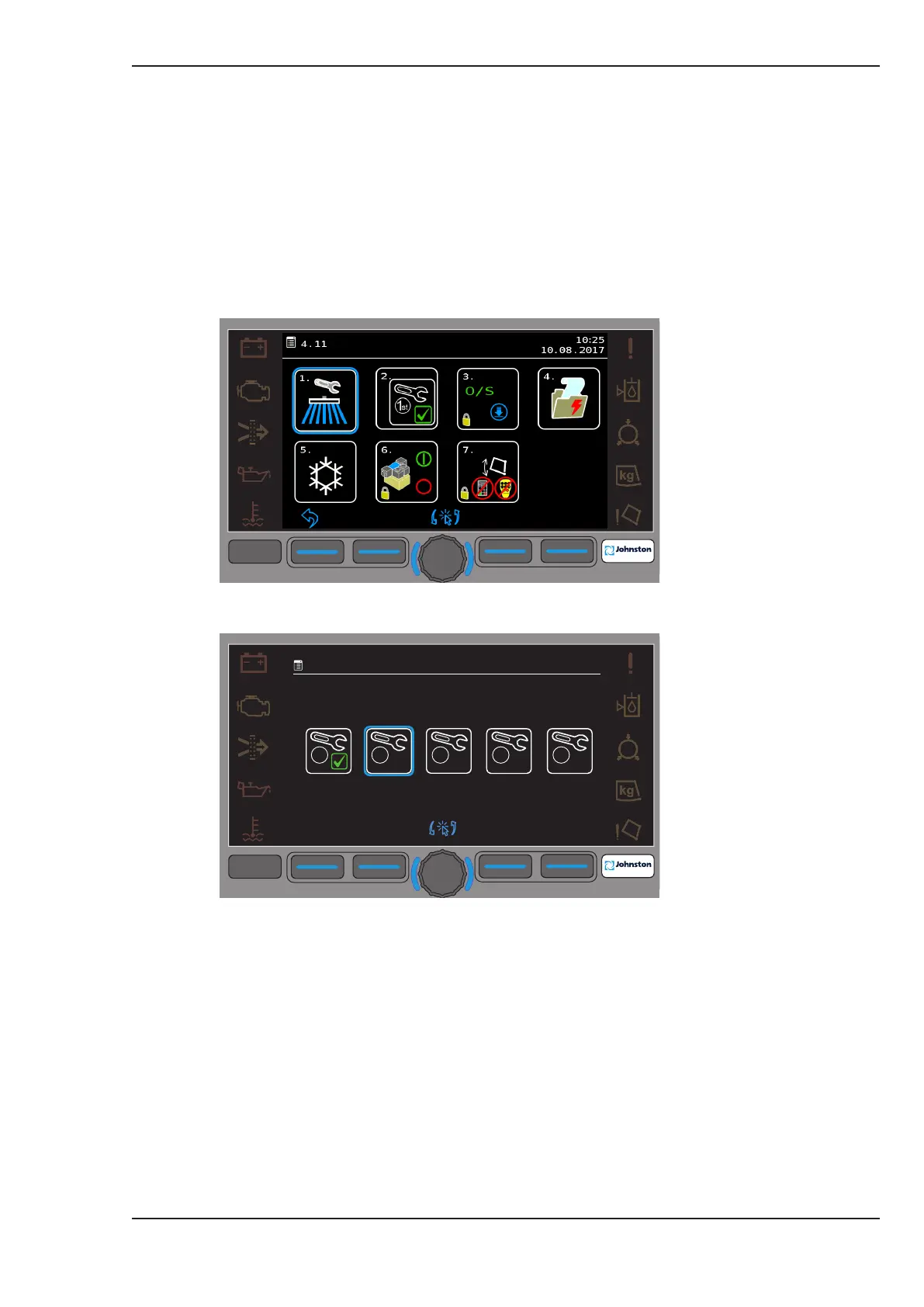
Once a service has been completed it must be acknowledged on the JVM display by resetting the
service indicator as follows:
1. Switch on the ignition.
2. Select the Main Menu (F3) on the JVM display.
3. Rotate the Encoder to highlight sub menu 4.11 (Service) and press to select.
4. Rotate the Encoder to highlight sub menu 4.11.1 (Service Acknowledgment) and press to select.
5. The JVM will automatically select which service requires acknowledgment and highlights the
corresponding icon with the blue halo.
6. To acknowledge that the service has been completed, press and hold the F3 button + the F4
button for ve seconds.
7. A green tick will appear to conrm the service is complete.
8. Exit from the menus and switch off the ignition.
F1
F2
F3
F4
F4
09:45
20:01:2016
4.11.1
1
st
A
B C D
F1
F2
F3
F4
F4
09:45
20:01:2016
4.11
2.
3.
4.
1.
O/S



 To Next Page