21 - 40
cube
06
07
ON
05
6.6 USING THE DEVICE
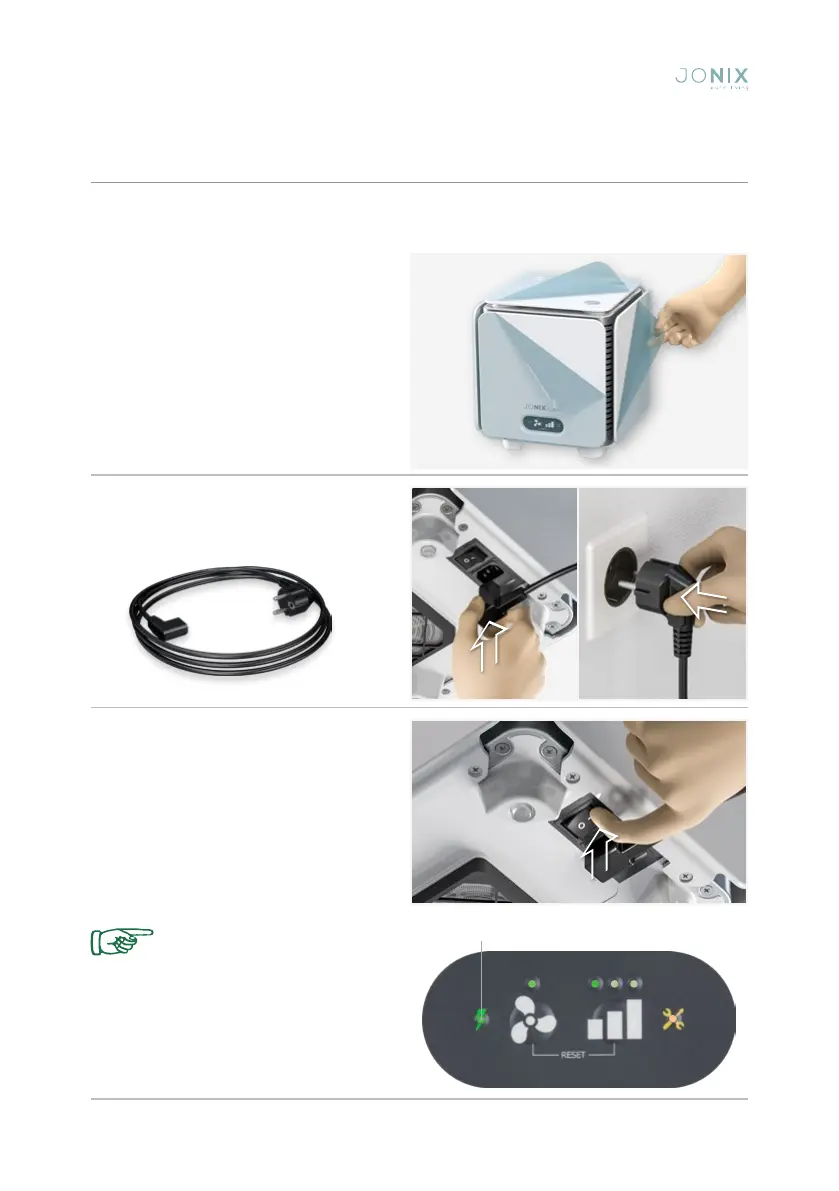
The JONIX cube device has been designed to work in a user-friendly and immediate way,
simply by connecting it to the power supply line with the cable provided.
The presence of high voltage
inside the device is indicated
by the relevant light, located
on the front panel, when the
device is switched on.
Fig. 6: Connect the device to the mains
using the power cable provided.
Fig. 5: Remove the device from the
packaging. Remove the protective film
from the sides of the device.
Fig. 7: The ON/OFF switch is located
at the bottom of the device (see chapter
4). To switch the device on press the 0/I
button, switching it to I; you will hear a
slight hissing sound coming from inside
the device and the LED on the control
panel will light up, indicating that the unit is
switched on.
Fixed green LED: the device is on


 To Next Page