LE D COLOR TV
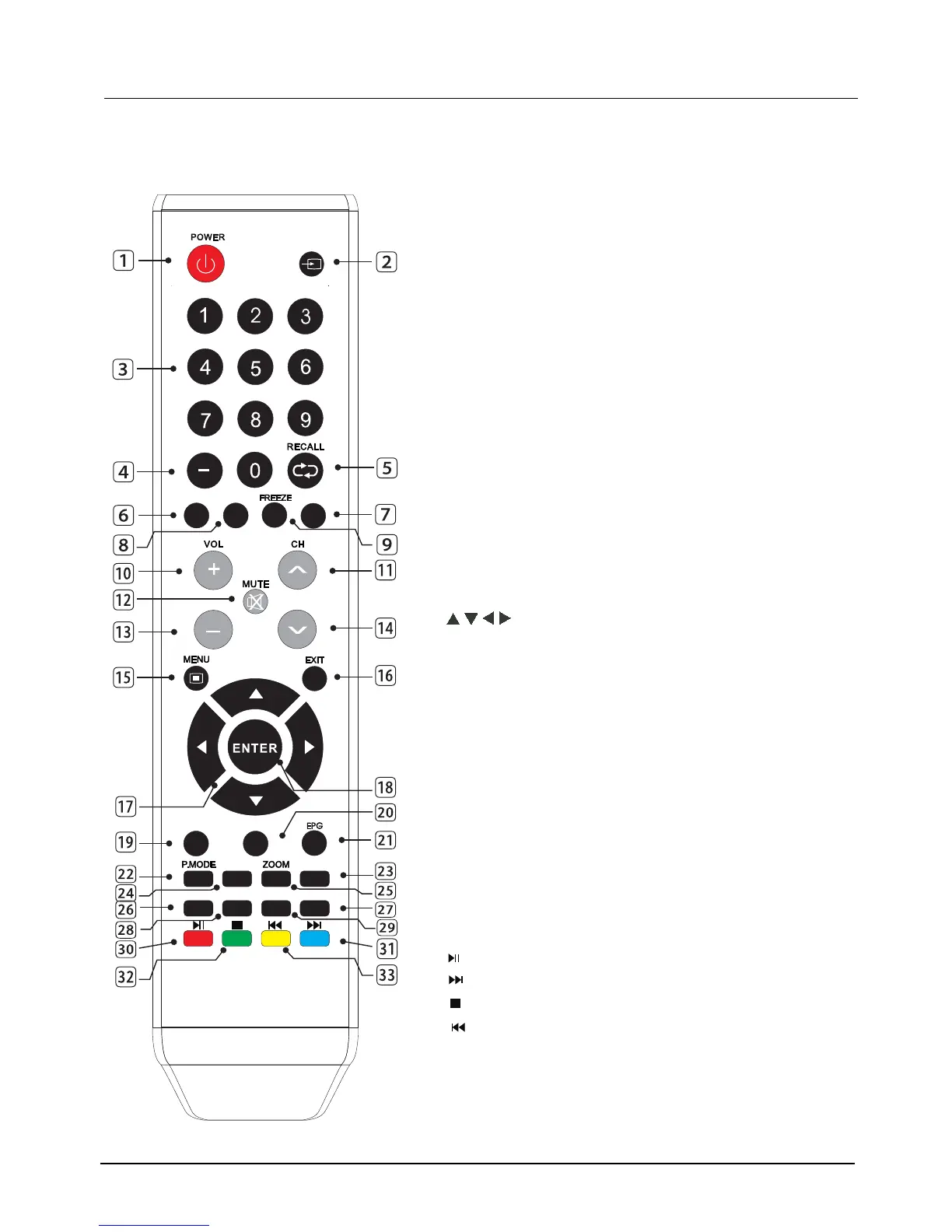
1.5 Remote Control
1. POWER: Standby turn on and off.
2. SOURCE: Select the signal source.
3. 0~9: Continue to press the keys to select
a channel.
4. :Dot button and minor channel number.Enter
5. RECALL: Return to previous channel.
7. INFO:Display
10.
VOL+: Increase the volume.
11. CHш
: Select the channel forward.
12. MUTE: Mute sound.
13.
VOL-: Decrease the volume.
14. CHщ
: Select the channel backward.
15. MENU: Enter or exit menu.
16. EXIT: Exit current setting and clear menu.
17.
, ,
,
key: The menu item selection.
18.
ENTER: Confirm or enter.
22. P.MODE: Select the picture mode.
23.
random, shuffle and folder.
26. ADD/ ERASE:Add current channel to favorite list
27. FAV-:Select the favorite channel forward.
CH.LIST
25. ZOOM: Zoom in or out the current
9. FREEZE: Freeze the picture.
24. S.MODE: Select the sound mode.
8. SLEEP: Enactment time of power off.
28. FAV.LIST: Favorite channel list
21. EPG:Enter or exit EPG(Electronic Program .Guide)
6. CH LIST: Channel list
19. MTS: Multi-channel sound.
30.
31.
32.
33.
Next.
Stop the playback and
return to lelist.
Previous.
Press one time to pause,
press twice to playback.
20. CCD:Change the CCD mode ;
AUTO: Adjust picture only for VGA.
or delete ot.
29. FAV+:Select the favorite channel backward.
to confirm.
-
)
SOURCE



 To Next Page