11
Spotify Connect
USB
Stream directly from your premium Spotify account to Juke.
This serves as a terrific option for users looking to stream
from their Android and computers, and has an added
benefit of the music not stopping when a phone call
comes in.
How to Access:
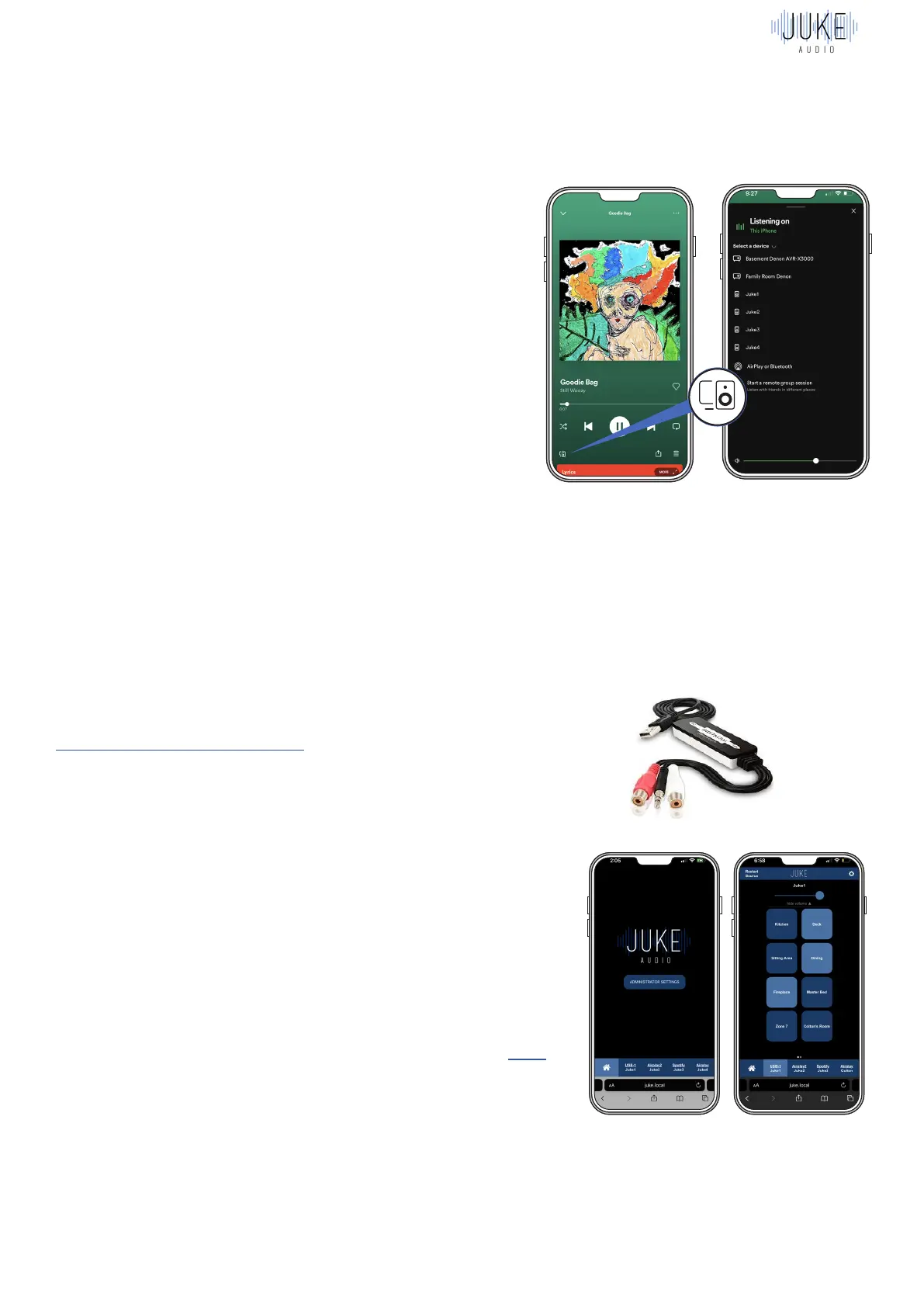
1.Launch the Spotify app on your device. Click on
the “Devices Available” icon (shown on the lower-left
above).
2.Select one of the Jukes from the list of available
devices.
Note: Apple users can stream Spotify to Juke using
Spotify Connect (as described above), or via Airplay.
One advantage of using Spotify Connect is that your
music will not be interrupted when you receive phone
calls. With Spotify Connect, when using the volume
buttons on your device, make sure that you are in the
Spotify app, otherwise you might be controlling something
other than Juke (e.g. your phone volume).
If you have an analog device connected to Juke via the
USB to RCA Digitnow adapter, then you’ll be able to edit
one of the four inputs to be a USB input.
Once that has been configured, you’ll go to that input in
the bottom of the screen and turn the zones on for the
connected USB and begin playing audio directly from
that device. The volume output can be controlled with
the slider at the top of the screen. However, keep in mind
that the output level set on the connected device will also
impact the volume as well.
Example of USB inputs:
AudioCast for Android: This is a separate dongle piece
that gives Android users great flexibility to stream from
inputs such as Pandora, iHeartRadio, and TuneIn. See
information on how to purchase and use the product here
Surround Sound Receiver: If you have a main media room
/ theater that you’d like to power with a separate surround
sound receiver, you can do so, and then connect the
receiver to the Juke USB as an input when you want to play
audio from that receiver to other areas of the house.
1 2
UP TO 8 ZONES
( Combine Juke For More Zones )
LEFT & RIGHT
SPEAKER
PER ZONE
USB SLOTS ACCEPTS
WIRED INPUTS
( Adapter Required )
POWER
SWITCH
ETHERNET
CONNECTION
PORT
( Also Wi-fi Compatible )


 To Next Page