Operation manualⅠ
2− 3
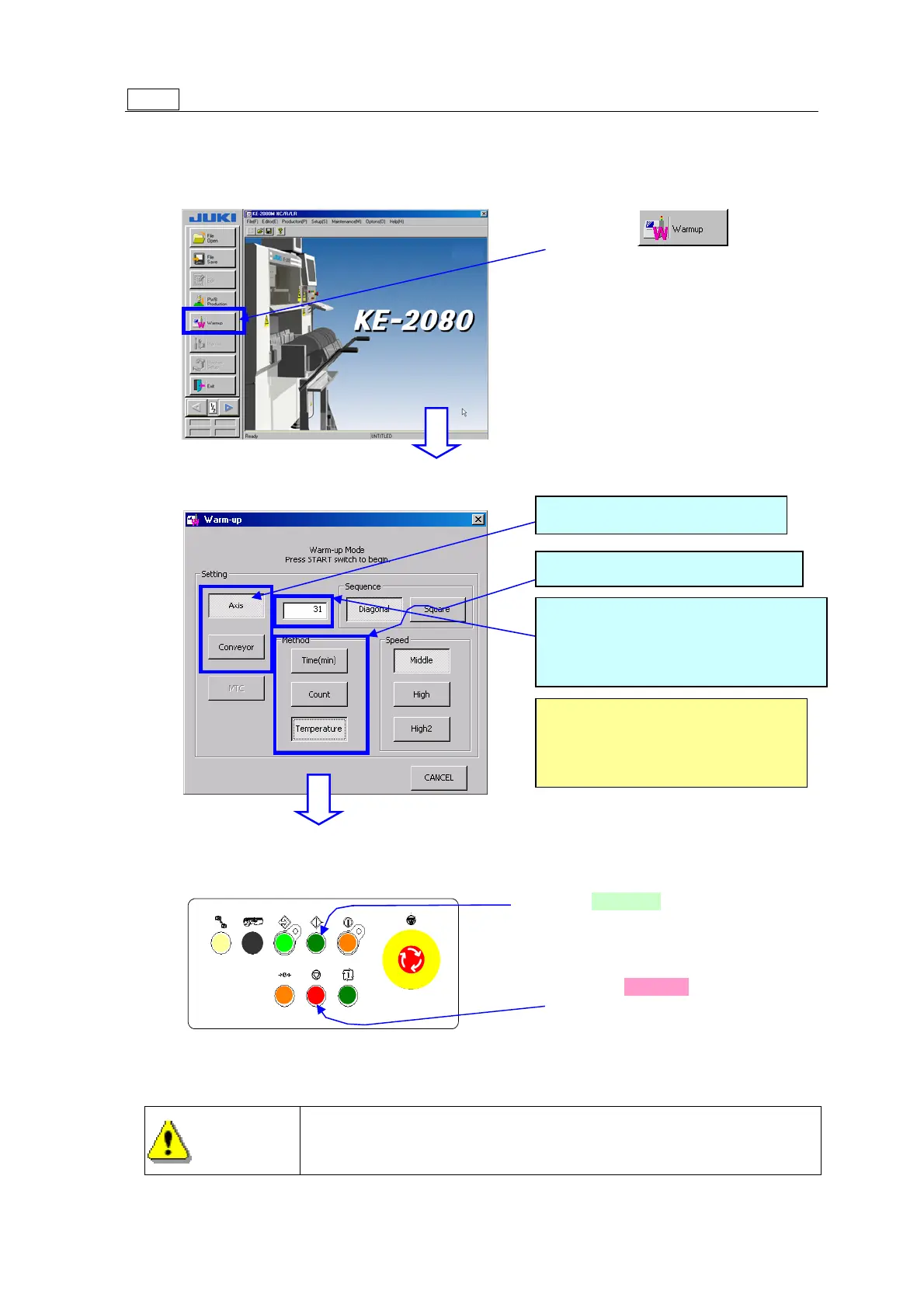
Step 2 Warm up the machine.
If you warm up the machine before PWB production, the machine can start PWB
production stably.
①
② The “Warming-up” screen appears. Make the settings for the warming-up
conditions.
③ Check to see if the safety cover is closed, and press the <START> switch of the
operation panel.
When you press the <START> switch, the machine starts moving.
To avoid risk of injury, never put your hand or head inside the
machine
Select the button
from the main screen.
* Refer to Section 2.4 “Warming
Up” of the “Instruction Manual
CD” for details of the
“Warming-up” screen.
Select what to be warmed up.
Select the warming-up conditions.
Enter the time duration when the
machine stops, the number of times
the machine stops or the temperature
at which the machine stops.
<Operation panel>
Press the <START> switch.
The axes and the conveyor start moving
and the warming up operation starts.
To finish the warming-up operation,
press the <STOP> switch.
(When you select the <Time> (Count) button, the
warming-up operation finishes when the specified
time passes or when the number of times the
machine warms up reaches the specified value.)
WARNING



 To Next Page
 Loading...






