HE
43
Level 2 Parameter level
Î
or
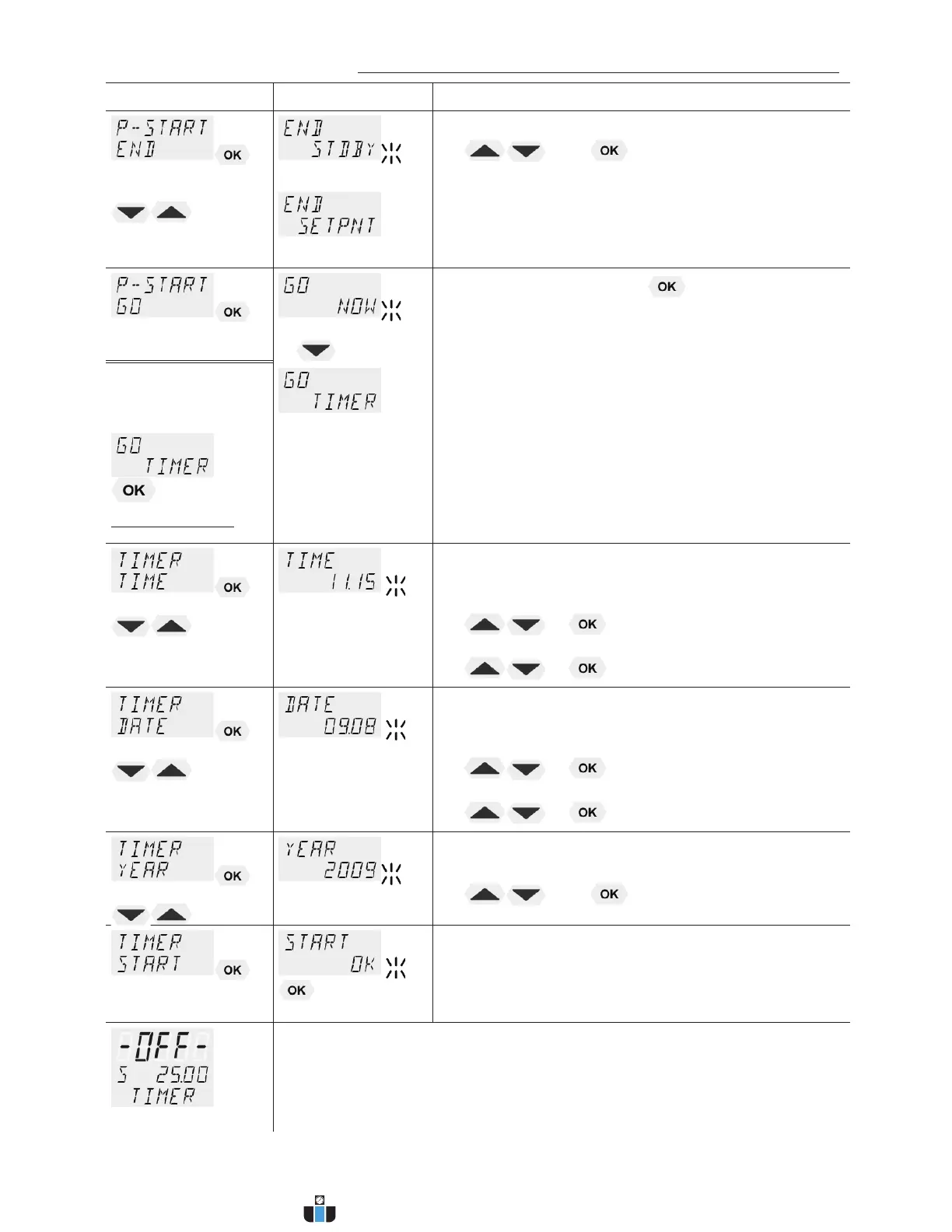
x Set desired parameters with
and .
L (STDBY/SETPNT)
Parameter STanDBY: the circulator switches to –
OFF-.
Parameter SETPoiNT: the circulator constantly
keeps the temperature at the value of the last step.
Î
oer
x Confirm >NOW< with the key and the program
will start immediately
L or
start at the set time under parameter (TIMER).
Set time in the example below:
09. August 2009, 11:15 hrs
É
Ð
Submenu TIMER
Parameter level
L set the time for the start of the program in the
submenu >TIMER<.
Î
>TIME< hours/minutes (hh:mm), set both values one
after the other and confirm
x hours flash, set by pressing
+
minutes flash, set by pressing
+
Î
>DATE< day/months (TT/MM), set both values one after
the other and confirm.
x day flashes, set by pressing
+
month flashes, set by pressing
+
Î
>YEAR< year
x Set the year with
and .
Î
L The program starts at the set time.
L Display of time until start:
In line 3 the notice >TIMER< and the set values for „TIME“ and
„DATE/YEAR“ are alternately indicated
L Check the correct setting of the internal real time clock if required
(see MENU CONFIG)
www.calcert.com sales@calcert.com1.888.610.7664
0
5
10
15
20
25
30


 To Next Page