Menu functions
48
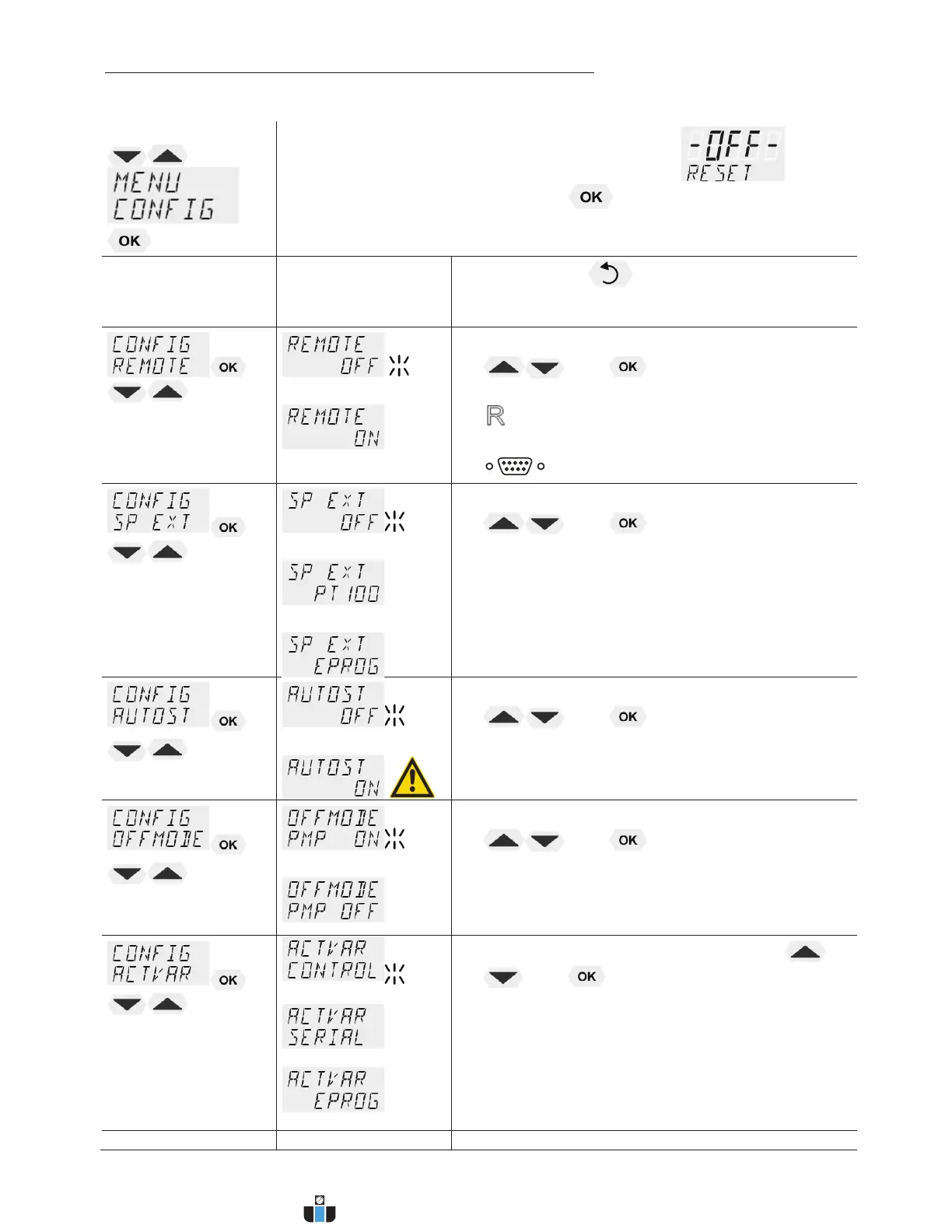
9.4. MENU CONFIG - Configuration of unit
Menu level 1
Ð
L A RESET can be effected only in the >OFF< mode.
Switch off circulator by pressing the key and call up the menu
CONFIGURATION.
Level 2 Parameter level
L Press the key if a parameter is to be
retained. Correction function for parameters and
values (prior to OK).
Î
or
x Switch on and off remote control by pressing
and
L Control display in the topline
for Remote
L For remote control refer to 81
L Connect RS232 with PC.
Î
or
or
x Switch over setpoint setting by pressing
and
L OFF –Setpoint setting with the navigation keys
or
Setpoint setting via the analog socket „ext. Pt100
or
analog socket >REG+EPROG<
Î
or
x Switch on and off autostart by pressing
and
AUTOSTART on = on
AUTOSTART off = off
See WARNING page 50
Î
or
x Switch on and off OFFMODE by pressing
and
PUMP ON continuous operation of circulating pump
PUMP OFF circulating pump is linked to Start/Stop
Î
or
or
x Switch over the input variable by pressing
and
L Programming of variables for the parameters >
SERIAL < or > EPROG < is only accepted, if the
unit is in Start mode
Level 2 Level 3 Parameter level
www.calcert.com sales@calcert.com1.888.610.7664
0
5
10
15
20
25
30


 To Next Page