HE
49
Î
Î
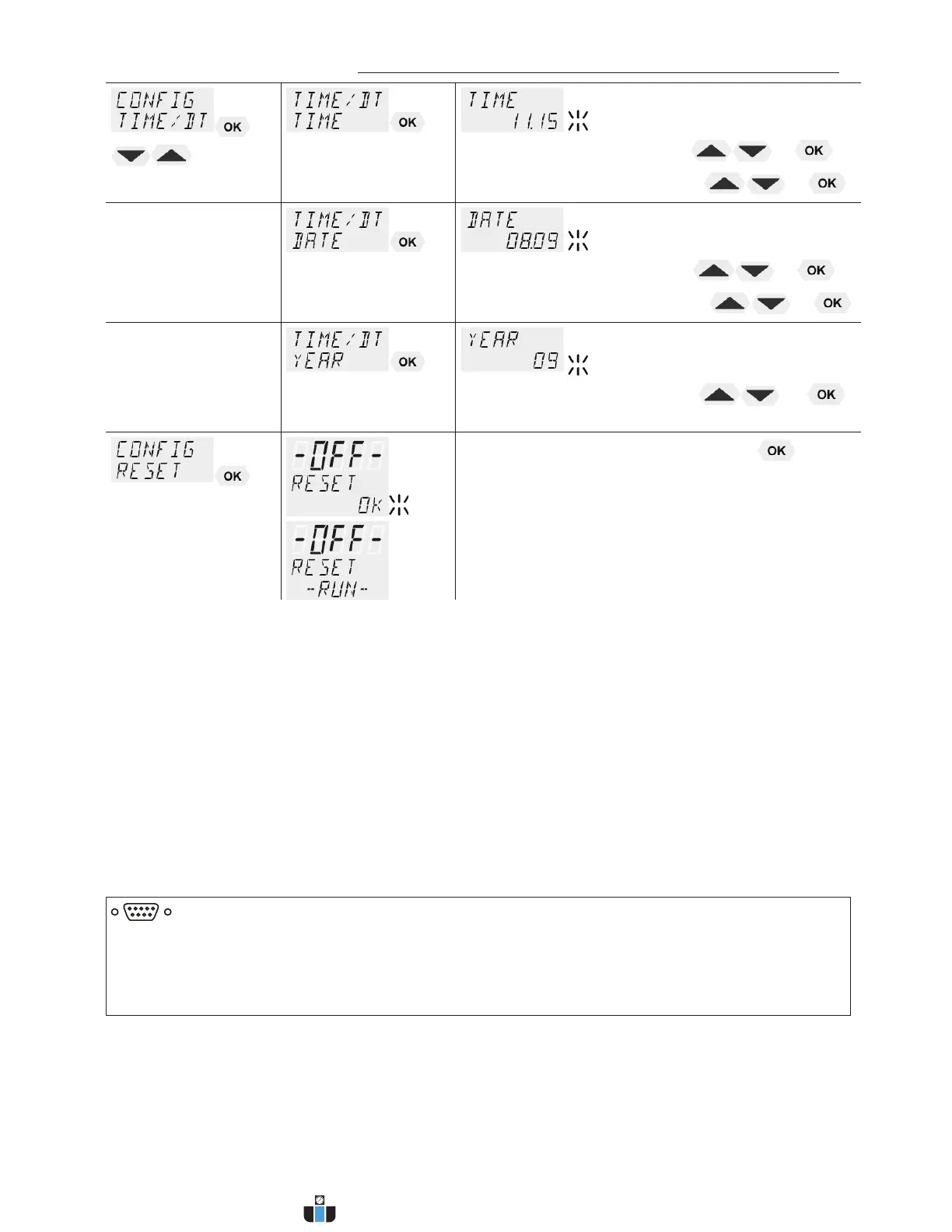
x Hours flash, set by pressing
+
x Minutes flash, set by pressing
+
Î
x Day flashes, set by pressing
+
x Month flashes, set by pressing
+
Î
x Year flashes, set by pressing
+
Î
x Return to factory settings by pressing
RESET returns all set values to the factory setting
except for date and time.
L A RESET can be effected only in the –OFF- mode.
L During the message –RUN- all parameters are
reset to factory settings.
9.4.1. Remote control via the serial interface
Factory setting: OFF
The control electronics offer two ways of adjusting a setpoint.
1. Adjustment of setpoint using the keypad
or the integrated programmer.
2. Adjustment of setpoint via the serial interface RS232 using a PC or a
superordinated process control system.
L The topline of the VFD-DISPLAY shows a bright „R“ for remote
control; - remote control discontinued.
RS232
IMPORTANT: additional measures for remote control
L Connect the circulator to the PC using an interface cable.
L Check the interface parameters of both interfaces (circulator and PC)
and make sure they match.
(refer to 12.1. Setup for remote controll page 81)
www.calcert.com sales@calcert.com1.888.610.7664
0
5
10
15
20
25
30


 To Next Page