Menu functions
36
10.3. Adjustable parameters
ACTUAL
SET
Set the parameters for the following menu items in the
configuration level:
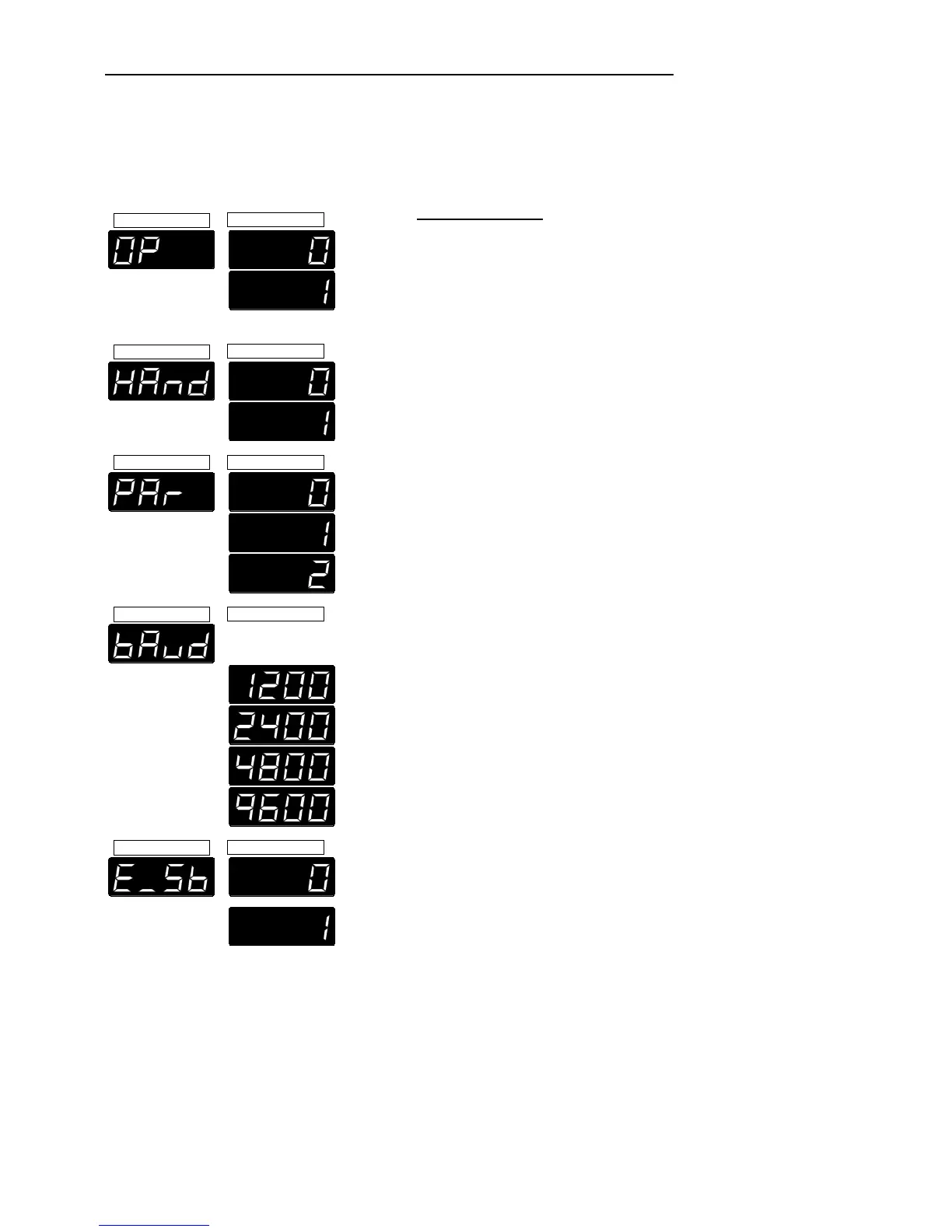
OP - Operating mode
0 = Keypad control
1 = Remote control via RS 232
ACTUAL
SET
HAnd - Handshake of the serial interface
0 = XOn/XOff, software handshake
1 = RTS/CTS, hardware handshake *
ACTUAL
SET
PAr - Parity bits of the serial interface
0 = no
1 = odd
2 = even *
ACTUAL
SET
bAud - Baud rate of the serial interface
1200 Bauds
2400 Bauds
4800 Bauds*
9600 Bauds
ACTUAL
SET
E
_
Sb - External stand-by for emergency switch-off
0 = stand-by input is ignored *
1 = stand-by input is active
(Stand-by input - see page 30)
(* factory setting)


 To Next Page