8.4.3 Creating a new function
A function corresponds to, for example, a KNX function, which possibly comprises multiple
group addresses. The up to 240 functions can be given individual names, icons from the
SV-Server library or additional descriptions. Each function can be assigned to one or more
areas or to none.
Access as Administrator
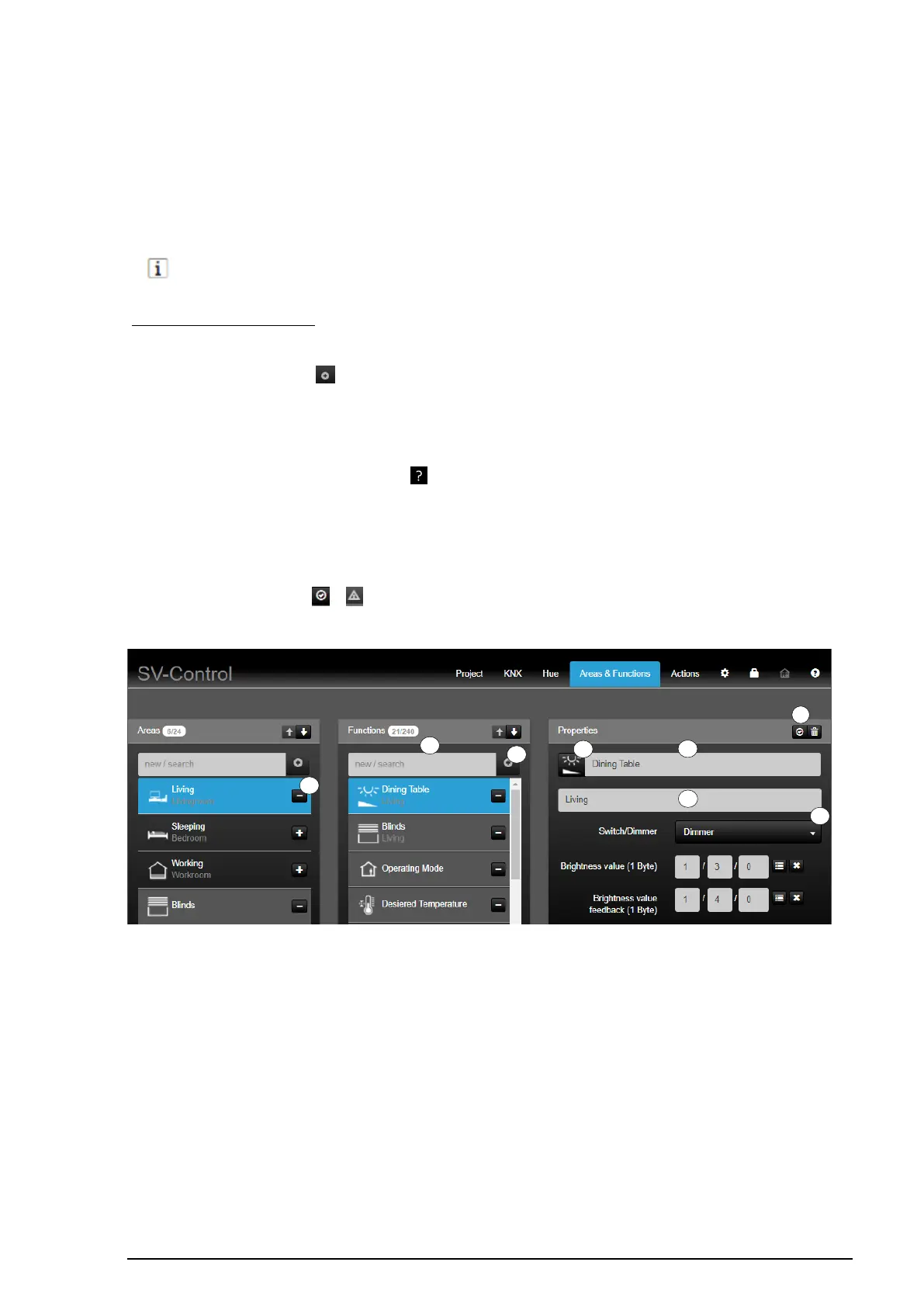
To create a new function, enter the name of the new function in the "Functions" column
(1) and then press the " " button (2). The new function is added in the function list with
its name, is selected automatically and, if necessary, assigned to a selected area (3).
A suitable function must be selected from the defined function types (4) in the "Properties"
column. Then, it is possible to assign an alternative icon to the selected function by
pressing the currently selected icon " " (5), edit the name of the function (6) and, beneath
that, add a description (7).
The changes are automatically saved and briefly displayed by a green "Save successful"
screen.
In addition, the button " / " (8) indicates whether the entries of the group addresses
are complete.
Figure 82: Structure of the "Areas and Functions" tab



 To Next Page
 Loading...
