EasyManua.ls Logo

Jung Smart Visu Server Series - Configuration management

Jung Smart Visu Server Series
187 pages
Print Icon
To Next Page IconTo Next Page
To Previous Page IconTo Previous Page
Loading...
SV- SERVER / SV-SERVER-INT 153 / 187
8.5.3 Editing or deleting an action
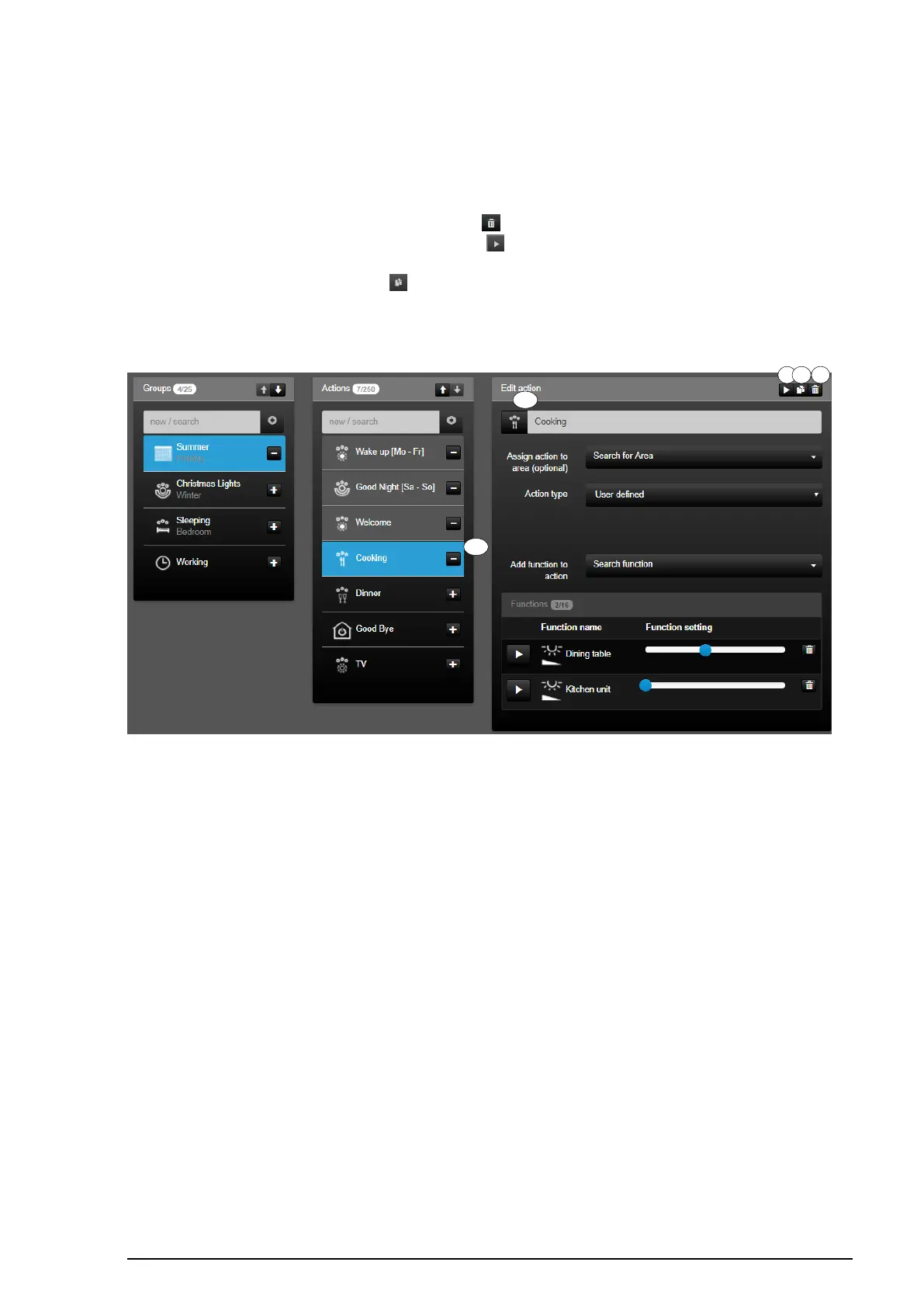
To be able to edit or delete an action, you must first select it in the "Actions" list (1). The
action selected in the list (1) is displayed for editing in the column "Edit action" (2).
A selected action can be deleted with the " " icon (3). You can execute the action
comfortably directly from SV-Control using the " " icon (4).
An action can be copied with the " " icon (5). The copy function causes the creation of a
new additional action with the same configuration.
The changes are automatically saved and briefly displayed by a green "Save successful"
screen.
Figure 122: "Actions" tab

1
T
hi
s
is
a
d
d
e
d
to
th
e
ar
e
a
lis
t
wi
th
its
n
a
m
e
a
n
d
is
s
el
e
ct
e
d
a
ut
o
m
2
T
hi
s
is
a
d
d
e
d
to
th
e
ar
e
a
lis
t
wi
th
its
n
a
m
e
a
n
d
is
s
el
e
ct
e
d
a
ut
o
m
at
ic
al
ly.
3
T
h
is
is
a
d
d
e
d
t
o
t
h
e
a
r
e
a
li
s
t
w
it
h
it
s
n
a
m
e
a
n
d
is
s
e
l
e
c
t
e
d
a
u
t
o
m
4
T
h
is
is
a
d
d
e
d
t
o
t
h
e
a
r
e
a
li
s
t
w
it
h
it
s
n
a
m
e
a
n
d
is
s
e
l
e
c
t
e
d
a
u
t
o
5

Table of Contents

Related product manuals